
HyperX Pulsefire Dart (HX-MC006B)
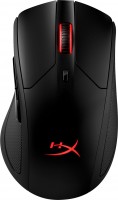 | Outdated Product A solid gaming mouse with fast wireless connectivity to meet the needs of demanding gamers. Equipped with a top-end high-resolution optical sensor, durable microswitches and controllable LED lighting. It connects via a radio channel with a frequency of 2.4 GHz and has the possibility of cable pairing. It is positioned as a product of the upper price category, aimed at hardcore gamers and novice e-sports players who want to purchase an accurate, reliable and comfortable manipulator for hot tournament battles. You can charge the HyperX Pulsefire Dart mouse both by wire and using Qi wireless charging (sold separately). It is completed with a USB microreceiver, and in order to minimize delays, it must be in close proximity (20-30 cm) to the manipulator and the corresponding extension cable is...included in the delivery. Made in a stylish matte plastic case with an asymmetric design, which is optimized for right-handed use. Best for palm grip. Handles five button presses and a scroll wheel rotation-press. The design of this manipulator uses one of the best optical sensors of 2019 PixArt PMW3389, which provides a resolution of up to 16000 dpi. Able to become a reliable companion of a gamer in games of any popular genres (FPS, MMO, MOBA, RPG, RTS). |


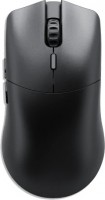


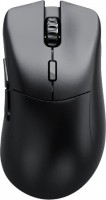

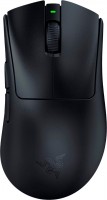
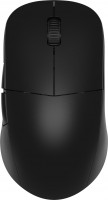

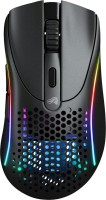
HyperX Pulsefire Dart | |||||||||||||||||||||||||||||||||||||||||||||||||||||||||||||||||||||||||||||||||||||
|
| ||||||||||||||||||||||||||||||||||||||||||||||||||||||||||||||||||||||||||||||||||||


A solid gaming mouse with fast wireless connectivity to meet the needs of demanding gamers. Equipped with a top-end high-resolution optical sensor, durable microswitches and controllable LED lighting. It connects via a radio channel with a frequency of 2.4 GHz and has the possibility of cable pairing. It is positioned as a product of the upper price category, aimed at hardcore gamers and novice e-sports players who want to purchase an accurate, reliable and comfortable manipulator for hot tournament battles.
You can charge the HyperX Pulsefire Dart mouse both by wire and using Qi wireless charging (sold separately). It is completed with a USB microreceiver, and in order to minimize delays, it must be in close proximity (20-30 cm) to the manipulator and the corresponding extension cable is included in the delivery. Made in a stylish matte plastic case with an asymmetric design, which is optimized for right-handed use. Best for palm grip. Handles five button presses and a scroll wheel rotation-press. The design of this manipulator uses one of the best optical sensors of 2019 PixArt PMW3389, which provides a resolution of up to 16000 dpi. Able to become a reliable companion of a gamer in games of any popular genres (FPS, MMO, MOBA, RPG, RTS).
Always clarify the specifications and configuration of the product with the online store manager before purchasing.
Catalog HyperX 2026 - new arrivals, bestsellers, and the most relevant models HyperX.













Excellent mouse, comfortable, good sensor, nice materials, possibility of wired and wireless connection. Wired and wireless connectivity options Type C Very pleasant materials Appearance Large, comfortably fits in hand. Expensive Terrible HyperX ngenuity software  James Wolfram: use HyperX Pulsefire Dart few months James Wolfram: use HyperX Pulsefire Dart few months |
Really wanted this mouse, liked the appearance, top-notch sensor, even wireless charging! Bought it in April, fits well in the hand, worked great. But around the beginning of autumn, I started noticing that the scroll wheel jumps up, down, and lags when scrolling pages. Read that mice from HyperX (and not only) have this "disease," got upset, returned it under warranty, and got my money back (as far as I understand, they don't repair them, they can either give a new one or return the money). Got the Asus ROG Chakram X, fits in the hand much nicer, the charge lasts about 3 times longer, hope there won't be any problems with the wheel. Wireless charging (very convenient if there is a station) The charge doesn't last very long, the rubber pads get clogged very quickly and permanently (I've tried cleaning with a toothbrush and tried to pry with a toothpick, doesn't help), the wheel starts malfunctioning after a few months. Mikita: use HyperX Pulsefire Dart few months |
If you want quality, think about another mouse, I think from another company. HyperX really disappointed me. 1. Wireless with high response speed. 2. Wireless charging, cable can also be used. 3. Good positioning sensor. 4. Fits comfortably in hand. 5. The charge lasts long. Terrible quality of the micro-switches on the two main mouse buttons. Replaced 3 times under warranty, all with double-click or non-click issues, straight from the factory. I immediately informed the manufacturer that this was a widespread issue, but I was assured it was just my bad luck. (With the second mouse) I'm just tired of going to the store to return the mouse under warranty. Replacement is good, but replacing a defective product with another defective one... Very funny. Now I'm on my 3rd mouse, there's already a double-click issue, but as I said before, I'm just tired of going to the warranty service. In addition to the main problem, there are the side pads on the mouse which can't be cleaned from dirt. They just soak up skin oil, and even brushing with a toothbrush won't help. The proprietary software conflicts with MSI Afterburner. Dmitriy Gorlov: use HyperX Pulsefire Dart more than year |




Darth but not Vader
The HyperX Pulsefire Dart is the top model in the debut line of HyperX Pulsefire mice. From a design standpoint, the guys from HyperX did not reinvent the wheel, but took a well-tested formula: a classic layout with 5 buttons (2 main + 2 additional + DPI switch), a top PixArt 3389 sensor (sensitivity from 800 to 16000 DPI, acceleration up to 50G), excellent switches with a resource of 50 million clicks and mechanical encoders. From a purely technical point of view, one cannot find fault with such a basis.
Unusual side moldings with memory effect
With ergonomics and design, HyperX mice are always in order, and Dart is no exception: a minimum of unnecessary details and smooth body lines create a feeling of conciseness, and a flowing back and the absence of humps allow it to lie comfortably even in a small palm. The low centre of gravity keeps it firmly on the mat, giving an extremely high level of control. However, we did not expect anything else from the flagship model for $100. But what really surprised me was the unusual gel pads with a memory effect, which are placed on the side faces of the mouse. They are slightly squeezed under the fingers, due to which the mouse is extremely tenaciously held in the hand. On the one hand, it turns out to be surprisingly convenient, on the other hand, it is clearly not suitable for everyone, plus there are questions about durability.
Qi wireless charging
HyperX Pulsefire Dart connects to a computer via a radio channel at a frequency of 2.4 GHz, and also has the ability to classic connection using a USB cable. Instead of traditional batteries, a built-in battery is used, which holds a charge from 2 to 4 days, depending on the time the backlight is used. For recharging, you can use a traditional cable, or simply put the mouse on the wireless charging pad. However it must be purchased separately. The picture is completed by dual-zone RGB lighting, which is configured using the HyperX NGenuity application. There you can also adjust the sensitivity of the sensor, bind the side buttons and stuff like that. Summing up, I would like to once again praise the gaming division of Corsair / HyperX, because a couple of years ago a mouse of this level simply had to cost at least twice as much.