
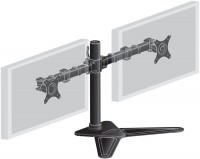
Iiyama DS1002D-B1
 |

Iiyama DS1002D-B1 | |||||||||||||||||||||||||||||||||||||||||||||
|
| ||||||||||||||||||||||||||||||||||||||||||||


The information in the model description is for reference purposes.
Always clarify the specifications and configuration of the product with the online store manager before purchasing.
Catalog Iiyama 2026 - new arrivals, bestsellers, and the most relevant models Iiyama.
Always clarify the specifications and configuration of the product with the online store manager before purchasing.
Catalog Iiyama 2026 - new arrivals, bestsellers, and the most relevant models Iiyama.

Best Desktop Monitor Arms with Maximum AdjustabilityUnlimited comfort and functionality of the workspace thanks to brackets adjustable in all directions
How to choose a bracket for TV and monitorCriteria for choosing a functional and reliable bracket for TVs and monitors with a certain screen diagonal
Buy Iiyama DS1002D-B1
All prices 11 →When you make a purchase through links on our site, we may receive a affiliate commission.
| £40.99 |  | ||||
Iiyama DS1002D-B1 stand - adjustable arm - for 2 monitors - black | £43.75 |  | |||
iiyama DS1002D-B1 monitor mount / stand 81.3 cm (32") Desk Black | £47.20 |  | |||
| £47.20 |  | ||||
| £46.78 | | ||||
6 more offer(s)
Losing money. I took 1 piece for testing, later I wanted to take it to all offices. I don't recommend it. Why? I'll share my experience. Advantages: A. Packaging. Well thought out. Packing such a large item neatly and tightly requires skill. All bolts with keys are in numbered bags, very nice. The instructions are concise and clear, one sheet in several languages. Everything seems thoroughly planned. B. Assembly. It is enjoyable. Not without drawbacks: - unpainted bolts on an entirely black structure. A downside; - no key for the screws at the base. Why they needed different screws there is unclear. A downside; - factory assembly defect. The factory over-tightened the brackets, crushed the metal, and after full assembly the "right arm" was lower than the "left arm". I photographed everything, there's a defect in two places. It wasn't immediately visible, covered by plastic overlays. It's been 3 months, too late to return, won't prove a warranty case. I straightened the dent myself, but the "arm" still doesn't hold straight; - weak glue on the foot pads (4 rubber pads). The glue on the pads literally wore off within minutes of adjustments. If you move the monitor, the pads pop out; - Warning stickers. There are two of them. They are stuck on firmly. Apparently, so their yellow warning is always visible in prominent places. I barely managed to remove them. Limited alternatives. Why take such a mount at all? To free up space on the table, raise monitors higher, hide wires, place 4 monitors instead of 2, arrange pairs in different configurations. This mount solves none of these tasks. Judge for yourself: - Stands are obstructive. It has two giant foot stands that really get in the way. - Height. The stand itself isn’t very high, the monitors are raised to a standard height and that's it. At least, the existing 27 monitors we have raise to the same height, rotate horizontally and vertically; - The hole in the stand hides the cables. But if they were not long enough, now you'll have to change them; - Folding the arms isn't possible. If a colleague sits across from me at the table, right now I can simply remove one monitor and talk. The new mount doesn't fold like that. It's best not to touch it at all, the metal feels weak in your hands; - Of course, you can't put 4 monitors. Even with extra arms. The arms are set only straight; - Set higher-lower. The arms are set only at one height. Right now I can set the monitors closer-further, higher-lower. This is needed for presentations, business games. You won’t be able to do that on the mount. The main concerns: 1. Soft metal (use a different one or put a gear inside); 2. Hidden factory defect (crumpled and covered), no quality control. |
Add Review
Ask Question
We recommendCompare using chart →

desktop, diagonal: from 10 ", up to 32 ", load: up to 8 kg, rotation, cable management, portrait orientation


desktop, diagonal: from 13 ", up to 32 ", load: up to 10 kg, rotation, cable management, portrait orientation
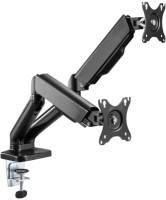
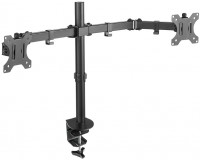
desktop, diagonal: from 10 ", up to 32 ", load: up to 8 kg, rotation, cable management, portrait orientation

desktop, diagonal: from 10 ", up to 32 ", load: up to 7 kg, rotation, cable management, portrait orientation


desktop, diagonal: from 17 ", up to 32 ", load: up to 9 kg, rotation, cable management, portrait orientation

desktop, diagonal: from 17 ", up to 32 ", load: up to 8.6 kg, rotation, cable management, portrait orientation

desktop, diagonal: from 13 ", up to 32 ", load: up to 8 kg, rotation, cable management, portrait orientation

desktop, diagonal: from 17 ", up to 40 ", load: up to 11 kg, rotation, cable management, portrait orientation