
Comparison Logitech MX Keys S vs Logitech MX Keys
Add to comparison |  | 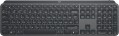 |
|---|---|---|
| Logitech MX Keys S | Logitech MX Keys | |
| Compare prices 64 | Compare prices 36 | |
| User reviews | ||
| TOP sellers | ||
Connect with up to three devices simultaneously with the ability to quickly switch between them. Smart backlight — can turn on when you bring your hands to the keyboard, and there is also an auto-brightness adjustment depending on the lighting. MX Keys S is an updated version of the MX Keys keyboard with improved switches and backlighting. | Connect with up to three devices simultaneously with the ability to quickly switch between them. Smart backlight — can turn on when you bring your hands to the keyboard, and there is also an auto-brightness adjustment depending on the lighting. Support fast charging (port — USB-C) | |
| Connection | Bluetooth / radio | Bluetooth / radio |
| Bluetooth version | v5.0 | v5.0 |
| Multi-Device |  | |
| Form factor | 100% (full size) | 100% (full size) |
| Layout | ANSI / ISO | ISO |
Keyboard | ||
| Key profile | low | low |
| Key type | island type | island type |
| Switch technology | scissor | scissor |
| Additional keys | 7 | 7 |
| Fn key | | |
| CMD / OPT keys | | |
Features | ||
| Application of symbols (Latin) | laser engraving | |
| Volume control | fn | fn |
| Lighting | white | white |
Connection and power supply | ||
| Power source | battery | battery |
| Battery capacity | 1500 mAh | 1500 mAh |
| Battery time | 10 days | 10 days |
| Port on the device | USB C | USB C |
| Receiver (dongle) | USB A | USB A |
General | ||
| Size | 430x132x21 mm | 430x132x21 mm |
| Weight | 810 g | 810 g |
| Color | ||
| Added to E-Catalog | june 2023 | october 2019 |




Compare Logitech MX Keys S and MX Keys
Keyboards Logitech MX Keys S and Logitech MX Keys have a lot in common, but there are key differences. Both models support Bluetooth connectivity and have the capability to connect to three devices simultaneously. However, the MX Keys S offers enhanced backlighting with auto-brightness, which automatically adjusts based on the lighting conditions, while the MX Keys simply has an on/off backlighting. Additionally, the MX Keys S uses the new Logi BOLT receiver for a more reliable connection, whereas the MX Keys is compatible with the older Logitech Unifying receiver. Overall, if enhanced backlighting and a more reliable connection are important to you, it's worth considering the MX Keys S.
Price comparison
You may be interested in
Logitech MX Keys S often compared


Logitech MX Keys often compared
Glossary
Layout
The layout describes the physical geometry of the keys and their standard arrangement: the shape of Enter and Shift, the presence of additional keys, the width of the space bar, and consequently, compatibility with keycap sets and typing familiarity. The standards hardly affect productivity in software and gaming — comfort and how easy it is to find suitable keycaps/cases are more important. The following types are found:
— ANSI (American). A distinctive feature of the American layout is the single-row Enter key; it is the only popular layout where this key occupies one row, not two. Additionally, unlike the European ISO, the Shift keys on ANSI keyboards have the same width, and the Alt key has the same function. The backslash “\” is usually placed above the Enter and can be longer.
— ISO (European). One characteristic feature of the European layout is the Enter key, which occupies two rows and is slightly wider at the top. Also, the modifier keys are asymmetrical: the Shift keys differ in size (the left one is shorter than the right), and the Alts differ in function (the right Alt is marked as “Alt Gr” and is used for typing special characters of European languages). From the similar in many ways "Japanese" JIS layout, the ISO layout differs by the placement of the backslash “\” — it is standardly located near the left Shift (in some models, it is duplicated near the Enter). As a result,...the left Shift is shorter than usual; this can be inconvenient, especially for new users.
— KS (Korean). The “Korean” layout can be distinguished by the characteristic shape of the Enter key: it occupies two rows and is longer at the bottom than at the top. Another feature is the backslash “\”, which is located to the left of the Backspace, resulting in a shorter Backspace than in other layouts.
— JIS (Japanese). A layout much like the European ISO: it has the same two-row Enter with an increased length of the upper half. In many models, the right Alt is labeled “Alt Gr” and is designed for typing special symbols. The main differences lie in two aspects: the length of the left Shift (it is standard in JIS, not shortened) and the placement of the backslash “\” (it is standardly installed to the left of the lower half of the Enter, where some ISO keyboards have a second, additional backslash).
— ANSI (American). A distinctive feature of the American layout is the single-row Enter key; it is the only popular layout where this key occupies one row, not two. Additionally, unlike the European ISO, the Shift keys on ANSI keyboards have the same width, and the Alt key has the same function. The backslash “\” is usually placed above the Enter and can be longer.
— ISO (European). One characteristic feature of the European layout is the Enter key, which occupies two rows and is slightly wider at the top. Also, the modifier keys are asymmetrical: the Shift keys differ in size (the left one is shorter than the right), and the Alts differ in function (the right Alt is marked as “Alt Gr” and is used for typing special characters of European languages). From the similar in many ways "Japanese" JIS layout, the ISO layout differs by the placement of the backslash “\” — it is standardly located near the left Shift (in some models, it is duplicated near the Enter). As a result,...the left Shift is shorter than usual; this can be inconvenient, especially for new users.
— KS (Korean). The “Korean” layout can be distinguished by the characteristic shape of the Enter key: it occupies two rows and is longer at the bottom than at the top. Another feature is the backslash “\”, which is located to the left of the Backspace, resulting in a shorter Backspace than in other layouts.
— JIS (Japanese). A layout much like the European ISO: it has the same two-row Enter with an increased length of the upper half. In many models, the right Alt is labeled “Alt Gr” and is designed for typing special symbols. The main differences lie in two aspects: the length of the left Shift (it is standard in JIS, not shortened) and the placement of the backslash “\” (it is standardly installed to the left of the lower half of the Enter, where some ISO keyboards have a second, additional backslash).
Application of symbols (Latin)
Legend application indicates how the Latin characters on the keys are made and how well they will survive years of heavy typing.
— Double-shot. The keycap is molded from two different plastics: the main “body” and a separate legend insert are formed together in a single mold, so the letters don’t wear off or fade at all. This method is ideal for RGB backlighting: if the legend layer is semi-transparent, light passes through the symbols without halos. ABS double-shot is more common (bright glow, pleasantly smooth feel), while the pricier PBT double-shot is rarer and offers higher surface wear resistance. Compared to laser engraving, the lifespan is an order of magnitude higher, and it beats the dye-sub method for backlighting (dye-sub doesn’t shine through). Downsides include cost and sometimes visible seams/thick walls that can affect the click’s sound profile. In practice, these keycaps are in demand for mechanical gaming keyboards, esports arenas, developers, and frequent hotkey typing—where double-shot keeps legends readable for years.
— Sublimation. A method of applying Latin symbols to keycaps where, under heat and pressure, the dye penetrates the top layer of plastic, creating a durable, “absorbed” legend. The print won’t rub off from fingers, resists household cleaners and UV light, preserves a matte texture, and maintains high contrast on light backgrounds, but it doesn’t let RGB shine through the symbols and is limited in palette. Compared to laser...engraving, it offers higher lifespan and readability, and versus double-shot it only loses in shine-through effects. Typical use cases include mechanical keyboards for typing, developers, and office work, where durability, the tactile matte PBT feel, and stable readability over years matter.
— Laser engraving. Burning/removing the top coating layer with a beam to form highly precise symbols. Legends last for years, but over time the fill paint can wear and contrast can drop in high-contact areas. Advantages include thin typefaces, clean contours, RGB compatibility, and low cost. Compared to double-shot, engraving is cheaper and more flexible in design, but not “forever”; versus dye-sub it wins on backlighting, but loses in tactile uniformity and longevity. Typical applications are mass-market office and gaming models with backlighting.
— Double-shot. The keycap is molded from two different plastics: the main “body” and a separate legend insert are formed together in a single mold, so the letters don’t wear off or fade at all. This method is ideal for RGB backlighting: if the legend layer is semi-transparent, light passes through the symbols without halos. ABS double-shot is more common (bright glow, pleasantly smooth feel), while the pricier PBT double-shot is rarer and offers higher surface wear resistance. Compared to laser engraving, the lifespan is an order of magnitude higher, and it beats the dye-sub method for backlighting (dye-sub doesn’t shine through). Downsides include cost and sometimes visible seams/thick walls that can affect the click’s sound profile. In practice, these keycaps are in demand for mechanical gaming keyboards, esports arenas, developers, and frequent hotkey typing—where double-shot keeps legends readable for years.
— Sublimation. A method of applying Latin symbols to keycaps where, under heat and pressure, the dye penetrates the top layer of plastic, creating a durable, “absorbed” legend. The print won’t rub off from fingers, resists household cleaners and UV light, preserves a matte texture, and maintains high contrast on light backgrounds, but it doesn’t let RGB shine through the symbols and is limited in palette. Compared to laser...engraving, it offers higher lifespan and readability, and versus double-shot it only loses in shine-through effects. Typical use cases include mechanical keyboards for typing, developers, and office work, where durability, the tactile matte PBT feel, and stable readability over years matter.
— Laser engraving. Burning/removing the top coating layer with a beam to form highly precise symbols. Legends last for years, but over time the fill paint can wear and contrast can drop in high-contact areas. Advantages include thin typefaces, clean contours, RGB compatibility, and low cost. Compared to double-shot, engraving is cheaper and more flexible in design, but not “forever”; versus dye-sub it wins on backlighting, but loses in tactile uniformity and longevity. Typical applications are mass-market office and gaming models with backlighting.