
Comparison Hoco HB45 USB/Type-C 2.0 vs Hoco HB39
Add to comparison | 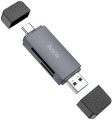 |  |
|---|---|---|
| Hoco HB45 USB/Type-C 2.0 | Hoco HB39 | |
| Outdated Product | Outdated Product | |
| TOP sellers | ||
| Product type | card reader | card reader |
| Placement | external adapter (connector on the body) | external adapter (connector on the body) |
| PC connectivity | USB-A and USB-C 2.0 | USB-A and USB-C 5Gbps |
| Card slots | SD microSD | SD microSD |
More features | ||
| Material | plastic | |
| Size | 70x20.5x11 mm | |
| Color | ||
| Added to E-Catalog | august 2024 | november 2023 |


Compare Hoco HB45 USB/Type-C 2.0 and HB39
You may be interested in
Hoco HB39 often compared

Glossary
PC connectivity
— USB-A. The classic, widely accepted USB port, which has recently been losing ground to the more advanced USB-C port.
— USB-C. Unlike the classic, full-sized USB, this connector is much smaller and features a reversible design, allowing the plug to be inserted in either direction. This interface is rarely found in desktop PCs but is becoming increasingly popular in laptops, tablets, and phones. Note that the Type C standard describes only the connector design; the version (interface) of USB is described in the section below.
The main difference between interface versions is the bandwidth — speed.
— 2.0. The outdated 2.0 version provides data transfer speeds up to 480 Mbps. Found only in USB-A ports.
— 5Gbps. Previously named USB 3.2 gen1 and USB 3.0 (they sure know how to confuse). Unlike 2.0, this version offers a 10 times higher maximum speed (4.8 Gbps) and higher power output, allowing power-hungry devices and extensive hubs to be connected.
— 10Gbps. Further enhancement of the 5Gbps standard (and typically, the previously renamed USB 3.2 gen2 and just USB 3.1), achieving a maximum speed of 10 Gbps and even higher power output for external devices.
— 20Gbps. As the name suggests, the interface supports spee...ds up to 20 Gbps.
— USB4 40Gbps / Thunderbolt 4. Connecting a USB4 or Thunderbolt 4 hub to a PC allows data to be transmitted at speeds up to 40 Gbps through a single cable, connect multiple monitors (e.g., two 4K or one 8K display), use high-speed drives with PCIe, supply power to devices up to 100 W, and connect peripherals like network cards, audio interfaces, and chargers, turning one USB-C port into a universal dock with many functions.
— Lightning. Apple's proprietary interface used in its compact devices (iPhone, iPad, and iPod touch) since 2012. In terms of application, it is fully analogous to the microUSB described above, with the adjustment that it is only found in Apple gadgets and not used by other manufacturers.
— Internal USB. A variety of the USB standard used for connecting internal card readers (see "Type", "Purpose"). It differs from external USB in its connector; a card reader with such a connection can only be connected to connectors on the motherboard and is not compatible with external USB ports. All other characteristics are fully analogous to the corresponding standard of external USB (see above).
— microUSB. A reduced version of the external USB interface (see above): the size of such a connector is much smaller than the full-sized one, allowing it to be used in portable equipment, particularly smartphones and tablets. In fact, card readers and hubs using this interface for connection are usually intended for such equipment. Note that proper operation is only possible if the primary device can operate in USB host mode (this feature is called USB On-the-Go).
— USB-C. Unlike the classic, full-sized USB, this connector is much smaller and features a reversible design, allowing the plug to be inserted in either direction. This interface is rarely found in desktop PCs but is becoming increasingly popular in laptops, tablets, and phones. Note that the Type C standard describes only the connector design; the version (interface) of USB is described in the section below.
The main difference between interface versions is the bandwidth — speed.
— 2.0. The outdated 2.0 version provides data transfer speeds up to 480 Mbps. Found only in USB-A ports.
— 5Gbps. Previously named USB 3.2 gen1 and USB 3.0 (they sure know how to confuse). Unlike 2.0, this version offers a 10 times higher maximum speed (4.8 Gbps) and higher power output, allowing power-hungry devices and extensive hubs to be connected.
— 10Gbps. Further enhancement of the 5Gbps standard (and typically, the previously renamed USB 3.2 gen2 and just USB 3.1), achieving a maximum speed of 10 Gbps and even higher power output for external devices.
— 20Gbps. As the name suggests, the interface supports spee...ds up to 20 Gbps.
— USB4 40Gbps / Thunderbolt 4. Connecting a USB4 or Thunderbolt 4 hub to a PC allows data to be transmitted at speeds up to 40 Gbps through a single cable, connect multiple monitors (e.g., two 4K or one 8K display), use high-speed drives with PCIe, supply power to devices up to 100 W, and connect peripherals like network cards, audio interfaces, and chargers, turning one USB-C port into a universal dock with many functions.
— Lightning. Apple's proprietary interface used in its compact devices (iPhone, iPad, and iPod touch) since 2012. In terms of application, it is fully analogous to the microUSB described above, with the adjustment that it is only found in Apple gadgets and not used by other manufacturers.
— Internal USB. A variety of the USB standard used for connecting internal card readers (see "Type", "Purpose"). It differs from external USB in its connector; a card reader with such a connection can only be connected to connectors on the motherboard and is not compatible with external USB ports. All other characteristics are fully analogous to the corresponding standard of external USB (see above).
— microUSB. A reduced version of the external USB interface (see above): the size of such a connector is much smaller than the full-sized one, allowing it to be used in portable equipment, particularly smartphones and tablets. In fact, card readers and hubs using this interface for connection are usually intended for such equipment. Note that proper operation is only possible if the primary device can operate in USB host mode (this feature is called USB On-the-Go).
Material
The main material used for the body of the device.
— Plastic. Plastic is light, cheap, quite practical, incl. has good strength properties. In addition, it allows you to create cases of complex shape and almost any color.
— Metal. As a rule, aluminium-based alloys are used for metal cases. Such cases are much stronger than plastic ones, and also have a stylish appearance. On the other hand, in terms of impact protection, this material has no advantages over plastic, but it costs more, and it can weigh much more.
— Plastic. Plastic is light, cheap, quite practical, incl. has good strength properties. In addition, it allows you to create cases of complex shape and almost any color.
— Metal. As a rule, aluminium-based alloys are used for metal cases. Such cases are much stronger than plastic ones, and also have a stylish appearance. On the other hand, in terms of impact protection, this material has no advantages over plastic, but it costs more, and it can weigh much more.