
Comparison Hoco DV12 vs Hoco DV11
Add to comparison | 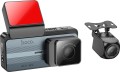 | 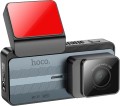 |
|---|---|---|
| Hoco DV12 | Hoco DV11 | |
| Outdated Product | Outdated Product | |
| TOP sellers | ||
Support for Bobocam mobile application. | ||
| Type | dashcam | dashcam |
| Installation | on the windscreen | on the windscreen |
| Glass mount | sticker | sticker |
| Dashcam mount | clip | clip |
| Power through mount |  |  |
| Power connector | USB C | USB C |
Camera | ||
| Screen type | Sandvik SC4336 | Sandvik SC4336 |
| Processor | Lingtong GP2178 | Ling tong GP2178 |
| Aperture | f/2.0 | f/2.0 |
| Full HD (1080) | 1920x1080, 30 fps | |
| Quad HD | 2560x1440, 30 fps | 2560x1440, 25 fps |
| Viewing angle | 140 ° | 140 ° |
| Recording features | G-sensor | G-sensor sound recording |
Features | ||
| Navigation | speed on video GPS | speed on video GPS |
| Driving assistants | Wi-Fi | Wi-Fi |
Additional camera | ||
| External camera | 1 | |
| Video resolution | 1280х720 px | |
| Frame frequency | 25 fps | |
Screen | ||
| Screen size | 3.69 " | 3.69 " |
| Screen resolution | 960x412 px | 960x412 px |
| IPS screen | | |
General | ||
| AV input | | |
| Max. memory card size | 128 GB | 128 GB |
| Backup power | supercapacitor | supercapacitor |
| Size | 96.3x58.1x57.8 mm | 96x58x58 mm |
| Added to E-Catalog | february 2025 | january 2025 |


Compare Hoco DV12 and DV11
You may be interested in
My comparisons
Hoco DV12 often compared


Glossary
Power through mount
This feature means that the power to the DVR (usually from the cigarette lighter) is supplied directly through the mount on which it is installed, and not through a separate cable. The mount itself is usually made quick-release.
Actually, the power cable in such models is also available — however, it is connected to the mount, and not to the registrar itself. Thanks to this, such a wire can be easily fixed in a strictly defined position; however, even without special fixation, he does not particularly move from his place. This feature provides a number of advantages over the more traditional connection format. Firstly, the wire does not hang around the cabin and does not create inconvenience. Secondly, it does not need to be searched for and reconnected every time when installing the recorder — just install the device on the mount. The latter is especially convenient if the recorder needs to be removed and put back often — for example, if the car has to be regularly left in an unguarded parking lot, where there is a risk of theft from the passenger compartment.
The cable is usually connected to the mount using a connector with the ability to quickly connect and disconnect — in case the wire needs to be removed from the passenger compartment without removing the mount. At the same time, many models use a standard connector like miniUSB or microUSB, which allows you to use a third-party power cable if necessary (for exam...ple, if the standard cable is lost or damaged). However, for a full guarantee, such details do not hurt to clarify separately.
Actually, the power cable in such models is also available — however, it is connected to the mount, and not to the registrar itself. Thanks to this, such a wire can be easily fixed in a strictly defined position; however, even without special fixation, he does not particularly move from his place. This feature provides a number of advantages over the more traditional connection format. Firstly, the wire does not hang around the cabin and does not create inconvenience. Secondly, it does not need to be searched for and reconnected every time when installing the recorder — just install the device on the mount. The latter is especially convenient if the recorder needs to be removed and put back often — for example, if the car has to be regularly left in an unguarded parking lot, where there is a risk of theft from the passenger compartment.
The cable is usually connected to the mount using a connector with the ability to quickly connect and disconnect — in case the wire needs to be removed from the passenger compartment without removing the mount. At the same time, many models use a standard connector like miniUSB or microUSB, which allows you to use a third-party power cable if necessary (for exam...ple, if the standard cable is lost or damaged). However, for a full guarantee, such details do not hurt to clarify separately.
Processor
Model of the processor used in the dashcam
The term "video chip" is used mainly for devices with classic capabilities, "processor" — for advanced models with an abundance of non-standard functions. However, anyway, we are talking about the same component — the main computing unit, the characteristics of which directly affect the capabilities of the recorder as a whole. Knowing the model of the processor, you can find detailed data on it and evaluate how satisfied you are with a device based on such electronics. Of the most advanced modern chips, one can name, in particular, Ambarella A7L, Ambarella A12, Novatek NTK96655, Novatek NTK96660 and HiSilicon Hi3516.
The term "video chip" is used mainly for devices with classic capabilities, "processor" — for advanced models with an abundance of non-standard functions. However, anyway, we are talking about the same component — the main computing unit, the characteristics of which directly affect the capabilities of the recorder as a whole. Knowing the model of the processor, you can find detailed data on it and evaluate how satisfied you are with a device based on such electronics. Of the most advanced modern chips, one can name, in particular, Ambarella A7L, Ambarella A12, Novatek NTK96655, Novatek NTK96660 and HiSilicon Hi3516.
Full HD (1080)
The maximum resolution and frame rate of video taken by the recorder in the Full HD (1080p) standard.
Many people associate the term Full HD with a resolution of 1920x1080 — and indeed, this resolution is very popular, including among DVRs. However, this standard also covers other options — in particular, 1440x1080 (4:3 aspect ratio) and 1920x540 (halved vertical size). In general, support for this resolution is a good indicator for a modern registrar, indicating that the device belongs to at least an average level.
As for the frame rate, the higher it is, the smoother and less blurry the video will be, the better the details on moving objects will be visible, and also the more space the footage will take up. It is worth noting here that in low-cost Full HD recorders, shooting can be carried out at very low speeds — 15 fps or even 10 fps. Such a shooting speed allows you to watch video more or less normally, but for a normal display of moving objects, a higher frame rate is still desirable — at least 25 frames / sec.
Many people associate the term Full HD with a resolution of 1920x1080 — and indeed, this resolution is very popular, including among DVRs. However, this standard also covers other options — in particular, 1440x1080 (4:3 aspect ratio) and 1920x540 (halved vertical size). In general, support for this resolution is a good indicator for a modern registrar, indicating that the device belongs to at least an average level.
As for the frame rate, the higher it is, the smoother and less blurry the video will be, the better the details on moving objects will be visible, and also the more space the footage will take up. It is worth noting here that in low-cost Full HD recorders, shooting can be carried out at very low speeds — 15 fps or even 10 fps. Such a shooting speed allows you to watch video more or less normally, but for a normal display of moving objects, a higher frame rate is still desirable — at least 25 frames / sec.
Quad HD
The maximum resolution and frame rate of video recorded by the recorder in the Quad HD standard.
In terms of detail, the Quad HD standard sits between Super HD and Ultra HD. It does not have a specific standard resolution, but most often in video recorders there is shooting with a frame size of 2560x1440. However, even such models are relatively few; and more specific values like 2688x1440 are used even less often. There are also quite unusual options — for example, a square frame 1440x1440.
As for the frame rate, the higher it is, the smoother and less blurry the video will be, the better the details on moving objects will be visible, and also the more space the footage will take up. However, in the case of Quad HD, a frequency of 24 fps or 30 fps is usually used, and the difference between these speeds is generally unimportant.
In terms of detail, the Quad HD standard sits between Super HD and Ultra HD. It does not have a specific standard resolution, but most often in video recorders there is shooting with a frame size of 2560x1440. However, even such models are relatively few; and more specific values like 2688x1440 are used even less often. There are also quite unusual options — for example, a square frame 1440x1440.
As for the frame rate, the higher it is, the smoother and less blurry the video will be, the better the details on moving objects will be visible, and also the more space the footage will take up. However, in the case of Quad HD, a frequency of 24 fps or 30 fps is usually used, and the difference between these speeds is generally unimportant.
Recording features
Among the photo and video functions used in the dashcam, we can distinguish G-sensor, rotating lens, live, HDR< /a>, WDR, polarizing filter, DEWARP and Time Lapse. More about them:
— G-sensor (video saving). A sensor that monitors shocks and vibrations acting on the DVR. The main function of this sensor is to ensure the safety of video materials in the event of an accident: in the event of a strong impact, characteristic of a collision or fall, the recorder with a G-sensor automatically saves the previously recorded video to a non-volatile memory protected from overwriting. Thus, materials about an emergency are not only guaranteed to be saved, but with a high probability remain intact even if the recorder itself is damaged. In addition, the G-sensor is used in parking mode — see "Functions" for details.
— Swivel lens. The ability to rotate the lens of the registrar horizontally or vertically, and in some cases — on both planes. This feature allows you to adjust the camera's field of view.
— Sound recording. Ability to record sound with a video recorder. First of all, we are talking about recording conversations in the cabin, which can become an add...itional argument in disputable situations — for example, they will allow you to determine whether the driver was talking on a mobile phone at the time of an accident, whether he noticed the situation on the road, how he assessed it, etc.
— Live broadcast. Allows you to remotely connect to the DVR and monitor what is happening from the camera in real time. It is very important if there is an additional camera in the cabin, when you can track the situation, for example, in taxi services, courier delivery, etc. This function will also become important and useful when a car is stolen, when you can not only see the hijacker from the video from the camera, but also track the route of his movement.
— HDR (high dynamic range). A function that increases the dynamic range of the recorder. Dynamic range is the maximum difference between the brightest and darkest area achievable within a single frame. Initially, this range for digital matrices is small, so an image with large brightness differences (for example, a road against a sunset sky) turns out to be either strongly overexposed in bright areas or very dim in dark areas. HDR addresses this shortcoming and also improves the overall colour quality. This is implemented as follows: the camera takes several frames with different settings and from them forms the finished image. At the same time, this technology is simpler and cheaper to implement than WDR, which is similar in purpose (see below). The main disadvantage of HDR is that this type of shooting increases the blurring of fast moving objects in the frame somewhat.
— WDR (Wide Dynamic Range). A function similar in purpose to HDR described above: it is used to improve the quality of a “picture” that has strong differences in brightness. The key difference between these technologies is that WDR works at the hardware level — due to high-end matrices. This allows you to achieve the required dynamic range within a single frame and do without gluing several frames — as a result, WDR, unlike HDR, does not give a blurring effect and does not worsen the detail of moving objects in the frame. The downside of this quality is the high price.
— Polarizing filter. The presence of a polarizing filter in the main camera of the DVR. Such a filter reduces the brightness of glare arising from strong light on glass, water and other similar surfaces. This greatly improves image quality, especially when shooting in sunny weather.
— DEWARP. A technology used to correct the "picture" obtained using a wide-angle lens. Such lenses are often used in DVRs; one of their drawbacks is their propensity for the fish-eye effect, the characteristic distortion when straight lines in the frame turn into rounded ones. The DEWARP function eliminates this shortcoming — it "bends back" curved lines, correcting the geometry of objects in the frame. Note that such a correction does not always work 100% accurately, however, the picture processed by DEWARP is anyway more reliable than without this technology.
— Time Lapse. A special mode of operation in which video recording is carried out at a slow frequency, which in practice is mainly used for shooting slow processes. Thus, for example, a long journey or a long sunset can fit into a 3-minute video.
— G-sensor (video saving). A sensor that monitors shocks and vibrations acting on the DVR. The main function of this sensor is to ensure the safety of video materials in the event of an accident: in the event of a strong impact, characteristic of a collision or fall, the recorder with a G-sensor automatically saves the previously recorded video to a non-volatile memory protected from overwriting. Thus, materials about an emergency are not only guaranteed to be saved, but with a high probability remain intact even if the recorder itself is damaged. In addition, the G-sensor is used in parking mode — see "Functions" for details.
— Swivel lens. The ability to rotate the lens of the registrar horizontally or vertically, and in some cases — on both planes. This feature allows you to adjust the camera's field of view.
— Sound recording. Ability to record sound with a video recorder. First of all, we are talking about recording conversations in the cabin, which can become an add...itional argument in disputable situations — for example, they will allow you to determine whether the driver was talking on a mobile phone at the time of an accident, whether he noticed the situation on the road, how he assessed it, etc.
— Live broadcast. Allows you to remotely connect to the DVR and monitor what is happening from the camera in real time. It is very important if there is an additional camera in the cabin, when you can track the situation, for example, in taxi services, courier delivery, etc. This function will also become important and useful when a car is stolen, when you can not only see the hijacker from the video from the camera, but also track the route of his movement.
— HDR (high dynamic range). A function that increases the dynamic range of the recorder. Dynamic range is the maximum difference between the brightest and darkest area achievable within a single frame. Initially, this range for digital matrices is small, so an image with large brightness differences (for example, a road against a sunset sky) turns out to be either strongly overexposed in bright areas or very dim in dark areas. HDR addresses this shortcoming and also improves the overall colour quality. This is implemented as follows: the camera takes several frames with different settings and from them forms the finished image. At the same time, this technology is simpler and cheaper to implement than WDR, which is similar in purpose (see below). The main disadvantage of HDR is that this type of shooting increases the blurring of fast moving objects in the frame somewhat.
— WDR (Wide Dynamic Range). A function similar in purpose to HDR described above: it is used to improve the quality of a “picture” that has strong differences in brightness. The key difference between these technologies is that WDR works at the hardware level — due to high-end matrices. This allows you to achieve the required dynamic range within a single frame and do without gluing several frames — as a result, WDR, unlike HDR, does not give a blurring effect and does not worsen the detail of moving objects in the frame. The downside of this quality is the high price.
— Polarizing filter. The presence of a polarizing filter in the main camera of the DVR. Such a filter reduces the brightness of glare arising from strong light on glass, water and other similar surfaces. This greatly improves image quality, especially when shooting in sunny weather.
— DEWARP. A technology used to correct the "picture" obtained using a wide-angle lens. Such lenses are often used in DVRs; one of their drawbacks is their propensity for the fish-eye effect, the characteristic distortion when straight lines in the frame turn into rounded ones. The DEWARP function eliminates this shortcoming — it "bends back" curved lines, correcting the geometry of objects in the frame. Note that such a correction does not always work 100% accurately, however, the picture processed by DEWARP is anyway more reliable than without this technology.
— Time Lapse. A special mode of operation in which video recording is carried out at a slow frequency, which in practice is mainly used for shooting slow processes. Thus, for example, a long journey or a long sunset can fit into a 3-minute video.
External camera
One or more remote cameras in the standard equipment of the registrar, used for video recording of the traffic situation behind the car. In the vast majority of cases, the remote camera is attached to the DVR in one copy. It covers the rear "stern" of the car and is simultaneously used as an assistant when reversing parking — the picture from the camera can be displayed on the DVR screen in real time. There can be several remote cameras, which provides a wider coverage of the DVR's field of view.
Video resolution
The maximum video resolution supported by the optional DVR camera. Depending on the design and configuration, we can talk about both a remote camera and a camera for filming the interior (see above for both); this nuance should be clarified separately.
The higher the resolution, the more detailed the image from the camera will be, the more small details will be normally visible on it. On the other hand, high detailing affects the volume of materials to be filmed and the requirements for the “hardware” of the registrar (and, accordingly, affects the cost).
In general, additional cameras of modern recorders can be divided into the following categories:
— SD. "Standard" resolution (as opposed to HD — "high resolution"). A rather modest frame size, which at the same time allows you to significantly save memory for video recording and is suitable even for low-cost recorders. Specific resolution options include, but are not limited to, 628x582, 640x480, and 720x480.
— HD 720p. The traditional, most popular resolution for this video recording standard is 1280x720. In addition to it, registrars also found 960x720 (aspect ratio 4:3) and reduced in height 1280x480. HD is the most modest of today's high-definition standards, but still provides pretty decent detail.
— Full HD 1080p. The "classic of the genre" for this standard is the resolution of 1920x1080, however, there are other values in registrars, including very speci...fic ones — such as 1440x1080 (4:3 aspect ratio) and 1920x540 (halved vertical resolution). This is a fairly solid indicator even for the main camera of the registrar, and there is no need to talk about additional ones.
— Super HD. Not a particularly popular standard in video technology, which, nevertheless, has found application in video recorders. Most often provides a resolution of 2304x1296, which provides even more
The higher the resolution, the more detailed the image from the camera will be, the more small details will be normally visible on it. On the other hand, high detailing affects the volume of materials to be filmed and the requirements for the “hardware” of the registrar (and, accordingly, affects the cost).
In general, additional cameras of modern recorders can be divided into the following categories:
— SD. "Standard" resolution (as opposed to HD — "high resolution"). A rather modest frame size, which at the same time allows you to significantly save memory for video recording and is suitable even for low-cost recorders. Specific resolution options include, but are not limited to, 628x582, 640x480, and 720x480.
— HD 720p. The traditional, most popular resolution for this video recording standard is 1280x720. In addition to it, registrars also found 960x720 (aspect ratio 4:3) and reduced in height 1280x480. HD is the most modest of today's high-definition standards, but still provides pretty decent detail.
— Full HD 1080p. The "classic of the genre" for this standard is the resolution of 1920x1080, however, there are other values in registrars, including very speci...fic ones — such as 1440x1080 (4:3 aspect ratio) and 1920x540 (halved vertical resolution). This is a fairly solid indicator even for the main camera of the registrar, and there is no need to talk about additional ones.
— Super HD. Not a particularly popular standard in video technology, which, nevertheless, has found application in video recorders. Most often provides a resolution of 2304x1296, which provides even more
Frame frequency
Maximum video frame rate supported by the optional DVR camera. Depending on the design and configuration, we can talk about both a remote camera and a camera for filming the interior (see above for both); this nuance should be clarified separately. Anyway, it is with this frequency that the shooting is carried out by default.
The higher the frame rate, the clearer the moving objects will be on the video, the less they will be blurred and the less “jerky” the video itself will be. It is believed that the most comfortable for the human eye is a speed of 24 to 60 frames per second; a lower frequency is already perceived as a “slideshow”, and a higher one only increases the amount of material being shot, without giving a visible increase in quality. At the same time, registrar cameras can also provide higher filming speeds than 60 fps — this provides good visibility of individual moving parts in slow motion or frame-by-frame playback.
The higher the frame rate, the clearer the moving objects will be on the video, the less they will be blurred and the less “jerky” the video itself will be. It is believed that the most comfortable for the human eye is a speed of 24 to 60 frames per second; a lower frequency is already perceived as a “slideshow”, and a higher one only increases the amount of material being shot, without giving a visible increase in quality. At the same time, registrar cameras can also provide higher filming speeds than 60 fps — this provides good visibility of individual moving parts in slow motion or frame-by-frame playback.
AV input
AV connector for connecting an additional remote camera to the DVR, which can be used to provide a view of the rear hemisphere or filming what is happening inside the vehicle.