
Comparison Logitech Wireless Mouse M280 vs Logitech Wireless Mouse M310
Add to comparison | 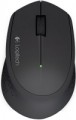 | 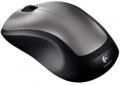 |
|---|---|---|
| Logitech Wireless Mouse M280 | Logitech Wireless Mouse M310 | |
| Compare prices 22 | Compare prices 4 | |
| User reviews | ||
| TOP sellers | ||
Battery level indicator | ||
| Product type | mouse | mouse |
| Connection | radio | radio |
| Sensor | optical | optical |
| Type | notebook | notebook |
Sensor and control | ||
| Sensor resolution | 1000 DPI | 1000 DPI |
| Number of buttons | 2 | 2 |
| Scroll wheels | 1 | 1 |
Connection and power supply | ||
| Power source | 1xAA | 1xAA |
| Battery life | 18 months | |
General | ||
| Suitable for left-handers |  |  |
| Left handed | | |
| In box | USB-A dongle | USB-A dongle |
| Size (LxWxH) | 105x68x38 mm | 111x62x39 mm |
| Weight | 91 g | 99 g |
| Color | ||
| Added to E-Catalog | september 2014 | january 2011 |




Compare Logitech Wireless Mouse M280 and M310
Comparing the Logitech Wireless Mouse M280 and M310, it can be noted that both mice share similar characteristics, such as an optical sensor with 1000 DPI resolution and a range of 10 meters. However, the M310 offers support for left-handed users, which can be an advantage for those with such a preference. Reviews indicate that the M280 features a more comfortable shape and long-lasting battery life, while the M310 also receives positive feedback for its stylish design and comfort. Nonetheless, the M310 is sometimes mentioned as being less stable on certain surfaces. Overall, both models are good, but the choice may depend on preferences in design and ease of use.
Price comparison
You may be interested in
Logitech Wireless Mouse M280 often compared


Logitech Wireless Mouse M310 often compared


Glossary
Battery life
Battery life of the mouse operating on replaceable power elements (see "Power") with one set of batteries.
The mentioned operating time is quite approximate: it is specified for an average usage mode. Actual battery life may be either less or more than stated, depending on the usage characteristics; moreover, the quality of the battery brand also greatly affects the operating time. Nevertheless, it is a fairly reliable indicator, which can be used to evaluate and compare different models: the difference in the stated operating time generally corresponds to the difference in actual battery life when using batteries of similar quality.
It is worth mentioning that modern battery-operated mice have fairly substantial battery life, measured in months; in the longest-lasting models, the stated operating time is about 36 months (or 3 years).
The mentioned operating time is quite approximate: it is specified for an average usage mode. Actual battery life may be either less or more than stated, depending on the usage characteristics; moreover, the quality of the battery brand also greatly affects the operating time. Nevertheless, it is a fairly reliable indicator, which can be used to evaluate and compare different models: the difference in the stated operating time generally corresponds to the difference in actual battery life when using batteries of similar quality.
It is worth mentioning that modern battery-operated mice have fairly substantial battery life, measured in months; in the longest-lasting models, the stated operating time is about 36 months (or 3 years).
Suitable for left-handers
Mice with a symmetrical body shape. The main advantage of such models is that their shape is the same well suited for both right and left hands. Considering that specialized "left-handed" devices are extremely rare, a symmetrical mouse can be a real salvation for a left-hander. At the same time, note that the symmetry in this case concerns only the shape of the case and the location of the main buttons; additional buttons can be placed exclusively under the right hand. If the mouse is bought for a left-hander, it is necessary to clarify these points.
Left handed
The Left-Handed filter helps quickly find mice that don't force left-handed users to adapt to non-ergonomic designs: these models have the right body geometry and logical button placement, making handling as natural as it is for right-handed users with standard models. This category includes several different designs. Firstly, there are models made exclusively for the left hand, where the body and side buttons are mirrored, so everything presses naturally. Secondly, it includes symmetrical mice without additional side buttons: they are universal, do not press on the fingers, and are ideal for those who value simplicity and comfort without extra elements. Thirdly, there are symmetrical options without side buttons but with additional buttons on top — a compromise when extra buttons are needed without anchoring to the right side of the body. Lastly, symmetrical mice with buttons on both sides fall here: a left-hander gets the same quick actions as a right-hander, but it's worth remembering that different models have different implementations of button deactivation/remapping, which affects convenience.
Weight
The total weight of the mouse. For models with a wired connection, usually, it is indicated without cable, and for devices with weight adjustment (see above) — without weights.
This parameter is important primarily for professional gaming applications, although it is often relevant for ordinary users. Theoretically, less weight promotes speed and reduces fatigue. At the same time, in fact, much depends on the personal habits and preferences of the user: a mouse that is too light may “not be felt in the hands” and not give familiar feedback. Therefore, although most mice have a lower weight limit of 60 – 80 g, however, even among professional gaming models there are much more massive devices — 120 – 140 g or more. The lightest variety of "rodents" is laptop (see "In the direction"), among them devices come across and less than 60 g.
Also note that the weight to some extent depends on the size and “tricked out” of the device, but there is no unambiguous dependence here: models similar in size and functionality can differ markedly in weight.
This parameter is important primarily for professional gaming applications, although it is often relevant for ordinary users. Theoretically, less weight promotes speed and reduces fatigue. At the same time, in fact, much depends on the personal habits and preferences of the user: a mouse that is too light may “not be felt in the hands” and not give familiar feedback. Therefore, although most mice have a lower weight limit of 60 – 80 g, however, even among professional gaming models there are much more massive devices — 120 – 140 g or more. The lightest variety of "rodents" is laptop (see "In the direction"), among them devices come across and less than 60 g.
Also note that the weight to some extent depends on the size and “tricked out” of the device, but there is no unambiguous dependence here: models similar in size and functionality can differ markedly in weight.