
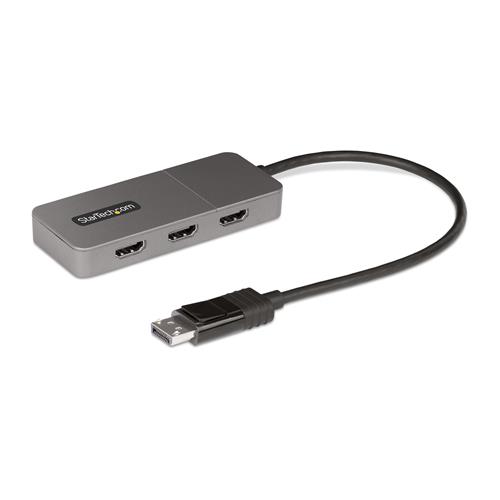
Startech.com 3-Port MST Hub - DisplayPort to 3x HDMI Triple 4K 60Hz Monitors DP 1.4 Multi-Monitor Video Adapter 1ft B (30cm)
 | Compare prices 2 → When you make a purchase through links on our site, we may receive a affiliate commission.
|
Buy Startech.com 3-Port MST Hub - DisplayPort to 3x HDMI Triple 4K 60Hz Monitors DP 1.4 Multi-Monitor Video Adapter 1ft B (30cm)
When you make a purchase through links on our site, we may receive a affiliate commission.
StarTech.com 3-Port MST Hub - DisplayPort to 3x HDMI Triple 4K 60Hz Monitors DP 1.4 Multi-Monitor Video Adapter 1ft (30cm) B | £46.08 |  | |||
StarTech.com 3-Port MST Hub - DisplayPort to 3x HDMI. Triple 4K 60Hz M MST14DP123HD | £39.60 |  | |||
Create a high-performance triple-monitor workstation by connecting a DisplayPort Desktop to three independent HDMI monitors
Connect three HDMI monitors to a DisplayPort-enabled host device using this DisplayPort to HDMI MST Hub.
Drive Triple 4K 60Hz Displays with HDR
Multi-Stream Transport (MST) technology combines multiple video signals into a single output signal/stream. This MST Hub separates the single input stream into three independent signals one for each HDMI-enabled display. Support for High Dynamic Range (HDR) facilitates enhanced contrast brightness color and luminosity.
Host Connection
Maximum Resolution Output 1
Maximum Resolution Output 2
Maximum Resolution Output 3
Example Host Processor/Graphics
DisplayPort 1.4 with DSC
4K 60Hz
4K 60Hz
4K 60Hz
Intel 12th Gen Processors & Later
Dedicated AMD & Nvidia GPU's that support DSC
4K 60Hz
4K 60Hz
N/A
Intel 11 th Gen with DSC
DisplayPort 1.4
4K 30Hz
4K 30Hz
4K 30Hz
Intel 10 th Gen (Ice Lake Only)
Intel 11th Gen Processors & Later
Dedicated AMD and Nvidia GPU's that support DP 1.4
DisplayPort 1.2
4K 30Hz
4K 30Hz
1080p
Intel 8 th - 10th Gen Processors & Later
*Please verify the GPU capabilities and driver support for DSC through MST with the OEM of the host device
Multitasking Made Easy
Configure the triple-HDMI displays in extended or mirrored mode. Create a high-performance workstation by adding three independent 4K 60Hz displays. This empowers increased multi-tasking across your organization resulting in increased productivity.
Driverless for Rapid Deployment and Seamless User Setup Experience
This MST Hub achieves maximum performance with Windows desktops featuring Intel 12th generation (and later) processors or dedicated graphics cards with DisplayPort 1.4 output ports and DSC support. Plug-and-play installation with no drivers or software required. The 12in (30cm) built-in DisplayPort cable provides options for flexible installation configurations reducing the amount of strain on the port and connector. Additionally this triple-monitor splitter is USB Powered and includes a 20inch (50cm) USB Micro-B power cable.
The StarTech.com Advantage
Connect three HDMI monitors to a DisplayPort-enabled host device using this DisplayPort to HDMI MST Hub.
Drive Triple 4K 60Hz Displays with HDR
Multi-Stream Transport (MST) technology combines multiple video signals into a single output signal/stream. This MST Hub separates the single input stream into three independent signals one for each HDMI-enabled display. Support for High Dynamic Range (HDR) facilitates enhanced contrast brightness color and luminosity.
Host Connection
Maximum Resolution Output 1
Maximum Resolution Output 2
Maximum Resolution Output 3
Example Host Processor/Graphics
DisplayPort 1.4 with DSC
4K 60Hz
4K 60Hz
4K 60Hz
Intel 12th Gen Processors & Later
Dedicated AMD & Nvidia GPU's that support DSC
4K 60Hz
4K 60Hz
N/A
Intel 11 th Gen with DSC
DisplayPort 1.4
4K 30Hz
4K 30Hz
4K 30Hz
Intel 10 th Gen (Ice Lake Only)
Intel 11th Gen Processors & Later
Dedicated AMD and Nvidia GPU's that support DP 1.4
DisplayPort 1.2
4K 30Hz
4K 30Hz
1080p
Intel 8 th - 10th Gen Processors & Later
*Please verify the GPU capabilities and driver support for DSC through MST with the OEM of the host device
Multitasking Made Easy
Configure the triple-HDMI displays in extended or mirrored mode. Create a high-performance workstation by adding three independent 4K 60Hz displays. This empowers increased multi-tasking across your organization resulting in increased productivity.
Driverless for Rapid Deployment and Seamless User Setup Experience
This MST Hub achieves maximum performance with Windows desktops featuring Intel 12th generation (and later) processors or dedicated graphics cards with DisplayPort 1.4 output ports and DSC support. Plug-and-play installation with no drivers or software required. The 12in (30cm) built-in DisplayPort cable provides options for flexible installation configurations reducing the amount of strain on the port and connector. Additionally this triple-monitor splitter is USB Powered and includes a 20inch (50cm) USB Micro-B power cable.
The StarTech.com Advantage
The product description is generated based on data from online stores. Before purchasing be sure to verify all information directly with the seller.

New USB Labels: How to Avoid Confusion in Speeds, Cables, and ConnectorsThe USB-IF organization has finally updated the USB port labels. Let's figure out what has changed.

How to Choose the Right Cable for Your Smartphone, Tablet, and LaptopConnectors, power, bandwidth and other criteria for choosing a cable for gadgets
How to place an order?How to add store?
Remember that the online store is responsible for the accuracy of information regarding price, warranty, and delivery!
You may be interested in