Catalog   /   Computing   /   Input Devices   /   Game Controllers   /   Logitech

Logitech Flight Radio Panel (945-000011)
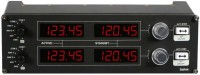
Photos - Game Controller Logitech Flight Radio Panel
Photos 4
Logitech Flight Radio Panel
Colour
Product type
instrument for flight simulators
Platform
PC (Windows)
Interface
wired
Wired interface
USB-A
Number of buttons
2 / + 4 rotary switches /
Feedback
in absent
Table mount
bolts
Material
metal/plastic
Power source
USB port
Added to E-Catalog
December 2017
P/N
945-000011

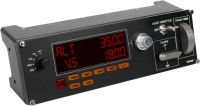
Controller for working with radio data.

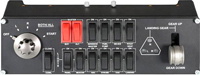
The Logitech Flight Radio Panel is a professional radio data controller part of Logitech Flight's dedicated line of aviation gadgets. It features four LCD displays with controls for communications, navigation, and more. The device is designed for experienced pilots who are looking to acquire realistic aircraft controls in MFS, X-Plane 10, Prepar3D and other flight simulators. The convenience of the Logitech Flight radio panel is that it can display the radio range finder, direction finder and transponder data in real time without requiring the pilot to look at the screen.

That is, as soon as some parameters change in the game, the panel immediately updates these data. In general, the following functions are available to the pilot: COM1/2 (communication), NAV1/2 (navigation), DME (range-finding radio beacon), ADF (radio direction finder) and XPDR (radar transponder). The radio panel can be combined with sticks, joysticks, pedals and other modular gadgets from the Logitech Flight series to recreate the cockpit of the McDonnell Douglas MD-80.

Full compatibility with all current versions of Windows does not require complex configuration manipulations from the user. It is enough to connect a USB cable, install drivers and connect it with other Logitech Flight devices, after which the entire control system will automatically integrate into the flight simulator installed on your computer. Logitech announces full support for Microsoft Flight Simulator X-Plane 10 and Prepar3D.

The information in the model description is for reference purposes.
Always clarify the specifications and configuration of the product with the online store manager before purchasing.
Catalog Logitech 2026 - new arrivals, bestsellers, and the most relevant models Logitech.
How to Choose a Gaming ControllerChoosing a gamepad is not just a purchase, but an investment in comfort and enjoyment of games.

Buy Logitech Flight Radio Panel

All prices 9 →
When you make a purchase through links on our site, we may receive a affiliate commission.

Logitech G - G Saitek Pro Flight Radio Panel

Clove.co.uk
Delivery: to United Kingdom
Report
£106.03

Logitech Pro Flight Radio Panel Flight Sim

Logitech Pro Flight Radio Panel Flight Sim
AVpartsmaster.co.uk
Delivery: in United Kingdom
Report
£106.98

Logitech G G Saitek Pro Flight Radio Panel 945-000011

Logitech G G Saitek Pro Flight Radio Panel
LaptopHub.uk
Delivery: in United Kingdom
Report
£109.38

Logitech Logitech G Saitek Pro Flight Radio Panel - PC 945-000011

Make your flight simulation experience more immersive with the Logitech G Saitek Flight Radio Panel. Use the LED displays to... moreshowcase real-time in-game information, while the dials and switches offer fine-tuned control. Better yet, the modular design makes it easy to integrate this hardware with other Logitech G Saitek flight controls. Logitech G Saitek Pro Flight Radio Panel at a Glance: Radio panel for flight sim set-ups LED displays for real-time in-game information Two concentric adjustment dials Standby switch for seamless control Modularly integrates with Logitech G Saitek flight hardware Compatible with Microsoft Flight Simulator and other popular flight sims Radio Panel The Logitech G Saitek Flight Radio Panel brings a new level of immersion to your flight simulation set-up, emulating the radio panels found on real planes. It modularly integrates with other Logitech G Saitek hardware, such as their yoke system, or within your cockpit set-up. The panel features four LED displays which can be used to show real-time in-game information from a compatible flight simulation game. This means you can take your radio stack off-screen, and enjoy the horizon properly. The displays can be used for COM1/COM2/NAV1/NAV2 or DME/ADF/XPDR functions. There are two concentric adjustment dials, which you can use to incrementally configure frequency units for fine-tuned control. What’s more, there is a standby switch which can easily be activated as needed. Any adjustments you make on the panel will be reflected in-game, for an authentic flight experience. Compatibility The Logitech G Saitek Flight Radio Panel is compatible with all other Logitech G Saitek flight hardware. What’s more, you can use multiple radio panels in tandem, either stacked or side-by-side with your other flight sim hardware. With additional drivers (external link), the Logitech G Saitek Flight Radio Panel is compatible with the following games: Microsoft Flight Simulator FSX - Flight Simulator X Plane 10 Prepar3D
Overclockers.co.uk
Delivery: to United Kingdom
Report
£109.99

Logitech G G Saitek Pro Flight Radio Panel 945-000011

Saitek's Pro Flight Radio Panel offers communication or navigation functions that work in real-time with FSX X-Plane and Prep... morear3D with one or more Radio Panels integrating easily into your home cockpit setup. Gone are the days of using fussy onscreen controls for COM1/2 NAV1/2 DME ADF and XPDR functions. Seamlessly integrating into FSX X-Plane and Prepar3D software no longer do you have to zoom into your flight sim's onscreen controls to make modifications. Change frequencies on the Panel and the sim will automatically and immediately reflect your selection.
Quzo.co.uk
Delivery: to United Kingdom
Report
£111.06
4 more offer(s)