
Cougar 600M
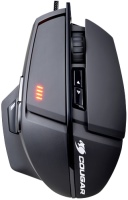 | Outdated Product Product type: mouse; Connection: wired; Sensor: laser; Type: for game; Sensor: Avago 9800; Sensor resolution (DPI): 8200; Max. acceleration (G): 30; Buttons: 7; Side buttons; DPI-button; Switch type: mechanical; Switches: Omron; DPI level indicator; Programmable buttons; Built-in memory |


Cougar 600M | ||||||||||||||||||||||||||||||||||||||||||||||||||||||||||||||||||||||
|
| |||||||||||||||||||||||||||||||||||||||||||||||||||||||||||||||||||||


Always clarify the specifications and configuration of the product with the online store manager before purchasing.
Catalog Cougar 2026 - new arrivals, bestsellers, and the most relevant models Cougar.







Wipe it with wet wipes more often and pick out dust between the parts with a toothpick (the same under the sniper button); you shouldn’t miss it against the bright orange background. • Looks as good as new after 1.5 years.
• Color, build quality, materials, awesome cable. • User-friendly UIX • UIX may not always work • The soft-touch coating has worn off under the thumb, and underneath there are some rough bumps, like on a tractor floor. It has also worn off on the bottom, but there it has already turned black (I use Cougar Control 1). • All marks stay on it for a long time. • The right mouse button only works if pressed hard, although there is a clicking sound. • The scroll wheel sometimes jumps. • I don’t know whether this is a downside of the mouse or the mouse pad, but I rubbed the pad of my little finger raw until it bled. Probably a downside of all three of us.  The Evil: use Cougar 600M more than year The Evil: use Cougar 600M more than year |
I bought it as a replacement for the Cyber Rat3, thought it would be something similar, but I was very wrong. After one or two months of use, 1 of the 2 side macro buttons broke. A month ago, the left mouse button broke — it started double-clicking a lot. Fits comfortably in the hand Thumb rest Short lifespan
Fragile macros Rapid wear use Cougar 600M month or more i recommend it don't buy |
The two main problems I encountered are the DPI settings constantly resetting and issues with scrolling. But the design is certainly good Design, thumb rest dPI setting resets. Problems with scrolling use Cougar 600M more than year |
Orange mood
Affordable, right-handed mouse with a soft-touch finish and available in several colours, including orange. Its sniper button is located on the side closer to the base, and is well pressed with the side of the thumb in any grip. However, the button needs to be pushed quite deep for the press to be registered, which can make the grip on the mouse loosen. Therefore, it is recommended to assign functions to the sniper button, such as the DPI mode switch or even opening the inventory in an RPG.
The mouse is small, fits comfortably in the hand and is equipped with five additional function keys, including a sniper button. The illumination of the Cougar M600 is located around the base of the left and right keys, which is quite rare and makes a good impression. There's also a four-position DPI indicator, and the 1.8-metre cable is wrapped in a binder.
The M600 is equipped with a full-fledged RGB backlight, which, like some other parameters (like sensitivity and polling rate), can be changed through proprietary software.
The mouse will be a great purchase if you need a modern gaming manipulator with original RGB lighting — the sniper button can be used for its intended purpose, but with a different function it will be more profitable.
- Built-in memory — 512 Kb — allows you to save up to 3 profiles for different games / players / PC
- Built-in processor — 32 bit
- Polling rate — 1000 Hz / 1 ms