
Microsoft Wedge Touch Mouse
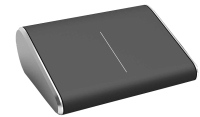 | Outdated Product Not being like most of its counterparts, this device, however, is a mouse in class. External features, in addition to the form, include a touchpad: it replaces both the keys and the scroll wheel, is designed for use with Windows 8 and has a set of gestures designed for this OS separately for one, two and three fingers. It is also worth noting the automatic transition to sleep mode simultaneously with the main device, which saves battery power. The optical sensor is made using BlueTrack technology. |


Microsoft Wedge Touch Mouse | |||||||||||||||||||||||||||||||||||||||
|
| ||||||||||||||||||||||||||||||||||||||


Not being like most of its counterparts, this device, however, is a mouse in class. External features, in addition to the form, include a touchpad: it replaces both the keys and the scroll wheel, is designed for use with Windows 8 and has a set of gestures designed for this OS separately for one, two and three fingers. It is also worth noting the automatic transition to sleep mode simultaneously with the main device, which saves battery power. The optical sensor is made using BlueTrack technology.
The information in the model description is for reference purposes.
Always clarify the specifications and configuration of the product with the online store manager before purchasing.
Catalog Microsoft 2026 - new arrivals, bestsellers, and the most relevant models Microsoft.
Always clarify the specifications and configuration of the product with the online store manager before purchasing.
Catalog Microsoft 2026 - new arrivals, bestsellers, and the most relevant models Microsoft.

How to choose a gaming mouseWe'll look at grip types, sensor sensitivity, pushbutton switches, and other important nuances

How to choose a mouse for games, office tasks and creative workLet's explore the nuances of the computer mouse market together and find the perfect options that match your requirements














Control:
One finger swipe anywhere
One finger swipe anywhere
- Scroll in any direction.
- Scroll in any direction.
- Up: Maximize the window to full screen.
- Right or Left: Expand to the right or left half of the screen (Aerosnap).
- Down: If the window is maximized, it becomes normal (not full screen). If normal, it collapses.
- Down — minimize all windows.
- Up — Thumbnails of open windows appear on top of the screen (a bit like a traditional Alt+Tab toggle, but done in a more modern way, above a darkened desktop), where you can select the desired programme.
We recommendCompare using chart →


gaming mouse, radio / Bluetooth / wired, Multi-Device, with memory, buttons: 6, programmable, + wheel, 4D, свитчи: optical, Razer Gen-3, up to 90 mln, RGB backlight, sensor 18000 DPI, battery, up to 180 h

Bluetooth/radio, BT v 5, Multi-Device, buttons: quiet, 7, programmable, + wheel, sensor 8000 DPI, battery, 650 mAh, up to 70 days
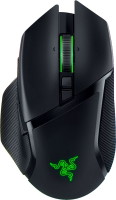
gaming mouse, radio / Bluetooth / wired, USB-A, with memory, buttons: 6, programmable, + wheel, 4D, свитчи: optical, Razer Gen-3, up to 90 mln, RGB backlight, sensor 30000 DPI, battery, up to 150 h
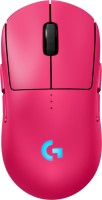
gaming mouse, radio / wired, USB-A, with memory, buttons: 6, programmable, + wheel, свитчи: optical, Logitech Lightforce, RGB backlight, sensor 32000 DPI, wireless charger, battery, up to 95 h


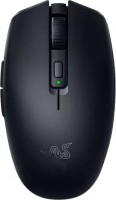
gaming mouse, Bluetooth/radio, Multi-Device, with memory, buttons: 5, programmable, + wheel, свитчи: mechanical, Razer Gen-2, sensor 18000 DPI, 1xAA
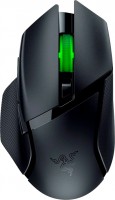
gaming mouse, Bluetooth/radio, Multi-Device, with memory, buttons: 6, programmable, + wheel, свитчи: mechanical, Razer Gen-2, up to 60 mln, RGB backlight, sensor 18000 DPI, 1xAA

gaming mouse, radio, with memory, buttons: 5, programmable, + wheel, sensor 30000 DPI, 1xAA

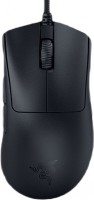
gaming mouse, wired, USB-A, with memory, buttons: 4, programmable, + wheel, свитчи: optical, Razer Gen-3, sensor 30000 DPI