
Comparison Cougar Vantar AX vs Cougar Vantar
Add to comparison | 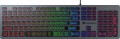 | 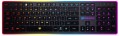 |
|---|---|---|
| Cougar Vantar AX | Cougar Vantar | |
from £42.49 | Compare prices 1 | |
| User reviews | ||
| TOP sellers | ||
Antighosting (simultaneous pressing of 19 specific keys) | ||
| Connection | wired | wired |
| Cable length | 1.6 m | |
| Type | for game | for game |
| Form factor | 100% (full size) | 100% (full size) |
| Layout | ANSI | ANSI |
Keyboard | ||
| Key profile | low | low |
| Key type | island type | classic type |
| Switch technology | scissor | scissor |
| Anti-Ghosting |  | |
| #KRO | 19-KRO | 19-KRO |
| Fn key | | |
Features | ||
| Volume control | fn | fn |
| Game mode | | |
| Lighting | RGB | multicolor |
| Lighting effects | + | |
Connection and power supply | ||
| Cable | USB-A | USB-A |
General | ||
| Size | 445x127x15.5 mm | 445x132x20 mm |
| Weight | 626 g | 800 g |
| Color | ||
| Added to E-Catalog | december 2022 | february 2017 |



Compare Cougar Vantar AX and Vantar
Keyboards Cougar Vantar AX and Cougar Vantar have similar features, but there are several key differences. Vantar AX is equipped with island-style keys with short travel and offers RGB backlighting with effects, making it more appealing to gamers. At the same time, Vantar uses classic keys with similarly short travel but has multicolor backlighting without effects. Users note that Vantar AX is more comfortable for extended use, though both models have similar reviews regarding reliability and build quality. The choice between them may depend on preferences in design and lighting functionality.
Price comparison
You may be interested in
Cougar Vantar AX often compared


Cougar Vantar often compared


Glossary
Cable length
The length of the cable that the keyboard is equipped with for wired connection (see "Connection type").
When choosing this parameter, you should first of all take into account the distance from the device to the connection port: a cable that is too short may simply not reach the connector, and a cable that is too long may get confused at hand and create inconvenience. As for specific values, the reference length is 1.8 m. However, there are cables both shorter and longer.
When choosing this parameter, you should first of all take into account the distance from the device to the connection port: a cable that is too short may simply not reach the connector, and a cable that is too long may get confused at hand and create inconvenience. As for specific values, the reference length is 1.8 m. However, there are cables both shorter and longer.
Key type
— Classic type. Keyboard with keys of the usual square and rectangular shape, with a small distance between them. Such keys usually expand downwards so that the gaps between them are as small as possible.
— Island type. Also known as "soaring" or chiclet. This is a keyboard in which each key is installed in a separate hole at a small distance from the others. Island models are more convenient than classical ones in that they are less likely to accidentally press the adjacent key. On the other hand, they are more difficult to clean: debris that has clogged into the gap between the key and the “board” itself is quite difficult to clean out, while contamination can create problems in operation.
On the practical side, the choice of a particular type of keys depends primarily on the personal preferences of the user.
— Island type. Also known as "soaring" or chiclet. This is a keyboard in which each key is installed in a separate hole at a small distance from the others. Island models are more convenient than classical ones in that they are less likely to accidentally press the adjacent key. On the other hand, they are more difficult to clean: debris that has clogged into the gap between the key and the “board” itself is quite difficult to clean out, while contamination can create problems in operation.
On the practical side, the choice of a particular type of keys depends primarily on the personal preferences of the user.
Lighting
The colour of the backlight provided in the design of the keyboard.
In general, the backlight performs two functions: practical (makes the keys more visible in low light) and aesthetic (gives the keyboard a beautiful appearance). However, it cannot be said that non-backlit keyboards will be unusable in the dark, the light from the monitor will still illuminate the buttons. The simplest version of the backlight is one-colour. In this case, specific colours can be different: for example, white is well suited for general-purpose keyboards (work or home), but other shades can be found in gaming or design models, for example, red, green, blue, purple or orange. If two or three colours are indicated for the keyboard, this may mean either the ability to switch between these colours, or that this model comes in several versions that differ in the shade of the backlight; these nuances should be clarified separately.
The most advanced options are multi-colour and RGB backlighting. Multi-colour systems are called systems in which more than three colour options are provided, sometimes with intermediate shades. And RGB-backlight all...ows you to choose almost any shade at the request of the user; in addition, the possibility of synchronization (see "Illumination with effects") is found mainly in such systems, although single-colour keyboards can also be equipped with other effects.
In general, the backlight performs two functions: practical (makes the keys more visible in low light) and aesthetic (gives the keyboard a beautiful appearance). However, it cannot be said that non-backlit keyboards will be unusable in the dark, the light from the monitor will still illuminate the buttons. The simplest version of the backlight is one-colour. In this case, specific colours can be different: for example, white is well suited for general-purpose keyboards (work or home), but other shades can be found in gaming or design models, for example, red, green, blue, purple or orange. If two or three colours are indicated for the keyboard, this may mean either the ability to switch between these colours, or that this model comes in several versions that differ in the shade of the backlight; these nuances should be clarified separately.
The most advanced options are multi-colour and RGB backlighting. Multi-colour systems are called systems in which more than three colour options are provided, sometimes with intermediate shades. And RGB-backlight all...ows you to choose almost any shade at the request of the user; in addition, the possibility of synchronization (see "Illumination with effects") is found mainly in such systems, although single-colour keyboards can also be equipped with other effects.
Lighting effects
The presence of additional effects in the backlight provided in the keyboard (see above). For models with the backlight synchronization function, this item indicates the synchronization technology.
Additional backlight effects can be different: multi-coloured backlighting of individual keyboard zones, smooth “flowing” of one colour into another, response to system or game events, etc.; specific features should be clarified for each model separately. As for synchronization, it allows you to coordinate the backlighting of various system components — keyboards, case mice, graphics cards, etc.; this opportunity is especially appreciated by the owners of high-end gaming stations. Coordination requires that all highlighted components support the same technology; usually, each manufacturer has its own — Aura Sync for Asus, RGB Fusion for Gigabyte, etc.
Additional backlight effects can be different: multi-coloured backlighting of individual keyboard zones, smooth “flowing” of one colour into another, response to system or game events, etc.; specific features should be clarified for each model separately. As for synchronization, it allows you to coordinate the backlighting of various system components — keyboards, case mice, graphics cards, etc.; this opportunity is especially appreciated by the owners of high-end gaming stations. Coordination requires that all highlighted components support the same technology; usually, each manufacturer has its own — Aura Sync for Asus, RGB Fusion for Gigabyte, etc.