
Comparison GoPro HERO+ LCD vs GoPro HERO4 Session
Add to comparison | 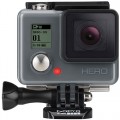 | 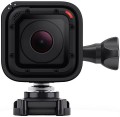 |
|---|---|---|
| GoPro HERO+ LCD | GoPro HERO4 Session | |
from £319.94 | Compare prices 1 | |
| TOP sellers | ||
Good image quality, touch screen, wide range of accessories, Wi-Fi and Bluetooth wireless modules, non-removable battery, low performance, heavy weight. | A clear and sharp picture, water resistance up to 10 m, rich equipment, compactness, compatibility with most accessories from other models, long turn-on time, non-removable battery, inconvenient access to settings. | |
| Product type | action camera | action camera |
| Thread 1/4" (for tripod) |  | |
| Dust-, moisture-proof camera | IPX8 | |
| Dust-, moisture-proof of case | IPX8 | |
Filming | ||
| HD (720p) | 1280x720 px 60 fps | 1280x720 px 60 fps |
| Full HD (1080p) | 1920x1080 px 60 fps | 1920x1080 px 60 fps |
| Quad HD | no support | no support |
| Ultra HD (4K) | no support | no support |
| Slow motion | 100 fps | |
| Field of view | 170 ° | 170 ° |
| Sound recording |  | |
| Noise cancelation | | |
| Megapixels | 8 | 8 |
| Photo resolution | 3264x2448 px | 3264x2448 px |
| Capabilities | serial photo shoot one click recording time lapse key point labels | serial photo shoot one click recording auto-rotate |
Features | ||
| Display | touch | |
| Front screen | service | |
| Connection | Wi-Fi Bluetooth | Wi-Fi Bluetooth |
| Max. memory card capacity | 64 GB | 64 GB |
Battery | ||
| Type | non-removable | non-removable |
| Capacity | 1160 mAh | 1000 mAh |
General | ||
| In box | protective case helmet mount flat mount | protective case mounting frame helmet mount flat mount |
| Dimensions | 54x70x37 mm | 35x35x35 mm |
| Weight | 127 g | 74 g |
| Color | ||
| Added to E-Catalog | july 2015 | july 2015 |


Compare GoPro HERO+ LCD and HERO4 Session
Price comparison
You may be interested in
GoPro HERO+ LCD often compared


GoPro HERO4 Session often compared


Glossary
Dust-, moisture-proof camera
The level of dust and water protection provided by the body of the camera itself. Most action cameras are designed for recording in extreme conditions, but the level of protection of each model can vary significantly — from the ability to shoot in the rain, to full tightness, allowing for a long immersion under water.
To characterize the security level of the camera, the international IP classification is used. Each device is assigned a code of the form IPXX, where instead of the first X — the level of protection against the ingress of foreign objects (including dust), and instead of the second X — the level of protection against the ingress of water.
Levels of protection against dust and foreign objects in modern action cameras are never lower than 5 — lower protection classes would provide unacceptably large gaps in the body. Specifically, level 5 provides that dust can get inside in small quantities, but does not affect the performance of the device. A higher level — 6 — provides full dustproof.
To characterize the level of protection from water, the following classification is used:
0 — no protection;
1 — drops of water falling at a right angle relative to the operating position of the device cannot cause dangerous consequences;
2 — protection against drops falling on the equipment at an angle of up to 15°;
3 — at an angle up to 60° (splash protection, minimum rain protection);
4 — protection from rai...n with strong wind;
5 — protection against water jets falling at any angle (water jets, for example, from a hose or heavy rain cannot harm the device);
6 — from temporary flooding;
7 — from temporary immersion under water to a depth of not more than 1 metre;
8 — from prolonged diving to depth (maximum time and depth are specified by the manufacturer separately).
In some cases, a model may only be IP-certified for one type of protection (only against sand or water). In this case, instead of the second parameter, simply X is put. So, for example, IPX6 security means that the camera is protected from temporary flooding and heavy rain, but the level of protection from dust is not defined and, accordingly, is not certified.
It is important to note that this parameter characterizes the protection of the camera itself, but does not take into account the capabilities of protective cases. Do not confuse it with the protection of the outer case, which sometimes comes with the device (see "Dust-, moisture-proof of case").
To characterize the security level of the camera, the international IP classification is used. Each device is assigned a code of the form IPXX, where instead of the first X — the level of protection against the ingress of foreign objects (including dust), and instead of the second X — the level of protection against the ingress of water.
Levels of protection against dust and foreign objects in modern action cameras are never lower than 5 — lower protection classes would provide unacceptably large gaps in the body. Specifically, level 5 provides that dust can get inside in small quantities, but does not affect the performance of the device. A higher level — 6 — provides full dustproof.
To characterize the level of protection from water, the following classification is used:
0 — no protection;
1 — drops of water falling at a right angle relative to the operating position of the device cannot cause dangerous consequences;
2 — protection against drops falling on the equipment at an angle of up to 15°;
3 — at an angle up to 60° (splash protection, minimum rain protection);
4 — protection from rai...n with strong wind;
5 — protection against water jets falling at any angle (water jets, for example, from a hose or heavy rain cannot harm the device);
6 — from temporary flooding;
7 — from temporary immersion under water to a depth of not more than 1 metre;
8 — from prolonged diving to depth (maximum time and depth are specified by the manufacturer separately).
In some cases, a model may only be IP-certified for one type of protection (only against sand or water). In this case, instead of the second parameter, simply X is put. So, for example, IPX6 security means that the camera is protected from temporary flooding and heavy rain, but the level of protection from dust is not defined and, accordingly, is not certified.
It is important to note that this parameter characterizes the protection of the camera itself, but does not take into account the capabilities of protective cases. Do not confuse it with the protection of the outer case, which sometimes comes with the device (see "Dust-, moisture-proof of case").
Dust-, moisture-proof of case
The degree of dust and water protection of the protective case supplied with the camera.
Protected case will save your camera from dust, water, temperature changes, shocks, etc. The specific degree of protection is indicated according to the international IP (Ingress Protection Rating) system, according to which each device is assigned a code of the form IPXX, where X is replaced by specific numbers. The first of them characterizes the protection against the penetration of foreign objects (from 0 to 6, where 0 is no protection). Usually, in boxes for action cameras, this indicator does not go below 5, because otherwise the container would have too large gaps, and its use simply would not make sense. Level 5 provides dust resistance — dust can get inside the case, but in small quantities that do not affect the device inside. Level 6 corresponds to complete imperviousness to dust.
The second digit is protection against liquid ingress (from 0 to 8, where 0 is no protection). Usually, the minimum level of protection against water is 6.
6 — protection against short-term immersion (for example, falling into a sea wave);
7 — protection against temporary immersion under water (up to 30 minutes) to a shallow depth (up to 1 metre), without continuous operation in immersed mode;
8 — protection against immersion to a depth of more than 1 metre for a time of more than 30 m, with the possibility of continuous...operation underwater. The specific level of protection of level 8 can be quite impressive — up to the possibility of diving to several tens of metres.
Note that protective cases for action cameras can be sold separately. Therefore, if the capabilities of the complete container do not suit you, there may be a more secure case on the market. On the other hand, in general, it is still more convenient to buy such an accessory immediately with a camera — so as not to waste time and effort on choosing the right protective case.
Protected case will save your camera from dust, water, temperature changes, shocks, etc. The specific degree of protection is indicated according to the international IP (Ingress Protection Rating) system, according to which each device is assigned a code of the form IPXX, where X is replaced by specific numbers. The first of them characterizes the protection against the penetration of foreign objects (from 0 to 6, where 0 is no protection). Usually, in boxes for action cameras, this indicator does not go below 5, because otherwise the container would have too large gaps, and its use simply would not make sense. Level 5 provides dust resistance — dust can get inside the case, but in small quantities that do not affect the device inside. Level 6 corresponds to complete imperviousness to dust.
The second digit is protection against liquid ingress (from 0 to 8, where 0 is no protection). Usually, the minimum level of protection against water is 6.
6 — protection against short-term immersion (for example, falling into a sea wave);
7 — protection against temporary immersion under water (up to 30 minutes) to a shallow depth (up to 1 metre), without continuous operation in immersed mode;
8 — protection against immersion to a depth of more than 1 metre for a time of more than 30 m, with the possibility of continuous...operation underwater. The specific level of protection of level 8 can be quite impressive — up to the possibility of diving to several tens of metres.
Note that protective cases for action cameras can be sold separately. Therefore, if the capabilities of the complete container do not suit you, there may be a more secure case on the market. On the other hand, in general, it is still more convenient to buy such an accessory immediately with a camera — so as not to waste time and effort on choosing the right protective case.
Slow motion
Frame rate supported by the camera when shooting in slow motion.
In general, such shooting is called “high-speed” because it is carried out at an increased frame rate (more than 60 fps). As a result, when played back at normal speed (60 fps and below), the video looks slow hence the name. This kind of slow-motion can be used just for fun, as an artistic technique, and even for scientific purposes — to capture movement that is too fast for the human eye. In any case, the higher the slow-mo frame rate, the more you can slow down the video and the more advanced the camera is in this regard. On the other hand, the higher the frame rate, the more performant the graphics part should be; and this, in turn, affects the price of the device, sometimes quite noticeably.
We also note that slow-mo shooting may be available only at certain resolutions, not always at maximum. These points can be directly specified in the specs of the action camera.
In general, such shooting is called “high-speed” because it is carried out at an increased frame rate (more than 60 fps). As a result, when played back at normal speed (60 fps and below), the video looks slow hence the name. This kind of slow-motion can be used just for fun, as an artistic technique, and even for scientific purposes — to capture movement that is too fast for the human eye. In any case, the higher the slow-mo frame rate, the more you can slow down the video and the more advanced the camera is in this regard. On the other hand, the higher the frame rate, the more performant the graphics part should be; and this, in turn, affects the price of the device, sometimes quite noticeably.
We also note that slow-mo shooting may be available only at certain resolutions, not always at maximum. These points can be directly specified in the specs of the action camera.
Noise cancelation
The presence of a active noise reduction system in the design of the action camera.
This function is relevant only for models with the ability to record sound (see above). The noise reduction system, by the name, monitors extraneous noise in the recorded sound (for example, the rumble of the wind in the microphone array) and eliminates them — thus, the camera captures only “useful” sound with a minimum of ambient noise. Of course, even the most advanced of these systems are not perfect, and errors in operation are inevitable — the camera may miss some noise or reduce the volume of a “useful” sound. However, in most cases, noise reduction somehow positively affects the quality of the recorded audio.
This function is relevant only for models with the ability to record sound (see above). The noise reduction system, by the name, monitors extraneous noise in the recorded sound (for example, the rumble of the wind in the microphone array) and eliminates them — thus, the camera captures only “useful” sound with a minimum of ambient noise. Of course, even the most advanced of these systems are not perfect, and errors in operation are inevitable — the camera may miss some noise or reduce the volume of a “useful” sound. However, in most cases, noise reduction somehow positively affects the quality of the recorded audio.
Capabilities
— Photo during video. The ability to take photos directly while recording a video — usually using a separate button. Thus, it is convenient to fix the most significant moments of what is happening. Such photos are much better in quality than "freeze frames" from the captured video.
— Serial photo shoot. This feature allows you to take several pictures at once in a short period (usually it is a fraction of a second). A series of shots increases the chance of capturing a good moment, which can be very important given the specifics of using action cameras.
— One click recording. The ability to quickly turn on the camera for recording — literally at the touch of a button, by the name. Moreover, such a button works even if the device is turned off. However, the recording inevitably starts with some delay; but often this delay is a fraction of a second.
— Online streaming. Ability to stream video to popular services like YouTube and social networks (Facebook, Instagram, TikTok, etc.). Usually, the online streaming function is implemented when the action camera is connected to the Internet via a Wi-Fi network, less often via a wired connection. Communication with the World Wide Web can be held directly or through a smartphone or computer. It will require the use of appropriate software.
— Loop recording.... This function allows old video files to be automatically overwritten when the memory card is full. The camera continues recording by deleting the oldest files, which ensures continuous recording. This function is especially useful for recording long events, where it's important to have constant recording without manually deleting files. This also applies to devices like trail cameras, where loop recording is necessary for wildlife observation and security tasks.
— Time lapse. A special mode of operation of the action camera, in which video recording is carried out at a slower frequency is mainly used for filming slow processes. Thus, for example, a long journey or a long sunset can fit into a 3-minute video.
— Auto-rotate. The function of automatic rotation of the captured photos and videos to the position corresponding to the position of the camera. Without this feature, all footage during playback would be displayed strictly in landscape orientation, and footage shot with the camera upside down or upside down would have to be rotated in a photo or video editor. Usually, at the beginning of video recording, auto-rotation is blocked — so that the position of the frame at any time corresponds to the rotation of the camera itself relative to its original position.
— Photo panoramas shooting. The ability to use the camera to take panoramic photos. In traditional action cameras (see "Product type"), such shooting is carried out as follows: the camera takes several separate photos, which are then glued into one image. Regarding panoramic and 360-degree models (see ibid.), it is worth noting that not all such models support shooting in panoramic format, so it is advisable to check the availability of this function separately.
— Key points labels. The ability to add special marks to the footage that indicate key moments. While viewing such videos, you can go directly to the labels — this is easier than manually searching for the right moment. This feature is especially useful when shooting long videos, as well as when numerous individual files. The label, usually, is placed right during the shooting by pressing a special button or by voice command.
— Night shooting. Special mode for recording in low light conditions. The specific implementation of this function may be different: in some models, the sensitivity of the sensor is increased, in others, shooting in the IR range is used. Accordingly, specific features may vary: not every camera with this function can shoot in complete darkness, and these nuances should be clarified separately.
— Motion sensor. A device that activates the camera for shooting upon detecting movement within its range. Typically, such sensors use infrared (PIR) sensors to detect changes in thermal emissions from objects like animals or humans, allowing the camera to react instantly to movement. Such sensors' advantages include energy efficiency, providing a high degree of reliability and convenience when using trail cameras, making them ideal for various purposes: from wildlife observation to security tasks.
— Serial photo shoot. This feature allows you to take several pictures at once in a short period (usually it is a fraction of a second). A series of shots increases the chance of capturing a good moment, which can be very important given the specifics of using action cameras.
— One click recording. The ability to quickly turn on the camera for recording — literally at the touch of a button, by the name. Moreover, such a button works even if the device is turned off. However, the recording inevitably starts with some delay; but often this delay is a fraction of a second.
— Online streaming. Ability to stream video to popular services like YouTube and social networks (Facebook, Instagram, TikTok, etc.). Usually, the online streaming function is implemented when the action camera is connected to the Internet via a Wi-Fi network, less often via a wired connection. Communication with the World Wide Web can be held directly or through a smartphone or computer. It will require the use of appropriate software.
— Loop recording.... This function allows old video files to be automatically overwritten when the memory card is full. The camera continues recording by deleting the oldest files, which ensures continuous recording. This function is especially useful for recording long events, where it's important to have constant recording without manually deleting files. This also applies to devices like trail cameras, where loop recording is necessary for wildlife observation and security tasks.
— Time lapse. A special mode of operation of the action camera, in which video recording is carried out at a slower frequency is mainly used for filming slow processes. Thus, for example, a long journey or a long sunset can fit into a 3-minute video.
— Auto-rotate. The function of automatic rotation of the captured photos and videos to the position corresponding to the position of the camera. Without this feature, all footage during playback would be displayed strictly in landscape orientation, and footage shot with the camera upside down or upside down would have to be rotated in a photo or video editor. Usually, at the beginning of video recording, auto-rotation is blocked — so that the position of the frame at any time corresponds to the rotation of the camera itself relative to its original position.
— Photo panoramas shooting. The ability to use the camera to take panoramic photos. In traditional action cameras (see "Product type"), such shooting is carried out as follows: the camera takes several separate photos, which are then glued into one image. Regarding panoramic and 360-degree models (see ibid.), it is worth noting that not all such models support shooting in panoramic format, so it is advisable to check the availability of this function separately.
— Key points labels. The ability to add special marks to the footage that indicate key moments. While viewing such videos, you can go directly to the labels — this is easier than manually searching for the right moment. This feature is especially useful when shooting long videos, as well as when numerous individual files. The label, usually, is placed right during the shooting by pressing a special button or by voice command.
— Night shooting. Special mode for recording in low light conditions. The specific implementation of this function may be different: in some models, the sensitivity of the sensor is increased, in others, shooting in the IR range is used. Accordingly, specific features may vary: not every camera with this function can shoot in complete darkness, and these nuances should be clarified separately.
— Motion sensor. A device that activates the camera for shooting upon detecting movement within its range. Typically, such sensors use infrared (PIR) sensors to detect changes in thermal emissions from objects like animals or humans, allowing the camera to react instantly to movement. Such sensors' advantages include energy efficiency, providing a high degree of reliability and convenience when using trail cameras, making them ideal for various purposes: from wildlife observation to security tasks.
Display
— Diagonal. The larger the screen, the more convenient it is to watch (and also to control if the display is touch-sensitive). On the other hand, the diagonal of the built-in display directly affects the size of the case, and action cameras should be quite compact. Thus, there are practically no screens larger than 2.5" in modern action cameras.
— Resolution. Theoretically, the higher the resolution, the clearer and better image the screen produces. On the other hand, displays in action cameras are designed mainly for menu operation and footage preview — and for these purposes, especially high resolutions are not needed. For models with two screens, the rear display is considered the main display.
— Touch screen. Display equipped with a sensor and responsive to touch like in smartphones/tablets. Control through such a display is simpler and more intuitive than using buttons, rotary knobs, etc. On the other hand, for more or less convenient control, the touch screen must be quite large, which affects the dimensions of the entire camera.
— Resolution. Theoretically, the higher the resolution, the clearer and better image the screen produces. On the other hand, displays in action cameras are designed mainly for menu operation and footage preview — and for these purposes, especially high resolutions are not needed. For models with two screens, the rear display is considered the main display.
— Touch screen. Display equipped with a sensor and responsive to touch like in smartphones/tablets. Control through such a display is simpler and more intuitive than using buttons, rotary knobs, etc. On the other hand, for more or less convenient control, the touch screen must be quite large, which affects the dimensions of the entire camera.
Front screen
The presence in the camera of a screen mounted on the front panel, next to the lens. Other displays may not be present at all; in such cases, the diagonal, resolution and other parameters are given for the front screen.
It is worth noting that most often the simplest black-and-white displays are installed on the front panel, suitable only for text and basic graphic information. However, even on such a screen, you can display a wide variety of service data: the current mode of operation (photo, video, standby), the resolution used, the shooting time, the amount of free space on the drive, etc. But more advanced displays are not used as front displays: a full-colour screen is needed only for taking a selfie, and for this you can use a remote display with a remote control(see "Control") or a smartphone connected to the camera.
It is worth noting that most often the simplest black-and-white displays are installed on the front panel, suitable only for text and basic graphic information. However, even on such a screen, you can display a wide variety of service data: the current mode of operation (photo, video, standby), the resolution used, the shooting time, the amount of free space on the drive, etc. But more advanced displays are not used as front displays: a full-colour screen is needed only for taking a selfie, and for this you can use a remote display with a remote control(see "Control") or a smartphone connected to the camera.
Capacity
The capacity of the battery supplied with the action camera.
All other things being equal, a higher capacity allows the device to last longer on a single charge. However, action cameras can differ markedly in design features and, as a result, in power consumption. Therefore, only models with similar specs can be compared with each other in terms of capacity (and even then quite approximately). To assess the autonomy of the device, it is better to use data on the actual operating time on a charge (this data can be indicated by the manufacturer itself or given in reviews).
All other things being equal, a higher capacity allows the device to last longer on a single charge. However, action cameras can differ markedly in design features and, as a result, in power consumption. Therefore, only models with similar specs can be compared with each other in terms of capacity (and even then quite approximately). To assess the autonomy of the device, it is better to use data on the actual operating time on a charge (this data can be indicated by the manufacturer itself or given in reviews).
In box
— Protective case. A special container that provides additional protection from dust, moisture, impacts, extreme temperatures and other similar "troubles". The specific level of protection in each case should be specified separately. In order not to interfere with filming, the box is made of transparent materials. In addition, we note that some cameras can only be mounted on mounts in a box (or in a mounting frame - see below), since the body itself may not have space for this.
— Mounting frame. A device designed to install a camera on various mounts — helmet, steering wheel, etc. The camera body itself often does not have "landing sites" for such mounts, which is why additional equipment has to be used. Note that a protective box (see above) often performs a similar function; the mounting frame, in contrast, provides almost no protection, but the camera body remains maximally open in the frame. This provides additional opportunities — in particular, it allows you to connect various cables and effectively use the built-in microphone, which is impossible when using many boxes.
— Helmet mount. A mount designed to mount a camera to a helmet or other curved surface. The design of such a mount is based on a curved platform with an adhesive layer or Velcro, the shape of which roughly matches the shape of the helmet surface. Such a device can provide a more s...ecure hold than a classic flat platform (see below).
— Flat mount. One of the main and simplest mounts used to fix an action camera to almost any uniform surface: snowboard, skateboard, car hood, etc. It is a small flat platform, to one side of which the camera is attached, while the second is fixed to the desired surface (using Velcro, special glue, etc.). Note that flat mounts are often used for installation on a helmet, but for this purpose there is a separate type of mount, with a curved platform (see above).
— 3-axis mount. This differs from other types of mounts by the presence of three movable units that allow you to rotate the camera at an angle of up to 90 degrees in three axes. In practice, this allows you to choose the most interesting or successful shooting angle - on the side of the helmet, for example. Such solutions are usually compatible with many other mounts, so they can be used together with a steering wheel, curved, etc.
— On the handlebars of a bicycle/motorcycle (pipe). A mount for installing a camera on a small pipe — for example, the handlebars of a bicycle or motorcycle. As a rule, it works on the principle of a clamp, and the size of the mount can be adjusted within a fairly wide range, adjusting it for pipes of different diameters.
— Suction cup(on glass). A camera mount that is fixed in the desired location using a suction cup. Allows you to install the device on flat and slightly curved surfaces. It is worth considering that such mounts do not hold as securely as flat or curved ones (see the relevant points). On the other hand, the suction cup is easy to attach and remove and leaves no marks. Therefore, mounts of this type are mainly used for installation on car glass when the camera operates as a video recorder.
— Clamp (clip). The clip-type mount is quite universal, since it allows you to hang the camera on almost any suitable piece of equipment (backpack strap, unloading belt, belt, etc.). However, it is not very suitable for extreme shooting due to its relatively low reliability.
— Head mount. A device for fixing the camera to the head — usually on the forehead, like a headlamp. In addition to freeing up your hands, this placement has another advantage: the camera lens looks in the same direction as the customer. The mount itself is usually a system of elastic straps and is designed to be worn directly on the head, as opposed to a curved helmet platform. However, some models allow the possibility of wearing it over a helmet.
— Chest mount. This mount is a system of elastic straps that allows you to fix the camera on the customer's chest, shooting slightly lower than "from the eyes". Like the head mount (see above), it is easily adapted to the desired size.
— Monopod(selfie). A device commonly known as a “selfie stick”. It is a rod, usually foldable and sometimes adjustable in length; at one end of the rod there is a mount for the camera, at the other - a handle for holding in the hand. In accordance with the name, such a monopod is intended mainly for filming yourself - thanks to the length of the rod, the camera can be held at a comfortable distance. However, other ways of using it are possible: for example, with the help of a monopod you can “look” quite far over the edge of a cliff or around a corner. The main disadvantage of such a device is that one hand is constantly occupied.
In addition to those described above, the delivery set may also include other types of fastenings - for example, for musical instruments (on the neck of a guitar, on the bar of a drum kit, etc.), on a surfboard, etc.
— Mounting frame. A device designed to install a camera on various mounts — helmet, steering wheel, etc. The camera body itself often does not have "landing sites" for such mounts, which is why additional equipment has to be used. Note that a protective box (see above) often performs a similar function; the mounting frame, in contrast, provides almost no protection, but the camera body remains maximally open in the frame. This provides additional opportunities — in particular, it allows you to connect various cables and effectively use the built-in microphone, which is impossible when using many boxes.
— Helmet mount. A mount designed to mount a camera to a helmet or other curved surface. The design of such a mount is based on a curved platform with an adhesive layer or Velcro, the shape of which roughly matches the shape of the helmet surface. Such a device can provide a more s...ecure hold than a classic flat platform (see below).
— Flat mount. One of the main and simplest mounts used to fix an action camera to almost any uniform surface: snowboard, skateboard, car hood, etc. It is a small flat platform, to one side of which the camera is attached, while the second is fixed to the desired surface (using Velcro, special glue, etc.). Note that flat mounts are often used for installation on a helmet, but for this purpose there is a separate type of mount, with a curved platform (see above).
— 3-axis mount. This differs from other types of mounts by the presence of three movable units that allow you to rotate the camera at an angle of up to 90 degrees in three axes. In practice, this allows you to choose the most interesting or successful shooting angle - on the side of the helmet, for example. Such solutions are usually compatible with many other mounts, so they can be used together with a steering wheel, curved, etc.
— On the handlebars of a bicycle/motorcycle (pipe). A mount for installing a camera on a small pipe — for example, the handlebars of a bicycle or motorcycle. As a rule, it works on the principle of a clamp, and the size of the mount can be adjusted within a fairly wide range, adjusting it for pipes of different diameters.
— Suction cup(on glass). A camera mount that is fixed in the desired location using a suction cup. Allows you to install the device on flat and slightly curved surfaces. It is worth considering that such mounts do not hold as securely as flat or curved ones (see the relevant points). On the other hand, the suction cup is easy to attach and remove and leaves no marks. Therefore, mounts of this type are mainly used for installation on car glass when the camera operates as a video recorder.
— Clamp (clip). The clip-type mount is quite universal, since it allows you to hang the camera on almost any suitable piece of equipment (backpack strap, unloading belt, belt, etc.). However, it is not very suitable for extreme shooting due to its relatively low reliability.
— Head mount. A device for fixing the camera to the head — usually on the forehead, like a headlamp. In addition to freeing up your hands, this placement has another advantage: the camera lens looks in the same direction as the customer. The mount itself is usually a system of elastic straps and is designed to be worn directly on the head, as opposed to a curved helmet platform. However, some models allow the possibility of wearing it over a helmet.
— Chest mount. This mount is a system of elastic straps that allows you to fix the camera on the customer's chest, shooting slightly lower than "from the eyes". Like the head mount (see above), it is easily adapted to the desired size.
— Monopod(selfie). A device commonly known as a “selfie stick”. It is a rod, usually foldable and sometimes adjustable in length; at one end of the rod there is a mount for the camera, at the other - a handle for holding in the hand. In accordance with the name, such a monopod is intended mainly for filming yourself - thanks to the length of the rod, the camera can be held at a comfortable distance. However, other ways of using it are possible: for example, with the help of a monopod you can “look” quite far over the edge of a cliff or around a corner. The main disadvantage of such a device is that one hand is constantly occupied.
In addition to those described above, the delivery set may also include other types of fastenings - for example, for musical instruments (on the neck of a guitar, on the bar of a drum kit, etc.), on a surfboard, etc.