
Comparison ZMI MF885 vs Huawei E3131
Add to comparison | 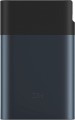 | 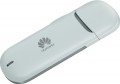 |
|---|---|---|
| ZMI MF885 | Huawei E3131 | |
from $78.91 | from $25.56 up to $27.80 | |
| TOP sellers | ||
Can be used as a Power Bank (via USB). | ||
| Device type | portable router | USB modem |
| Wi-Fi | ||
| Connected devices, up to | 8 | |
Connection | ||
| Communication generation | 2G 3G 4G (LTE) | 2G 3G |
| 4G (LTE) | Cat.4 (150/50 Mbps) | |
| Transmission technology | GPRS EDGE W-CDMA HSUPA HSDPA HSPA+ WiMAX LTE | GPRS EDGE W-CDMA HSUPA HSDPA HSPA+ |
| Ports | microUSB USB-A | USB |
Features | ||
| External antenna connector |  |  |
| Memory card slot | | |
| SIM card slot | | |
General | ||
| Built-in battery | | |
| Battery capacity | 10000 mAh | |
| Power bank feature | | |
| Dimensions | 111x70x22 mm | 84x27x12 mm |
| Weight | 257 g | 30 g |
| Added to E-Catalog | april 2019 | january 2015 |


Compare ZMI MF885 and Huawei E3131
You may be interested in
ZMI MF885 often compared


Huawei E3131 often compared


Glossary
Device type
— USB modem. Modems in the form factor of a USB stick that is connected to a computer, laptop or other devices via an unoccupied USB port. These can be either the simplest devices for servicing one client device (to which the modem is directly connected), or more advanced models with support for Wi-Fi networks and the ability to wirelessly distribute the Internet to several gadgets. To access the World Wide Web, USB modems provide a slot for a SIM card.
— Portable router. Mobile routers for Internet access, necessarily with a built-in Wi-Fi module. Wi-Fi modems are capable of simultaneously working with several connected devices; in addition, they are battery-powered and can be used completely autonomously - without the need to connect to a computer and an outlet. It is advisable to use portable routers in cases where a fixed connection to the Internet is difficult or completely absent (at the dacha, outdoor recreation, as backup equipment for accessing the global network).
— Portable router. Mobile routers for Internet access, necessarily with a built-in Wi-Fi module. Wi-Fi modems are capable of simultaneously working with several connected devices; in addition, they are battery-powered and can be used completely autonomously - without the need to connect to a computer and an outlet. It is advisable to use portable routers in cases where a fixed connection to the Internet is difficult or completely absent (at the dacha, outdoor recreation, as backup equipment for accessing the global network).
Wi-Fi
Wi-Fi connection speeds, more precisely—the Wi-Fi standards supported by a modem with the corresponding capabilities (see “Type” and “Connection”).
— Wi-Fi 3 (802.11g). A further development of the Wi-Fi 1 (802.11b) standard, designed primarily to increase connection throughput (2.4 GHz) and introduced in 2003. 802.11g equipment is fully backward compatible with 802.11b, so even the simplest modern Wi-Fi devices support both standards.
— Wi-Fi 4 (802.11n). A Wi-Fi standard that further develops the formats described above—in particular, by adding support for MIMO technology (distributing input and output among multiple antennas). Introduced in 2009. The primary operating frequency is 2.4 GHz, although devices with an additional 5 GHz band are also available.
— Wi-Fi 5 (802.11aс). Based on 802.11n and introduced at the end of 2013. The main improvements involved increasing the number of streams on the second frequency (5 GHz) and implementing more advanced MIMO and modulation standards, which accordingly increased throughput.
— Wi-Fi 6 (802.11ax). Wi-Fi 6 distributes internet using the modern 802.11ax standard in the 2.4 and 5 GHz bands, handling large numbers of connected devices more effectively. Such a modem is especially convenient where smartphones, laptops, a TV, and smart devices use the network simultaneously, because Wi-Fi 6 distributes traffic more efficiently a...nd reduces latency on a busy network. Compared with Wi-Fi 5, the difference is usually felt not so much in “peak” speed as in more stable operation during streaming, video calls, and online gaming.
— Wi-Fi 6E (802.11ax). Essentially the same Wi-Fi 6, but with the addition of the 6 GHz band, making the connection more stable, especially in congested areas. In practice, this is particularly useful in an apartment building with many neighboring networks. But the main point is that the advantage of Wi-Fi 6E is only realized on devices that also support 6 GHz. It is precisely this frequency that makes it possible to allocate a separate channel with the fewest interferences from third-party devices.
— Wi-Fi 7 (802.11be). A step beyond Wi-Fi 6E: it provides even higher speeds, lower latency, and more stable network performance under load. Its key advantages over the previous version are associated with channels up to 320 MHz and Multi-Link Operation, allowing a device to use multiple bands simultaneously rather than just one. In practice, this is especially useful if the modem is to replace the main home router and distribute fast 5G to a laptop, gaming PC, TV with 4K/8K content, NAS, and other demanding equipment at the same time. In other words, Wi-Fi 7 is intended for cases where you need not just fast Wi-Fi, but significant headroom in speed and responsiveness for the future.
— Wi-Fi 3 (802.11g). A further development of the Wi-Fi 1 (802.11b) standard, designed primarily to increase connection throughput (2.4 GHz) and introduced in 2003. 802.11g equipment is fully backward compatible with 802.11b, so even the simplest modern Wi-Fi devices support both standards.
— Wi-Fi 4 (802.11n). A Wi-Fi standard that further develops the formats described above—in particular, by adding support for MIMO technology (distributing input and output among multiple antennas). Introduced in 2009. The primary operating frequency is 2.4 GHz, although devices with an additional 5 GHz band are also available.
— Wi-Fi 5 (802.11aс). Based on 802.11n and introduced at the end of 2013. The main improvements involved increasing the number of streams on the second frequency (5 GHz) and implementing more advanced MIMO and modulation standards, which accordingly increased throughput.
— Wi-Fi 6 (802.11ax). Wi-Fi 6 distributes internet using the modern 802.11ax standard in the 2.4 and 5 GHz bands, handling large numbers of connected devices more effectively. Such a modem is especially convenient where smartphones, laptops, a TV, and smart devices use the network simultaneously, because Wi-Fi 6 distributes traffic more efficiently a...nd reduces latency on a busy network. Compared with Wi-Fi 5, the difference is usually felt not so much in “peak” speed as in more stable operation during streaming, video calls, and online gaming.
— Wi-Fi 6E (802.11ax). Essentially the same Wi-Fi 6, but with the addition of the 6 GHz band, making the connection more stable, especially in congested areas. In practice, this is particularly useful in an apartment building with many neighboring networks. But the main point is that the advantage of Wi-Fi 6E is only realized on devices that also support 6 GHz. It is precisely this frequency that makes it possible to allocate a separate channel with the fewest interferences from third-party devices.
— Wi-Fi 7 (802.11be). A step beyond Wi-Fi 6E: it provides even higher speeds, lower latency, and more stable network performance under load. Its key advantages over the previous version are associated with channels up to 320 MHz and Multi-Link Operation, allowing a device to use multiple bands simultaneously rather than just one. In practice, this is especially useful if the modem is to replace the main home router and distribute fast 5G to a laptop, gaming PC, TV with 4K/8K content, NAS, and other demanding equipment at the same time. In other words, Wi-Fi 7 is intended for cases where you need not just fast Wi-Fi, but significant headroom in speed and responsiveness for the future.
Connected devices, up to
The largest number of devices that can be simultaneously connected to the modem via Wi-Fi (see "Connection").
The presence of this limitation is due to the fact that processing network requests from several devices at once requires a fairly large amount of computing resources, and there are not so many of them in miniature electronics like wireless modems. However, even inexpensive models can support about 5 – 6 devices, which is more than enough for most cases; and in more advanced modems, this number can reach 10.
The presence of this limitation is due to the fact that processing network requests from several devices at once requires a fairly large amount of computing resources, and there are not so many of them in miniature electronics like wireless modems. However, even inexpensive models can support about 5 – 6 devices, which is more than enough for most cases; and in more advanced modems, this number can reach 10.
Communication generation
The generation(s) of mobile networks supported by the modem.
Note that this spec is rather conditional and generalized, since one generation usually includes several data transmission technologies (see below), and the set of these technologies may vary in different mobile networks and in different modems. Therefore, it is possible to evaluate the compatibility of a device with a specific cellular network using this parameter only approximately. Nevertheless, generation data may well come in handy at the preliminary selection stage: they allow you to at least select the generation you are interested in and then search further among models that are compatible with it.
As for specific generations, today they are as follows:
— 2g. Communication standards of the second generation implemented through mobile networks of the GSM standard. Support GPRS and EDGE transmission technologies. Due to low bandwidth, today they are considered obsolete and are gradually being replaced by the next generations of communication. However, this process is uneven, and in some countries 2G is still the main mobile standard (although everything is moving towards changing this situation). Also note that even the introduction of newer standards does not mean the replacement of GSM — many operators keep this technology as a spare and intended for the simplest mobile phone models. Actually, the second generation in its pure form is pract...ically never found in cellular modems — it complements more advanced standards.
— 3G. Communication technologies of the third generation. Includes W-CDMA, HSUPA, HSDPA, and HSPA+ technologies, and in CDMA networks, EV-DO Rev.A and Rev.B. Significantly outperforms second-generation standards in terms of both pure throughput and additional features. And the data transfer speed itself can be comparable to that of a fixed wired Internet connection, which allows you not only to comfortably browse the web, but also use video calls, listen to streaming audio, etc. However, in fact, the quality of communication depends both on the specific technologies used, on the signal level, and the workload of base stations, etc.
— 4G. The fourth generation of communication, the most advanced to date. It includes WiMAX and LTE technologies, which significantly exceed not only 3G standards in terms of data transfer speed, but also the usual fixed wired Internet connection via Ethernet. However such a connection is not cheap.
Note that this spec is rather conditional and generalized, since one generation usually includes several data transmission technologies (see below), and the set of these technologies may vary in different mobile networks and in different modems. Therefore, it is possible to evaluate the compatibility of a device with a specific cellular network using this parameter only approximately. Nevertheless, generation data may well come in handy at the preliminary selection stage: they allow you to at least select the generation you are interested in and then search further among models that are compatible with it.
As for specific generations, today they are as follows:
— 2g. Communication standards of the second generation implemented through mobile networks of the GSM standard. Support GPRS and EDGE transmission technologies. Due to low bandwidth, today they are considered obsolete and are gradually being replaced by the next generations of communication. However, this process is uneven, and in some countries 2G is still the main mobile standard (although everything is moving towards changing this situation). Also note that even the introduction of newer standards does not mean the replacement of GSM — many operators keep this technology as a spare and intended for the simplest mobile phone models. Actually, the second generation in its pure form is pract...ically never found in cellular modems — it complements more advanced standards.
— 3G. Communication technologies of the third generation. Includes W-CDMA, HSUPA, HSDPA, and HSPA+ technologies, and in CDMA networks, EV-DO Rev.A and Rev.B. Significantly outperforms second-generation standards in terms of both pure throughput and additional features. And the data transfer speed itself can be comparable to that of a fixed wired Internet connection, which allows you not only to comfortably browse the web, but also use video calls, listen to streaming audio, etc. However, in fact, the quality of communication depends both on the specific technologies used, on the signal level, and the workload of base stations, etc.
— 4G. The fourth generation of communication, the most advanced to date. It includes WiMAX and LTE technologies, which significantly exceed not only 3G standards in terms of data transfer speed, but also the usual fixed wired Internet connection via Ethernet. However such a connection is not cheap.
4G (LTE)
The 4G (LTE) mobile connection speed supported by the modem.
All modern LTE equipment is assigned one or another category (Cat.3, Cat.4, Cat.6, Cat.7, Cat.9, Cat.12, Cat.13, Cat.16, Cat.18, Cat.19, Cat.20, Cat.22), on which the transmission speed directly depends. This paragraph specifies both this category and specific speed indicators, moreover, in two parameters — for reception and for transmission. The transmission speed is always much lower, but given the specifics of mobile Internet access, this is usually not critical.
Note that equipment with different speed categories will be quite compatible with each other, however, the throughput will be limited by the capabilities of the slower device. It is also worth saying that this paragraph indicates the theoretical maximum; practical amounts can be noticeably lower (depending on the quality of the network coverage and the features of specific electronics). However, a modem with a higher speed category will perform faster in fact.
All modern LTE equipment is assigned one or another category (Cat.3, Cat.4, Cat.6, Cat.7, Cat.9, Cat.12, Cat.13, Cat.16, Cat.18, Cat.19, Cat.20, Cat.22), on which the transmission speed directly depends. This paragraph specifies both this category and specific speed indicators, moreover, in two parameters — for reception and for transmission. The transmission speed is always much lower, but given the specifics of mobile Internet access, this is usually not critical.
Note that equipment with different speed categories will be quite compatible with each other, however, the throughput will be limited by the capabilities of the slower device. It is also worth saying that this paragraph indicates the theoretical maximum; practical amounts can be noticeably lower (depending on the quality of the network coverage and the features of specific electronics). However, a modem with a higher speed category will perform faster in fact.
Transmission technology
Data transfer technologies supported by the modem.
— GPRS. The oldest communication technology in use today. It was developed as a standard for GSM cellular networks, allowing data to be transmitted in parallel with voice communications and text messages, as well as charging network access by the amount of data transmitted, and not by connection time (as in the previous CSD standard). At the time of its creation, it was very progressive, but now it is considered completely obsolete and is used only in cases where more advanced standards cannot be used.
— EDGE. A technology created as a modification of the GPRS described above, which would increase the channel throughput and improve communication reliability. Otherwise, this standard is completely similar to GPRS in terms of its main practical features.
— W-CDMA. One of the early third generation ( 3G) communication standards. Used in UMTS networks. One of the main advantages of such networks is the ability to build networks based on the existing GSM infrastructure. Therefore, UMTS, and specifically W-CDMA, is being used by many mobile operators in the early stages of their transition from 2G to 3G.
— HSUPA. Third generation (3G) communication technology, an evolution of W-CDMA described above. The name stands for "Hi...gh-Speed Uplink Packet Access" — high-speed packet data transmission in the "from the subscriber" direction. This, in fact, describes the purpose of this technology: it increases the speed of data transfer from the modem to the base station, which can be useful for some specific tasks — for example, video communications.
— HSDPA. Further, after HSUPA, improvement of the W-CDMA standard (see above). It belongs to third generation (3G) networks, but is considered an “extended” standard, which is why HSUPA-enabled networks can be referred to as 3.5G, 3G+, etc. The name itself — "High-Speed Downlink Packet Access" — translates as "high-speed packet data transmission from the base station to the device."
— HSPA+. Today's most advanced third-generation communication standard based on UMTS networks (W-CDMA). Thanks to a number of improvements, it allows to achieve higher speeds than the options described above, approaching fourth-generation networks in terms of capabilities; therefore, sometimes conventionally referred to as 3.75G.
— WiMAX. Initially, WiMAX was created in two versions — "mobile" and "stationary"; the vast majority of modern cellular modems use the second option. It belongs to the fourth generation standards — 4G (whereas "mobile" was a competitor to 3G technologies, although sometimes it is also referred to as a 4th generation connection for marketing purposes). Some time ago, WiMAX was actively promoted as an alternative to wired broadband Internet connection (in particular, as the best option for areas, where it is difficult to reach the cable). However, now this standard is gradually losing popularity — in particular, in connection with the development and promotion of a more advanced LTE (which also does not have a division into "mobile" and "stationary" varieties).
— LTE (up to 173 Mbps). The fourth generation cellular communication standard, the most popular 4G technology today — in particular, due to the fact that it is a further development of W-CDMA/UMTS and can be implemented by improving existing networks (both UMTS and CDMA2000). Another reason for the popularity is the same convenience for both stationary and mobile equipment. On the other hand, when choosing a modem of this standard, you should keep in mind that LTE bands and channels may differ in different countries, so the support of this technology does not guarantee compatibility with a particular network. It should also be taken into account that in some countries LTE networks are only at the deployment stage, and in some they are not available at all.
When evaluating the capabilities of a modem, note that the speed values given for each technology are the maximum, which in fact is achievable only under perfect conditions. The actual values of the speed, usually, are lower than the potential ones; they may depend both on the specs of the network, signal strength and other technical issues, and on the policy of the operator and the conditions of a particular tariff.
— GPRS. The oldest communication technology in use today. It was developed as a standard for GSM cellular networks, allowing data to be transmitted in parallel with voice communications and text messages, as well as charging network access by the amount of data transmitted, and not by connection time (as in the previous CSD standard). At the time of its creation, it was very progressive, but now it is considered completely obsolete and is used only in cases where more advanced standards cannot be used.
— EDGE. A technology created as a modification of the GPRS described above, which would increase the channel throughput and improve communication reliability. Otherwise, this standard is completely similar to GPRS in terms of its main practical features.
— W-CDMA. One of the early third generation ( 3G) communication standards. Used in UMTS networks. One of the main advantages of such networks is the ability to build networks based on the existing GSM infrastructure. Therefore, UMTS, and specifically W-CDMA, is being used by many mobile operators in the early stages of their transition from 2G to 3G.
— HSUPA. Third generation (3G) communication technology, an evolution of W-CDMA described above. The name stands for "Hi...gh-Speed Uplink Packet Access" — high-speed packet data transmission in the "from the subscriber" direction. This, in fact, describes the purpose of this technology: it increases the speed of data transfer from the modem to the base station, which can be useful for some specific tasks — for example, video communications.
— HSDPA. Further, after HSUPA, improvement of the W-CDMA standard (see above). It belongs to third generation (3G) networks, but is considered an “extended” standard, which is why HSUPA-enabled networks can be referred to as 3.5G, 3G+, etc. The name itself — "High-Speed Downlink Packet Access" — translates as "high-speed packet data transmission from the base station to the device."
— HSPA+. Today's most advanced third-generation communication standard based on UMTS networks (W-CDMA). Thanks to a number of improvements, it allows to achieve higher speeds than the options described above, approaching fourth-generation networks in terms of capabilities; therefore, sometimes conventionally referred to as 3.75G.
— WiMAX. Initially, WiMAX was created in two versions — "mobile" and "stationary"; the vast majority of modern cellular modems use the second option. It belongs to the fourth generation standards — 4G (whereas "mobile" was a competitor to 3G technologies, although sometimes it is also referred to as a 4th generation connection for marketing purposes). Some time ago, WiMAX was actively promoted as an alternative to wired broadband Internet connection (in particular, as the best option for areas, where it is difficult to reach the cable). However, now this standard is gradually losing popularity — in particular, in connection with the development and promotion of a more advanced LTE (which also does not have a division into "mobile" and "stationary" varieties).
— LTE (up to 173 Mbps). The fourth generation cellular communication standard, the most popular 4G technology today — in particular, due to the fact that it is a further development of W-CDMA/UMTS and can be implemented by improving existing networks (both UMTS and CDMA2000). Another reason for the popularity is the same convenience for both stationary and mobile equipment. On the other hand, when choosing a modem of this standard, you should keep in mind that LTE bands and channels may differ in different countries, so the support of this technology does not guarantee compatibility with a particular network. It should also be taken into account that in some countries LTE networks are only at the deployment stage, and in some they are not available at all.
When evaluating the capabilities of a modem, note that the speed values given for each technology are the maximum, which in fact is achievable only under perfect conditions. The actual values of the speed, usually, are lower than the potential ones; they may depend both on the specs of the network, signal strength and other technical issues, and on the policy of the operator and the conditions of a particular tariff.
Ports
— USB plug. The presence in the design of the modem of its own USB plug, which allows you to connect the device to a computer directly. Such a connection provides a device with a USB port with Internet access, and the power necessary for the operation of the modem is also supplied via USB.
— microUSB. A smaller version of the USB connector (see above), used primarily in Wi-Fi modems (see "Type") that can work autonomously and do not require a constant connection to another device. At the same time, in 3G/4G modems, microUSB usually looks like a socket, not a plug, and a special cable is used to connect. This interface usually plays the role of a general-purpose service connector: the battery is charged through it, and it is also connected to a PC or other device to manage settings, update firmware, etc.
— USB. Wired interface, the most common and universal modern standard used to connect peripheral equipment to various electronic devices, ranging from computers to smartphones and even wireless modems. In this case, the full-size version of the USB connector is meant. It is usually installed in classic modems (see "Type") and has the form of a plug, with which the modem is connected to a control device (PC, laptop, tablet, etc.). Power is usually supplied through the same connector.
— USB-C.... Connector, in its functional features similar to the paragraph above. With the exception of the symmetrical form factor and the use of more modern technologies.
— LAN (RJ45). Classic wired connection via a cable with an RJ-45 connector. Also known as "LAN". Nowadays, it is one of the most common methods of wired Internet connection, and is also widely used in local networks. With it, you can connect a laptop or PC directly to the modem via a cable and not bother with a Wi-Fi connection. In addition, such a connection can be faster (depending on the speed of the LAN).
— ExpressCard. A connection interface mainly used in laptops. Peripheral devices of this standard, including wireless modems, have the form of cards, when connected, they are installed in a special slot in the device. It should be taken into account that there are two ExpressCard form factors — 54 mm and 34 mm, and 34 mm cards can be used without restrictions with 54 mm slots, but not vice versa. Therefore, when choosing such a modem, it is worth clarifying the correspondence of its form factor to the planned slot. However, this standard is gradually disappearing from the scene, being replaced by more advanced interfaces — in particular, USB 3.0.
— microUSB. A smaller version of the USB connector (see above), used primarily in Wi-Fi modems (see "Type") that can work autonomously and do not require a constant connection to another device. At the same time, in 3G/4G modems, microUSB usually looks like a socket, not a plug, and a special cable is used to connect. This interface usually plays the role of a general-purpose service connector: the battery is charged through it, and it is also connected to a PC or other device to manage settings, update firmware, etc.
— USB. Wired interface, the most common and universal modern standard used to connect peripheral equipment to various electronic devices, ranging from computers to smartphones and even wireless modems. In this case, the full-size version of the USB connector is meant. It is usually installed in classic modems (see "Type") and has the form of a plug, with which the modem is connected to a control device (PC, laptop, tablet, etc.). Power is usually supplied through the same connector.
— USB-C.... Connector, in its functional features similar to the paragraph above. With the exception of the symmetrical form factor and the use of more modern technologies.
— LAN (RJ45). Classic wired connection via a cable with an RJ-45 connector. Also known as "LAN". Nowadays, it is one of the most common methods of wired Internet connection, and is also widely used in local networks. With it, you can connect a laptop or PC directly to the modem via a cable and not bother with a Wi-Fi connection. In addition, such a connection can be faster (depending on the speed of the LAN).
— ExpressCard. A connection interface mainly used in laptops. Peripheral devices of this standard, including wireless modems, have the form of cards, when connected, they are installed in a special slot in the device. It should be taken into account that there are two ExpressCard form factors — 54 mm and 34 mm, and 34 mm cards can be used without restrictions with 54 mm slots, but not vice versa. Therefore, when choosing such a modem, it is worth clarifying the correspondence of its form factor to the planned slot. However, this standard is gradually disappearing from the scene, being replaced by more advanced interfaces — in particular, USB 3.0.
External antenna connector
The presence of a connector for an external removable antenna in the modem design. The meaning of all external antennas is described above; here we note that the connector makes it possible to use rather large antennas with the modem, which significantly exceed the capabilities of stock antennas (both internal and external non-removable ones). In addition, the user can choose the antenna at his discretion.
Memory card slot
The presence of a slot for memory card in the design of the modem. Memory cards are very popular in modern electronics as removable storage media; in wireless modems, there are two main options for working with them. The first one provides use as an external card reader, for exchanging information between the card and the device to which the modem is connected via USB (see below); Simply put, installing a card turns the modem into a "flash drive" with removable storage. And in models with Wi-Fi (see "Type"), it may also be possible to work as a server that provides access to the contents of the memory card to all wireless devices connected to the modem. As for the types of cards, the most common support for the microSD standard is that they are small enough to be easily combined with compact wireless modem cases. Note that even within the same standard of memory cards there are several varieties, and before buying it's worth to clarify which of them the device is compatible with.