
Comparison Razer DeathAdder Essential vs Razer DeathAdder Chroma
Add to comparison | 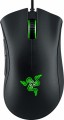 | 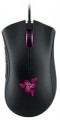 |
|---|---|---|
| Razer DeathAdder Essential | Razer DeathAdder Chroma | |
| Compare prices 128 | Compare prices 1 | |
| User reviews | ||
| TOP sellers | ||
4G sensor. Company switches. Additional keys. Razer Synapse app. | ||
| Product type | mouse | mouse |
| Connection | wired | wired |
| Sensor | optical | optical |
| Type | for game | for game |
Sensor and control | ||
| Sensor resolution | 6400 DPI | 10000 DPI |
| Max. acceleration | 30 G | |
| Max. speed | 220 ips | |
| Max. polling rate | 1000 Hz (1 ms) | 1000 Hz (1 ms) |
| Number of buttons | 4 | 4 |
| Side buttons |  | |
| Switch type | mechanical | |
| Switches | Razer (Omron D2FC-F-7N) | |
| Scroll wheels | 1 | 1 |
Additional features | ||
| Optimal grip | palmar | palmar |
| Programmable buttons | | |
| Lighting | green | + |
| Lighting effects | + | |
| Feet material | teflon (PTFE) | |
Connection and power supply | ||
| Cable | USB-A braided | USB-A |
| Cable length | 1.8 m | |
General | ||
| Size (LxWxH) | 127x73x43 mm | |
| Weight | 96 g | 105 g |
| Color | ||
| Added to E-Catalog | august 2019 | september 2015 |




Compare Razer DeathAdder Essential and DeathAdder Chroma
When comparing the mice Razer DeathAdder Essential and Razer DeathAdder Chroma, several key differences can be highlighted. The DeathAdder Chroma offers a higher sensor resolution up to 10,000 DPI, while the Essential has a maximum resolution of 6,400 DPI. This can give the Chroma an advantage in precision and speed during gameplay. Additionally, the Chroma features body lighting that allows you to customize the color scheme, while the Essential offers only green lighting. User reviews note that both models are comfortable to use, but the Chroma receives more positive feedback for its functionality and design.
Price comparison
You may be interested in
My comparisons
Razer DeathAdder Essential often compared


Razer DeathAdder Chroma often compared
Glossary
Sensor resolution
Resolution of the sensor responsible for tracking mouse movements on the work surface. Specified in DPI — dots per inch.
The physical meaning of DPI as a whole is as follows. The sensor of a modern mouse works on the same principle as the camera matrix, and consists of pixels. And DPI is the number of pixels that fall on 1 inch of the underlying surface (length or width), "visible" by the sensor.
It is believed that more DPI means a more advanced sensor and mouse in general; nowadays, models for 3500 – 5000 DPI, 12000 DPI, 16000 DPI even more are not uncommon. In a way, it is — high resolution contributes to accuracy. However, the only thing that is directly determined by this indicator is the speed at which the cursor moves across the screen: the higher the resolution of the sensor, the greater the number of pixels that the cursor will move when the mouse itself moves a certain distance. At the same time, it is worth recalling that too high a speed is even more undesirable than too low. So the real need for high DPI ( 1000 and above) arises mainly when working on large screens (4K resolution and more); for more modest displays (HD and Full HD), smaller values are often enough.
The physical meaning of DPI as a whole is as follows. The sensor of a modern mouse works on the same principle as the camera matrix, and consists of pixels. And DPI is the number of pixels that fall on 1 inch of the underlying surface (length or width), "visible" by the sensor.
It is believed that more DPI means a more advanced sensor and mouse in general; nowadays, models for 3500 – 5000 DPI, 12000 DPI, 16000 DPI even more are not uncommon. In a way, it is — high resolution contributes to accuracy. However, the only thing that is directly determined by this indicator is the speed at which the cursor moves across the screen: the higher the resolution of the sensor, the greater the number of pixels that the cursor will move when the mouse itself moves a certain distance. At the same time, it is worth recalling that too high a speed is even more undesirable than too low. So the real need for high DPI ( 1000 and above) arises mainly when working on large screens (4K resolution and more); for more modest displays (HD and Full HD), smaller values are often enough.
Max. acceleration
The greatest acceleration during movement, at which the mouse maintains normal performance; if this indicator is exceeded, the cursor may “break down” (moving to an unexpected place due to incorrect processing of data from the sensor).
The faster the mouse moves, the greater the acceleration acting on it. Accordingly, this parameter determines the sensitivity to sudden movements, the extent to which this model is able to normally perceive and process such movements. High values of maximum acceleration ( 40 G, 50 G) are important first of all in dynamic games, especially for professional e-sportsmen and advanced enthusiasts. If the mouse is bought for relatively simple tasks (working with documents, surfing the web, etc.), you can ignore this indicator.
The faster the mouse moves, the greater the acceleration acting on it. Accordingly, this parameter determines the sensitivity to sudden movements, the extent to which this model is able to normally perceive and process such movements. High values of maximum acceleration ( 40 G, 50 G) are important first of all in dynamic games, especially for professional e-sportsmen and advanced enthusiasts. If the mouse is bought for relatively simple tasks (working with documents, surfing the web, etc.), you can ignore this indicator.
Max. speed
The ips (inches per second) parameter is the linear speed of mouse movement, expressed in inches per second, at which the manipulator's sensor is able to read the surface. In top models, the maximum mouse movement speed often reaches 400-600 ips, but devices with ips in the region of 200 are more common.
Switch type
The type of switches in a mouse indicates the mechanism used under the main buttons to register a click. It affects the feel when pressing, actuation speed, lifespan, and resistance to accidental double clicks.
— Optical. Button mechanisms where the press is registered not by closing metal contacts but by interrupting a light beam. This makes them faster, less prone to wear, and almost unaffected by accidental double-click issues.
These switches are especially valued in gaming mice, where response speed and stability after a large number of clicks are crucial. For example, in shooters or MOBA games, they help achieve clear feedback without delay and contact bouncing.
— Mechanical. Classic button mechanisms where a click is registered due to the closing of metal contacts. They provide a familiar tactile feel, a well-audible click, and are widely used in both office and gaming models.
Compared to optical switches, mechanical ones are usually simpler and cheaper, but over time the contacts may wear out. For example, with active gaming or daily work, after a few years, a double click might occur instead of a single press.
— Optical. Button mechanisms where the press is registered not by closing metal contacts but by interrupting a light beam. This makes them faster, less prone to wear, and almost unaffected by accidental double-click issues.
These switches are especially valued in gaming mice, where response speed and stability after a large number of clicks are crucial. For example, in shooters or MOBA games, they help achieve clear feedback without delay and contact bouncing.
— Mechanical. Classic button mechanisms where a click is registered due to the closing of metal contacts. They provide a familiar tactile feel, a well-audible click, and are widely used in both office and gaming models.
Compared to optical switches, mechanical ones are usually simpler and cheaper, but over time the contacts may wear out. For example, with active gaming or daily work, after a few years, a double click might occur instead of a single press.
Switches
The switches in a mouse indicate which specific switches are installed under the main buttons, such as Omron, Huano, Kailh, TTC, or proprietary solutions from the manufacturer. These determine the click characteristics, actuation force, click volume, lifespan, and the likelihood of double-clicking over time.
Unlike the general switch type, which refers to the working principle—mechanical or optical—the brand and model provide a more precise understanding of the performance level. For example, two mice with mechanical switches might feel different when clicked: some may be softer and quieter, while others could be stiffer, louder, and feel more "gaming-like."
Unlike the general switch type, which refers to the working principle—mechanical or optical—the brand and model provide a more precise understanding of the performance level. For example, two mice with mechanical switches might feel different when clicked: some may be softer and quieter, while others could be stiffer, louder, and feel more "gaming-like."
Lighting
The presence of illumination in the design of the mouse.
This illumination can be provided by the same LED that illuminates the surface below the sensor, or by separate light sources. It can have a different colour, and the most advanced systems — RGB backlighting — allow you to adjust the shade to your liking. Anyway, the backlight gives the mouse an unusual and stylish appearance, besides, it can also have special effects (see below). However, this function has not only an aesthetic, but also quite a practical meaning: for example, a colour change can be used as a DPI level indicator (see above) or as a low battery signal. On the other hand, the backlight affects the cost of the device, and the real need for it is not so often — moreover, in many cases (for example, in the office) an extra “illumination” is completely useless. Therefore, most modern mice still do not have a backlight.
This illumination can be provided by the same LED that illuminates the surface below the sensor, or by separate light sources. It can have a different colour, and the most advanced systems — RGB backlighting — allow you to adjust the shade to your liking. Anyway, the backlight gives the mouse an unusual and stylish appearance, besides, it can also have special effects (see below). However, this function has not only an aesthetic, but also quite a practical meaning: for example, a colour change can be used as a DPI level indicator (see above) or as a low battery signal. On the other hand, the backlight affects the cost of the device, and the real need for it is not so often — moreover, in many cases (for example, in the office) an extra “illumination” is completely useless. Therefore, most modern mice still do not have a backlight.
Lighting effects
The mouse has additional lighting effects. For more information about the backlight itself, see above, and its effects can be different — ranging from a smooth change in brightness and/or colour to colour and light signals, as well as backlight synchronization(for models with synchronization, this paragraph indicates the supported synchronization technology).
The last function is worth dwelling on separately. Synchronization itself allows you to "match" the mouse backlight with the backlight of other system components — the case, graphics card, keyboard, monitor, etc. Thanks to this matching, you can create various unusual effects: synchronous colour and brightness changes, "colour waves", "running lights" etc. However, for such work, all components of the system must support the same synchronization technology — and such a technology, usually, each manufacturer has its own. So before buying it's ok to check compatibility. However, some mice are able to work with several options at once — for example, iCUE from Corsair and MLS (Mystic Light Sync) from MSI.
The last function is worth dwelling on separately. Synchronization itself allows you to "match" the mouse backlight with the backlight of other system components — the case, graphics card, keyboard, monitor, etc. Thanks to this matching, you can create various unusual effects: synchronous colour and brightness changes, "colour waves", "running lights" etc. However, for such work, all components of the system must support the same synchronization technology — and such a technology, usually, each manufacturer has its own. So before buying it's ok to check compatibility. However, some mice are able to work with several options at once — for example, iCUE from Corsair and MLS (Mystic Light Sync) from MSI.
Feet material
- Teflon (PTFE). Polytetrafluoroethylene (PTFE) glides - also known as Teflon - are characterized by an extremely low coefficient of friction. As a result, mice with Teflon feet boast excellent glide and high cursor speed on any type of surface. The minimum level of friction allows you to easily control the movements of the mouse. Manipulators with Teflon gliders perform well in dynamic games and reduce wrist strain during prolonged work at the computer.
— Metal. When properly sanded, the metal feet provide excellent glide for the mouse, and they also have a long service life before abrasion. Note that manipulators with metal gliders are best used on plastic or other hard-wearing playing surfaces. Using a mouse without a mouse pad runs the risk of scratching the surface.
— Metal. When properly sanded, the metal feet provide excellent glide for the mouse, and they also have a long service life before abrasion. Note that manipulators with metal gliders are best used on plastic or other hard-wearing playing surfaces. Using a mouse without a mouse pad runs the risk of scratching the surface.
Cable
Additional features of the cable that the mouse is equipped with.
These features may include a winding system, a detachable wire, and a braided wire(however, most modern mice still have a cable without a braid). Here is a more detailed description of all these features.
— Retractable. Wire equipped with a special coil for winding. This feature greatly simplifies transportation: during off-hours, the wire is as compact as possible and does not get tangled, and when used, it can be unwound to the desired length (usually the coil allows this possibility). All this is especially important for laptop mice (see "In direction") — in fact, most models with a wire reel fall into this category.
— Removable. Wire that can be detached from the mouse. Almost all mice with two connection options have this feature — wired and wireless: when working in a wireless format, the cable can be removed so that it does not interfere. However, there are also purely wired devices with such a cable — mostly laptop devices, where the wire is removed for ease of transportation. Also note that most often a universal connector like microUSB is used to connect the cable, so if necessary, the wire can be replaced with another one — for example, a longer one.
— In a braid. The presence of an additional braid on the mouse cable. This feature makes the wire more d...urable, reliable and resistant to bending. On the other hand, braid tends to accumulate dirt and fray when worn; because of this, the wire sheath loses its presentation faster than in mice without a braid. Yes, and such a wire is more expensive than a regular smooth one.
These features may include a winding system, a detachable wire, and a braided wire(however, most modern mice still have a cable without a braid). Here is a more detailed description of all these features.
— Retractable. Wire equipped with a special coil for winding. This feature greatly simplifies transportation: during off-hours, the wire is as compact as possible and does not get tangled, and when used, it can be unwound to the desired length (usually the coil allows this possibility). All this is especially important for laptop mice (see "In direction") — in fact, most models with a wire reel fall into this category.
— Removable. Wire that can be detached from the mouse. Almost all mice with two connection options have this feature — wired and wireless: when working in a wireless format, the cable can be removed so that it does not interfere. However, there are also purely wired devices with such a cable — mostly laptop devices, where the wire is removed for ease of transportation. Also note that most often a universal connector like microUSB is used to connect the cable, so if necessary, the wire can be replaced with another one — for example, a longer one.
— In a braid. The presence of an additional braid on the mouse cable. This feature makes the wire more d...urable, reliable and resistant to bending. On the other hand, braid tends to accumulate dirt and fray when worn; because of this, the wire sheath loses its presentation faster than in mice without a braid. Yes, and such a wire is more expensive than a regular smooth one.