
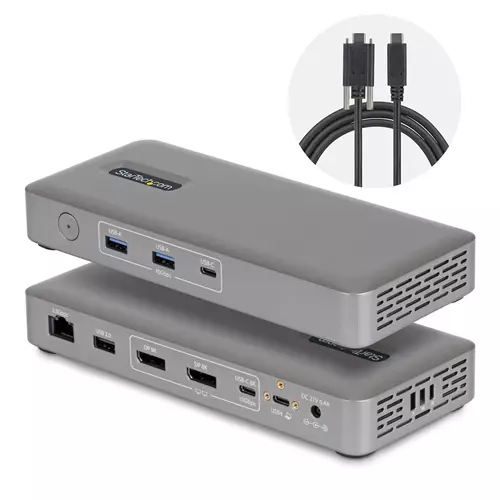
Startech.com USB4 Docking Station Driverless Dual 4K 144Hz for Mac and Windows Universal USB-C Dock with DisplayPort 100W PD
 |
Buy Startech.com USB4 Docking Station Driverless Dual 4K 144Hz for Mac and Windows Universal USB-C Dock with DisplayPort 100W PD
When you make a purchase through links on our site, we may receive a affiliate commission.
StarTech.com USB4 Docking Station Driverless Dual 4K 144Hz for Mac and Windows Universal USB-C Dock with DisplayPort 100W PD | £119.33 |  | |||
StarTech.com USB4 Docking Station, Driverless Dual 4K 144Hz for Mac and Windows, Universal USB-C Dock with DisplayPort, 100W | £120.99 |  | |||
Startech - docking station - USB4 / Thunderbolt 4 / Thunderbolt 5 - 2 x DP - 1GbE, 2.5GbE 208UE-USB4-DOCK | £143.98 |  | |||
StarTech USB4 Docking Station Driverless Dual 4K for macOS and Windows Universal USB-C Dock with 100W Laptop Charging and 2. | £162.04 |  | |||
StarTech.com USB4 Docking Station. Driverless Dual 4K 144Hz for Mac an 208UE-USB4-DOCK | £115.06 |  | |||
Driverless Dual 4K on Mac without the Thunderbolt 4 cost
This universal USB4/Thunderbolt dock lets IT teams deploy high-performance dual-display workstations with secure networking and simple driverless setup.
Standardize Your Docking Strategy
Simplify mixed-device environments with a single USB4 docking station that works seamlessly across Mac and Windows. Native USB4 support on the latest MacBook Pro MacBook Air and business laptops makes it easier than ever to consolidate and eliminate compatibility gaps.
Dual 4K on Mac Without Compromise
Unlock true driverless dual 4K video on macOS without investing in costly Thunderbolt 4 docks. Deliver consistent multi-display performance across teams while maintaining the flexibility IT needs for modern deployments.
Built for Fast Low-Touch Deployments
Reduce setup time and avoid OS-specific workarounds with plug-and-play performance. This dock helps minimize help desk tickets and ensures predictable behavior in hot-desking and shared workspace environments.
Performance That Scales With Your Workspace
Support demanding workflows with dual 4K 144Hz or single 8K 60Hz video 2.5GbE network speeds and 100W laptop charging through one connection. Enable advanced IT features like PXE Boot and Wake-on-LAN for easier remote management.
Designed for Real-World IT Environments
Integrated lock slots and VESA or surface mounting options deter theft and tampering. The included locking USB-C host cable prevents accidental disconnections or lost and missing cables in hot-desk and meeting spaces. Keep critical systems connected organized and protected in high-traffic environments. This hub also features a housing made from 75% post-consumer recycled (PCR) plastic and the product ships in FSC Mix packaging made from responsibly sourced materials to help align your IT infrastructure with your organization's sustainability goals.
Enhance Productivity and Device Management with the StarTech.com Connectivity Tools Application
Developed to improve performance and security StarTech.com Connectivity Tools is the only software suite on the market that works with a wide range of IT connectivity accessories. The software suite includes:
Advanced Window Layout Utility : To set up and save custom window layouts.
MAC Address Pass-Through Utility : To improve network security.
USB Event Monitoring Utility : To track and log connected USB devices.
Wi-Fi Auto Switch Utility : Enabling users to quickly access faster network speeds via wired LAN.
For more information and to download the StarTech.com Connectivity Tools application please visit: www.startech.com/connectivity-tools
This universal USB4/Thunderbolt dock lets IT teams deploy high-performance dual-display workstations with secure networking and simple driverless setup.
Standardize Your Docking Strategy
Simplify mixed-device environments with a single USB4 docking station that works seamlessly across Mac and Windows. Native USB4 support on the latest MacBook Pro MacBook Air and business laptops makes it easier than ever to consolidate and eliminate compatibility gaps.
Dual 4K on Mac Without Compromise
Unlock true driverless dual 4K video on macOS without investing in costly Thunderbolt 4 docks. Deliver consistent multi-display performance across teams while maintaining the flexibility IT needs for modern deployments.
Built for Fast Low-Touch Deployments
Reduce setup time and avoid OS-specific workarounds with plug-and-play performance. This dock helps minimize help desk tickets and ensures predictable behavior in hot-desking and shared workspace environments.
Performance That Scales With Your Workspace
Support demanding workflows with dual 4K 144Hz or single 8K 60Hz video 2.5GbE network speeds and 100W laptop charging through one connection. Enable advanced IT features like PXE Boot and Wake-on-LAN for easier remote management.
Designed for Real-World IT Environments
Integrated lock slots and VESA or surface mounting options deter theft and tampering. The included locking USB-C host cable prevents accidental disconnections or lost and missing cables in hot-desk and meeting spaces. Keep critical systems connected organized and protected in high-traffic environments. This hub also features a housing made from 75% post-consumer recycled (PCR) plastic and the product ships in FSC Mix packaging made from responsibly sourced materials to help align your IT infrastructure with your organization's sustainability goals.
Enhance Productivity and Device Management with the StarTech.com Connectivity Tools Application
Developed to improve performance and security StarTech.com Connectivity Tools is the only software suite on the market that works with a wide range of IT connectivity accessories. The software suite includes:
Advanced Window Layout Utility : To set up and save custom window layouts.
MAC Address Pass-Through Utility : To improve network security.
USB Event Monitoring Utility : To track and log connected USB devices.
Wi-Fi Auto Switch Utility : Enabling users to quickly access faster network speeds via wired LAN.
For more information and to download the StarTech.com Connectivity Tools application please visit: www.startech.com/connectivity-tools
The product description is generated based on data from online stores. Before purchasing be sure to verify all information directly with the seller.
Best MacBook StandsNot only beautiful, but also convenient: choosing the right stand for your MacBook.
Best Advanced PC GamepadsProfessional gamepads with improved ergonomics, programmable buttons, and other useful features for gamers.
How to place an order?How to add store?
Remember that the online store is responsible for the accuracy of information regarding price, warranty, and delivery!
We recommend

display 16.2 ", 3456x2234, CPU, Apple M5 Max, GPU M5 Max 32-Core / M5 Max 40-Core, RAM 36 / 48 GB, storage 2 TB, weight 2.14 kg

display 16.2 ", 3456x2234, CPU, Apple M5 Pro, GPU M5 Pro 20-Core, RAM 24 / 48 GB, storage 1 TB, weight 2.14 kg

display 13.6 ", 2560x1664, CPU, Apple M5, GPU M5 10-core / M5 8-core, RAM 16 / 24 GB, storage 512 GB / 1 TB, weight 1.23 kg

display 15.3 ", 2880x1864, CPU, Apple M5, GPU M5 10-core, RAM 16 / 24 GB, storage 512 GB / 1 TB, weight 1.5 kg

display 16 ", 1920x1200 (16:10), CPU Intel, Core Ultra 5 / Core Ultra 7, GPU Arc 8-Cores - Graphics 4-Cores, RAM 16 / 32 GB, storage 256 GB - 1 TB, weight 1.7 kg
display 17.3 ", 1920x1080 (16:9), CPU Intel, Core i5 / Core i7, GPU Iris Xe Graphics G7 80EUs - UHD Graphics Xe G4 48EUs, RAM 8 / 16 GB, storage 256 GB / 512 GB, weight 2 kg

display 16 ", 1920x1200 (16:10), CPU AMD, Ryzen 5 - Ryzen AI, GPU Radeon 740M - Radeon 860M, RAM 16 / 32 GB, storage 512 GB / 1 TB, weight 1.8 kg
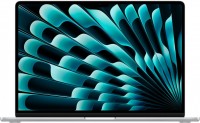
display 15.3 ", 2880x1864, CPU, Apple M3, GPU M3 10-Core, RAM 8 - 24 GB, storage 256 GB / 512 GB, weight 1.51 kg
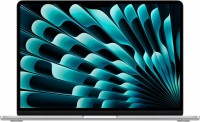
display 13.6 ", 2560x1664, CPU, Apple M3, GPU M3 10-Core / M3 8-Core, RAM 8 / 16 GB, storage 256 GB / 512 GB, weight 1.24 kg
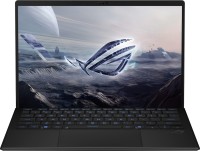
display 13.4 ", 2560x1600 (16:10), CPU AMD, Ryzen AI, GPU 8050S Graphics / 8060S Graphics, RAM 32 / 64 GB, storage 1 TB, weight 1.59 kg

display 13 ", 2408x1506 (16:10), CPU, Apple A18 Pro, GPU A18 Pro 5‑core, RAM 8 GB, storage 256 GB / 512 GB, weight 1.23 kg

display 16 ", 2560x1600 (16:10), CPU AMD, Ryzen AI, GPU RTX 5060, RAM 16 GB, storage 1 TB, weight 2 kg