
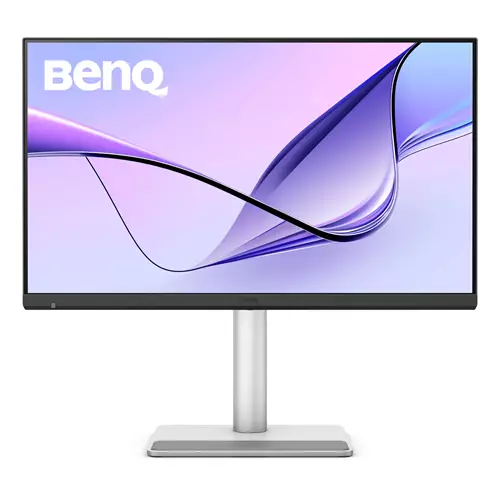
BenQ MA270S computer 68.6 cm 5120 x 2880 pixels 5K Ultra HD LED White 9H.LNYLA.TBE (27")
 | Compare prices 4 → When you make a purchase through links on our site, we may receive a affiliate commission.
|
Buy BenQ MA270S computer 68.6 cm 5120 x 2880 pixels 5K Ultra HD LED White 9H.LNYLA.TBE (27")
When you make a purchase through links on our site, we may receive a affiliate commission.
| £899.99 |  | ||||
BenQ MA270S 27 IPS 5K USB-C KVM Thunderbolt 4 Height-Adjustable Monitor for MacBook Silver 9H.LNYLA.TBE | £969.97 |  | |||
BenQ MA270S computer monitor 68.6 cm (27") 5120 x 2880 pixels 5K Ultra HD LED White 9H.LNYLA.TBE | £972.26 |  | |||
BenQ MA270S computer monitor 68.6 cm (27") 5120 x 2880 pixels 5K | £1,048.87 |  | |||
Show Mac Colors in Every Pixel
Engineered for Mac this 5K monitor delivers 14.7 million pixels of precision advanced color accuracy Thunderbolt connectivity and blazing brightness for professional-grade results.
Colors Not Matching?Plug in and Get the Right Colors
Most external monitors display colors differently from MacBook computers. As the best color-matching monitors for all MacBook generations BenQ MA series delivers a wide P3 color gamut and BenQs Mac color-tuning technology- making the MA Series the best monitors for MacBook users.
Sync with MacBook Control
Now you can synchronize controls between your MacBook computer and monitor with simple keystrokes just like you would on your MacBook Pro and MacBook Air. Simply press the brightness or volume key and both displays will adjust simultaneously.
Get it Done with Display Pilot 2
Experience Mac-like simplified settings with BenQ Display Pilot 2 software.
Nano Gloss Panel
Mac Colors in Full Clarity
Love the way your Mac looks? Youll see it here all in stunning detail. The Nano Gloss surface brings crystal-clear depth true blacks and brilliant highlights revealing every nuance with natural contrast. Even from the side colors stay accurate and lifelike so every angle feels unmistakably Mac.
A Powerful Hub Connects All
One cable brings everything together display power and connection. You can keep your MacBook Mac Mini Mac Studio iPad iPhone and more charged and ready.
*USB-IF certified USB-C ports ensure safe charging and reliable connectivity without risking damage to your Apple devices.
Daisy Chain
Expand Your Vision
See more of your timeline your creative space your world. Up to dual 5K display support lets you see every detail with room to think and create.
*Since Apple Silicon M1 and M2 chips do not support multiple monitors natively Daisy Chain cannot be applied on M1 and M2-based devices. Daisy Chain can be applied on Apple Silicon Pro Max and Ultra-based devices.
Built-in Smart KVM
Two Systems. One Control.
Switch between starting ideas and final touches without breaking your flow. With the built-in KVM switch your MacBook and Mac Studio feel like one system. One keyboard. One mouse. One seamless workflow.
We Adjust Easily. You View Comfortably.
No more bad posture. BenQs best monitors for MacBook Pro and MacBook Air go beyond screen limitations offering greater freedom with multiple angles and height adjustments for an improved viewing experience.
Engineered for Mac this 5K monitor delivers 14.7 million pixels of precision advanced color accuracy Thunderbolt connectivity and blazing brightness for professional-grade results.
Colors Not Matching?Plug in and Get the Right Colors
Most external monitors display colors differently from MacBook computers. As the best color-matching monitors for all MacBook generations BenQ MA series delivers a wide P3 color gamut and BenQs Mac color-tuning technology- making the MA Series the best monitors for MacBook users.
Sync with MacBook Control
Now you can synchronize controls between your MacBook computer and monitor with simple keystrokes just like you would on your MacBook Pro and MacBook Air. Simply press the brightness or volume key and both displays will adjust simultaneously.
Get it Done with Display Pilot 2
Experience Mac-like simplified settings with BenQ Display Pilot 2 software.
Nano Gloss Panel
Mac Colors in Full Clarity
Love the way your Mac looks? Youll see it here all in stunning detail. The Nano Gloss surface brings crystal-clear depth true blacks and brilliant highlights revealing every nuance with natural contrast. Even from the side colors stay accurate and lifelike so every angle feels unmistakably Mac.
A Powerful Hub Connects All
One cable brings everything together display power and connection. You can keep your MacBook Mac Mini Mac Studio iPad iPhone and more charged and ready.
*USB-IF certified USB-C ports ensure safe charging and reliable connectivity without risking damage to your Apple devices.
Daisy Chain
Expand Your Vision
See more of your timeline your creative space your world. Up to dual 5K display support lets you see every detail with room to think and create.
*Since Apple Silicon M1 and M2 chips do not support multiple monitors natively Daisy Chain cannot be applied on M1 and M2-based devices. Daisy Chain can be applied on Apple Silicon Pro Max and Ultra-based devices.
Built-in Smart KVM
Two Systems. One Control.
Switch between starting ideas and final touches without breaking your flow. With the built-in KVM switch your MacBook and Mac Studio feel like one system. One keyboard. One mouse. One seamless workflow.
We Adjust Easily. You View Comfortably.
No more bad posture. BenQs best monitors for MacBook Pro and MacBook Air go beyond screen limitations offering greater freedom with multiple angles and height adjustments for an improved viewing experience.
The product description is generated based on data from online stores. Before purchasing be sure to verify all information directly with the seller.
Best 34-inch Curved Gaming MonitorsA large ultra-wide screen provides full immersion in virtual gaming worlds.

Best Portable MonitorsPortable monitors in the format of a "laptop cover".
How to place an order?How to add store?
Remember that the online store is responsible for the accuracy of information regarding price, warranty, and delivery!
SimilarCompare using chart →
gaming, smart, 32 ", 4K, 3840x2160 (16:9), QD-OLED, response 0.03 ms, 240 Hz, 10-bit (1.07B Colors), DCI-P3 99 %, HDMI, v 2.1, DisplayPort, Bluetooth, Wi-Fi, HUB: USB-A 2x5Gbps, speakers, AMD FreeSync Premium Pro, VESA Adaptive-Sync, HDR

gaming, 31.5 ", 4K, 3840x2160 (16:9), WOLED, response 0.03 ms, 165 Hz, 330 Hz (Full HD), 10-bit (1.07B Colors), DCI-P3 99 %, HDMI, v 2.1, DisplayPort, USB-C (DP Alt Mode), Power Delivery, HUB: USB-A 3x5Gbps, KVM switch, AMD FreeSync Premium Pro, NVIDIA G-Sync Compatible, HDR, TÜV Rheinland
gaming, 24.5 ", 1920x1080 (16:9), IPS, response 0.5 ms, 320 Hz, 16.7M Colors, sRGB 99 %, HDMI, v 2.1, DisplayPort, HUB: USB-A 2x5Gbps, AMD FreeSync Premium, NVIDIA G-Sync Compatible, VESA Adaptive-Sync, HDR

gaming, 31.5 ", 4K, 3840x2160 (16:9), IPS, response 0.5 ms, 160 Hz, 320 Hz (Full HD), 8-bit + FRC (1.07B Colors), sRGB 131 %, DCI-P3 99 %, HDMI, v 2.1, DisplayPort, HUB: USB-A 2x2.0, VESA Adaptive-Sync, HDR, TÜV Rheinland

gaming, 31.5 ", 4K, 3840x2160 (16:9), QD-OLED, response 0.03 ms, 240 Hz, 10-bit (1.07B Colors), DCI-P3 99 %, HDMI, v 2.1, DisplayPort, USB-C (DP Alt Mode), Power Delivery, HUB: USB-A 2x5Gbps, KVM switch, speakers, AMD FreeSync Premium Pro, NVIDIA G-Sync Compatible, HDR
gaming, 26.5 ", 2560x1440 (16:9), QD-OLED, response 0.03 ms, 240 Hz, sRGB 147.6 %, DCI-P3 99.1 %, HDMI, DisplayPort, NVIDIA G-Sync Compatible, VESA Adaptive-Sync, HDR, TÜV Rheinland

gaming, 27 ", 2560x1440 (16:9), QD-IPS, response 1 ms, 200 Hz, 1.07B Colors, sRGB 150 %, DCI-P3 99 %, HDMI, DisplayPort, USB-C (DP Alt Mode), Power Delivery, HUB: USB-A 2x5Gbps, KVM switch, NVIDIA G-Sync Compatible, VESA Adaptive-Sync, HDR, TÜV Rheinland
for graphics, 27 ", 4K, 3840x2160 (16:9), IPS, response 5 ms, 120 Hz, 1.07B Colors, sRGB 100 %, DCI-P3 99 %, HDMI, v 2.1, DisplayPort, USB-C (Thunderbolt v4), Power Delivery, LAN, HUB: USB-A 5x10Gbps, USB-C 2x10Gbps, KVM switch, VESA Adaptive-Sync, HDR, CalMAN Verified, TÜV Rheinland

gaming, 27 ", 4K, 3840x2160 (16:9), IPS, response 1 ms, 160 Hz, 320 Hz (Full HD), 1.07B Colors, sRGB 125 %, DCI-P3 95 %, HDMI, v 2.1, DisplayPort, USB-C (DP Alt Mode), Power Delivery, HUB: USB-A 3x5Gbps, KVM switch, speakers, AMD FreeSync Premium, NVIDIA G-Sync Compatible, VESA Adaptive-Sync, HDR, TÜV Rheinland

gaming, 27 ", 2560x1440 (16:9), WOLED, response 0.03 ms, 240 Hz, 10-bit (1.07B Colors), DCI-P3 99 %, HDMI, v 2.1, DisplayPort, USB-C (DP Alt Mode), AMD FreeSync Premium, NVIDIA G-Sync Compatible, HDR, TÜV Rheinland

gaming, 42.5 ", 4K, 3840x2160 (16:9), *VA, MPRT 0.3 ms, 144 Hz, 8-bit + FRC (1.07B Colors), HDMI, v 2.1, DisplayPort, HUB: USB-A 4x5Gbps, speakers, VESA Adaptive-Sync, HDR

gaming, 27 ", 4K, 3840x2160 (16:9), Mini LED IPS, response 1 ms, 160 Hz, 320 Hz (Full HD), 8-bit + FRC (1.07B Colors), sRGB 151.8 %, DCI-P3 98 %, HDMI, v 2.1, DisplayPort, HUB: USB-A 4x5Gbps, NVIDIA G-Sync Compatible, VESA Adaptive-Sync, HDR