How to quickly choose a tablet?

We independently test the products and technologies that we recommend.
So, you've already answered the main question: "Do you even need a tablet?" And since the answer is yes, it's just a matter of making a well-informed choice and ordering a device. However, there are many offers available in our catalog, differing from each other in appearance and functionality. To make the right choice, it's important to know which parameters to pay attention to first. We suggest taking the following 5 steps:
.jpg) |
|
The tablet is primarily a screen, and special attention needs to be paid to it when selecting |
1) Choose an operating system;
2) Decide on the screen size;
3) What type of matrix and its resolution;
4) How much built-in memory is needed;
5) Additional features.
Decide on these points and mark them in our selection, and the list of possible options will immediately narrow down, making the further choice not particularly difficult.
Step 1: Choose an Operating System
Today, the market offers tablets on several different platforms, each with its pros and cons. But in general, there are only three options: Android, iOS, and Windows.
In terms of the number of offers, Android takes the lead. Many tablets have been created on this platform, from $100 creations by Chinese craftsmen to premium devices from prestigious brands. This system boasts good functionality, a large number of apps and games from third-party developers, and support for various peripherals, like USB keyboards or flash drives. A particular point: uploading your favorite music or any other files to the tablet is as easy as simply connecting it to a computer. This solution might also be quite convenient for those who use various Google services. As for the drawbacks, it's worth mentioning the sometimes complicated process of updating the firmware, as well as the system's instability and even occasional glitches.
 |
|
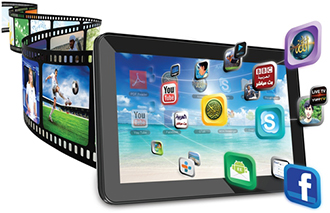
Windows can provide excellent functionality, and many high-quality apps are created for iOS |
Apple is essentially the trailblazer in the market—it was their efforts that sparked the wave of popularity for tablets. However, their own offerings consist of just a few versions of the iPad, each operating on the iOS platform. Due to the closed file system, this solution somewhat loses out in capabilities compared to the "open" Android. Yet, there are significantly more apps in the App Store than its competitor, and their quality is noticeably higher due to the strict approval procedures that are typical of all "apple" products. The system runs quickly and stably, with glitches being out of the question. However, to record any file on the device, proprietary software and a cable must be used, which noticeably limits the user. If a companion for the computer is needed, rather than a fully functional replacement, iOS is a perfect fit.
As for solutions based on the well-known Windows OS, they should be recommended to users who need maximum functionality. Windows 8 was specifically designed for working with touchscreens, and its tablet version possesses almost the same set of features as the personal version. The drawbacks include a relatively small number of programs optimized for tablet use. Models with external keyboards and docking stations are often available, allowing a tablet to easily become a full-fledged laptop.
Step 2: Screen Size
The screen size determines both the overall dimensions and the weight of the device, and in portable devices, bigger is not always better. Tablets can generally be divided into 10-inch and 7-inch categories, with all others falling into the "other" group.
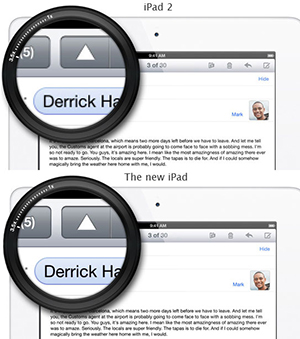 |
| The resolution of the screen on the top model is 1024x768, and on the bottom—2048x1536 |
A screen with a 9 or 10-inch diagonal is good for working with applications that have complex interfaces, reading PDF files without zooming, watching movies, surfing the internet, etc. Such devices are best used while seated at a table in a café or lying at home on a comfortable sofa. However, holding them at arm's length can be quite tiring, making comfortable use in a crowded morning subway unlikely.
Tablets with 7-inch screens are light and portable, as are their 8-inch siblings. This is an optimal solution for reading e-books and communicating on social networks, though playing games with many small elements or working with PDFs may not be as convenient. However, if the plan is to constantly carry the tablet, a 7-inch screen will be more preferable. It easily fits into a bag or pocket.
Step 3: Type and Resolution of the Display
Interaction with the tablet happens through the screen, so skimping on quality here is unwise. Some of the best matrices today are of the IPS type. They perform well in sunlight and provide reliable color reproduction at high brightness levels. If the budget allows for a model with such a matrix, it will be the best decision.
There are still many models on the market with a standard TN matrix, one of whose main advantages is low cost. However, their color reproduction quality isn't high, viewing angles are greatly reduced, and in sunlight, the image "shy away."
As for the resolution, the rule "the higher, the better" applies here. The higher this figure, the more detailed and quality a picture the tablet can produce. For larger screens, a resolution of 1280x800 will be optimal, while smaller models can have 1024x600. At the same time, Apple's flagship iPad Air is equipped with an excellent Retina display with a resolution of 2048x1536, while cheap Chinese Android tablets still show off with a modest 800x480 resolution.
Step 4: Storage Volume
In practice, 16 GB of built-in memory is enough for photos, apps, a small audio collection, and casual games. But for movies, this will be insufficient, and large-scale game titles sometimes take up 1.5 GB each. Therefore, while deciding on this question, you should also decide for what purposes the device will be used. If the structure includes a card reader module, you can always count on an additional 64 GB, which is a plus. However, with iPads, Nexus, and Kindle tablets, you need to ensure you have enough storage from the outset, as they do not have the capability to connect memory cards.
Step 5: Final Review
 |
| Additional features allow a modern model to replace a navigator, smartphone, and laptop at the same time |
If you followed our previous recommendations, the number of offers should now be significantly reduced. It's time to look "under the hood" and examine additional features.
All tablets from 2013 and the latter half of 2012 have enough performance for most users. Therefore, this parameter shouldn't be deemed decisive. However, if you want to play modern 3D games, you should look for a device on a high-end platform with a powerful video processor. RAM is never redundant, so consider 1 GB a baseline today.
Almost all models are equipped with a built-in Wi-Fi module for internet connectivity. Some can boast 3G or cellular modules, including 2 SIM cards, thereby acting as a smartphone replacement (and with a small screen, this can be quite an interesting alternative). Built-in GPS or GLONASS support allows for competition with navigators. No matter what marketers say, it's rather hard for a tablet to replace a camera. However, it can take quality pictures thanks to the built-in camera, and some are even equipped with a flash from the start.
When it comes to battery life, it's quite clear—a tablet should operate for a long time. If the manufacturer guarantees 8-9 hours, you can go for it. Thus, the larger the battery capacity, the better.
And in Conclusion. All the listed features are merely reference points, behind which lie many other parameters. Weighing them carefully, with an eye on the allowable budget, will allow you to choose the optimal tablet. At least for you.






Articles, reviews, useful tips
All materials