
MSI Clutch GM40
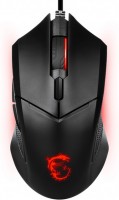
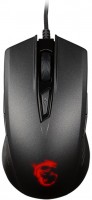 | Outdated Product Symmetric gaming mouse with a wired connection, positioned by the manufacturer in the lower part of the average price range. First of all, you should pay attention to the fact that MSI Clutch GM40 can work in both standard and advanced modes. To activate the latter, it is necessary to hold down the front side buttons for 6-7 s, the reverse switching is carried out in the same way. Using the advanced mode, the following resolution levels become available to the user: 800/1600/3200 and 5000 dpi. While in standard mode, you can select the following resolution options: 1000/1800/2800 and 3600 dpi. In total, there are 7 buttons on board the device, 1 shift wheel and 1 three-position switch for additional buttons — there are 2 buttons on each sidewall. It is noteworthy that the user can use the...buttons only on one sidewall or can completely block all side buttons. The side switches are controlled by a switch located on the base of the manipulator. The device got a red backlight. For more effective contact with the mat, the base is equipped with high-quality Teflon feet (PTFE). Despite the low cost, the manipulator accurately sets the trajectory of the cursor. |




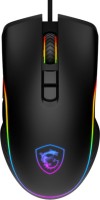


MSI Clutch GM40 | |||||||||||||||||||||||||||||||||||||||||||||||||||||||||||||||||||
|
| ||||||||||||||||||||||||||||||||||||||||||||||||||||||||||||||||||


Symmetric gaming mouse with a wired connection, positioned by the manufacturer in the lower part of the average price range. First of all, you should pay attention to the fact that MSI Clutch GM40 can work in both standard and advanced modes. To activate the latter, it is necessary to hold down the front side buttons for 6-7 s, the reverse switching is carried out in the same way.
Using the advanced mode, the following resolution levels become available to the user: 800/1600/3200 and 5000 dpi. While in standard mode, you can select the following resolution options: 1000/1800/2800 and 3600 dpi. In total, there are 7 buttons on board the device, 1 shift wheel and 1 three-position switch for additional buttons — there are 2 buttons on each sidewall. It is noteworthy that the user can use the buttons only on one sidewall or can completely block all side buttons. The side switches are controlled by a switch located on the base of the manipulator. The device got a red backlight. For more effective contact with the mat, the base is equipped with high-quality Teflon feet (PTFE). Despite the low cost, the manipulator accurately sets the trajectory of the cursor.
Always clarify the specifications and configuration of the product with the online store manager before purchasing.
Catalog MSI 2026 - new arrivals, bestsellers, and the most relevant models MSI.







It looks cool, but there is no software with it in the package. The appearance is definitely not bad, the glowing dragon is fire! MSI positions this junk as a gaming gadget. Explain to me how this "semi-gaming" mouse manages to move on its own!!! In the game, you just stand there, and the crosshair starts slowly drifting away... there is a mouse pad. Moreover, I can't catch the pattern, sometimes diagonally, sometimes upward. Tech support says to contact the store!!! It's truly durable... I recommend it, so far it has withstood 5 solid hits. use MSI Clutch GM40 few months |