
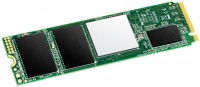
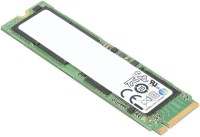
Transcend PCIe SSD220S TS512GMTE220S 512 GB
 | Compare prices 4 → When you make a purchase through links on our site, we may receive a affiliate commission.
|

Transcend TS512GMTE220S | |||||||||||||||||||||||||||||||||||||||||||||
| |||||||||||||||||||||||||||||||||||||||||||||

Always clarify the specifications and configuration of the product with the online store manager before purchasing.
Catalog Transcend 2026 - new arrivals, bestsellers, and the most relevant models Transcend.
Buy Transcend PCIe SSD220S TS512GMTE220S 512 GB
Transcend PCIe SSD 220S 512GB TS512GMTE220S | £358.31 |  | |||
Transcend PCIe SSD 220S 512GB | £358.31 |  | |||
| £364.11 |  | ||||
| £365.47 |  | ||||
1 0 1 5 |
Price-quality, speed No  Viktor S.: use Transcend TS512GMTE220S few months Viktor S.: use Transcend TS512GMTE220S few months |
I've been using it for over a year, and I can't be happier. As for me, this drive is one of the best in terms of price/performance ratio. After installing it, you completely forget about it because everything works fast, and there are no problems at all. While in use, the drive heats up to 50 degrees, so it needs a heatsink, and an additional fan in the case would not be superfluous. The drive is used as a system disk. As a rule, it's always half-empty for me, so it will last longer. Price/quality ratio. 1. The brand utility "Transcend SSD Scope" does not recognize this drive. It's necessary to use the "outdated" version 3.11.0, which is no longer available for download on the website; 2. After six months of use, the wear indicator increased by 1%, according to information from other utilities. I don't know if this is good or bad.  Dyudyuka Barbidokskaya: use Transcend TS1TMTE220S more than year Dyudyuka Barbidokskaya: use Transcend TS1TMTE220S more than year |
Installed in my HP EliteBook 820 G3 instead of the hybrid hard drive. The system was transferred normally, works confidently and stably, but when launching gaming applications, it starts to heat up significantly. However, ultrabooks are not designed for installing SSD heat sinks))). Subjectively, system responsiveness improved, system updates install faster, applications launch quicker. 12 seconds from pressing the power button to the system login password prompt appearing. 38-41°C is the normal working temperature under office load. For those who need a solid SSD for a reasonable price for regular surfing, office programs, watching movies, etc., I recommend this product. -price-quality -without respect Maksym: use Transcend TS512GMTE220S more than year |
Universal Soldier
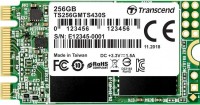
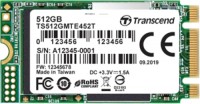
The Transcend MTE220S is an all-in-one M.2 NVMe SSD that is equally well suited for full-size desktop PCs, compact nettops, all-in-ones and laptops. The optimal ratio of solid speed characteristics and moderate heating allows this SSD to do without a cooling radiator and, as a result, fit even in the thinnest ultrabooks.
Modern interface
Naturally, provided that the laptop or PC has an M.2 2280 connector with support for NVMe drives. After all, this is the only way to guarantee that in addition to the usual M.2 SATA SSDs with speeds up to 560 MB / s, the connector also supports high-speed PCIe SSDs. Thus, the Transcend MTE220S has four PCIe 3.0 lanes, which results in a sequential read speed of 3500 MB / s (almost the maximum interface bandwidth) and a sequential write of 2100 MB / s.
Rest time
But due to the use of 3D TLC flash memory, the sequential write speed of the Transcend MTE220S, like the vast majority of other modern SSDs, is unstable. When writing very large amounts of data at a time, the speed is reduced by a factor of three — up to 700 MB / s. After that, the drive needs a short rest time to restore the initial high speed.
Smart caching
The IOPS (the number of input-output operations per second) for the smallest 4K blocks of the Transcend MTE220S is a decent 210K for reading and 310K for writing. Such a high result is achieved thanks to the Silicon Motion SM2262EN dual-core controller and an external 512 MB buffer RAM chip. Whereas many competing SSDs either have a small 32 MB cache integrated into the controller, or use part of the PC's system-wide RAM as it. We also advise you to pay attention to other Transcend SSD models: an even more affordable internal NVMe MTE110S and an external ESD350C with USB 3.1 Gen 2 connections.



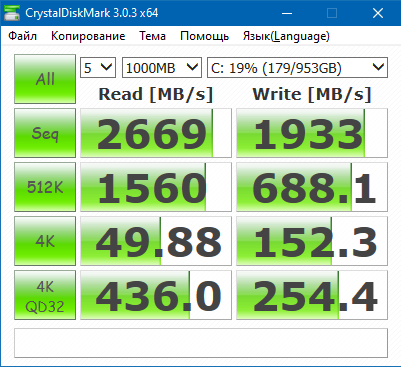
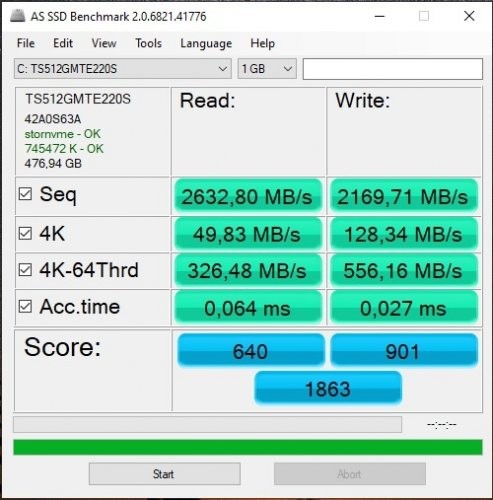
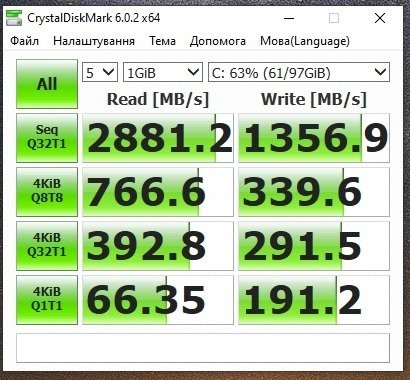
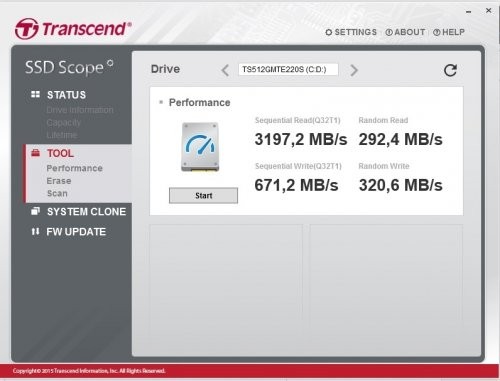
When compared to my SSD that was previously installed, this one is 7 times faster in terms of numbers, but practically speaking, let's say the difference is noticeable during tasks like unpacking archives, installing games, or copying. But for everyday use like internet surfing or watching a movie, the difference is not significant, although Windows may boot faster. I'll say this honestly - I bought it because I simply love the PC scene and tinkering with all these components and want to keep up with the times, though a regular SSD would generally be more than enough. Regarding heating, there's no issue; only particularly fast M2 drives heat up, and this one is quite standard and stays cool.
In general, if you're looking for an M2, I recommend paying attention to this model.