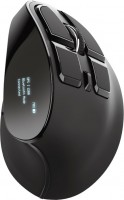
Trust Voxx Rechargeable Ergonomic Wireless Mouse (23731)
 |

Trust Voxx Rechargeable Ergonomic Wireless Mouse | |||||||||||||||||||||||||||||||||||||||||||||||||||||||||||||
|
| ||||||||||||||||||||||||||||||||||||||||||||||||||||||||||||


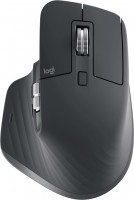
An ergonomic eight-button wireless mouse with a special external design, a digital LED screen, two wireless connection options (radio or Bluetooth) and support for Multi-Device technology for simultaneous pairing with several devices. The high body of a specially shaped body provides an inclined position of the user's hand. This position of the hand is considered to be the most natural and helps to avoid a common unpleasant syndrome (carpal tunnel syndrome, which manifests itself as numbness in the fingertips and pain in the wrist).
It is worth noting that this grip may seem unusual and takes time to get used to. A comfortable position of the thumb and a tactilely pleasant coating provide a secure grip. The Trust Voxx Rechargeable Ergonomic Wireless Mouse is equipped with nine buttons, five of which are programmable. The LED display shows the functions of the buttons, resolution (DPI), connection status and remaining battery charge, which allows the user to be aware of everything that is happening and control the situation. Guaranteed compatibility with PCs and laptops running Windows, macOS, ChromeOS.
Always clarify the specifications and configuration of the product with the online store manager before purchasing.
Catalog Trust 2026 - new arrivals, bestsellers, and the most relevant models Trust.


Buy Trust Voxx Rechargeable Ergonomic Wireless Mouse
All prices 8 →Trust Mouse Wireless Ergonomico Ricaricabile Nero One Size Verticale wireless ricaricabile Single 23731 | £42.07 |  | |||
| £49.99 |  | ||||
Trust Voxx Wireless Rechargeable Ergonomic Mouse Optical 2400 DPI (TRVOXX) 23731 | £50.27 |  | |||
Trust Voxx mouse Office Right-hand RF Wireless + Bluetooth Optical 240 | £52.81 |  | |||
Trust Voxx mouse Office Right-hand RF Wireless + Bluetooth Optical 240 23731 | £52.81 |  | |||











The mouse is not bad, but there are some moments that can sometimes be annoying. For regular use - it's okay, but NOT for gaming! ! ! + Comfort of position and size + No. of buttons + Battery capacity + LED screen and non-distracting brightness + Storage space, USB connection - Sometimes an extra random click occurs. More often it's LMB. - It's not possible to reprogram the buttons. Mouse settings on the mouse. - The response speed is not enough for me. It's very noticeable after using a wired one. - As for the 2.4G connection, it seems weak at 1.2 meters (without obstacles) - it still sort of works, but at 2 meters - (without obstacles) there's no connection. - I haven't considered Bluetooth - There's an error in the description - there's no wired connection. There's wired charging.  Igor: use Trust Voxx Rechargeable Ergonomic Wireless Mouse few months Igor: use Trust Voxx Rechargeable Ergonomic Wireless Mouse few months |
The mouse is not bad, but with certain features. The manipulator has just entered our market, but you may already encounter problems - a non-functional LED display installed in the device’s body. Be careful and be sure to check the functionality of the display; without this function, additional mouse buttons become useless. First: two modes of connecting to devices: radio channel and bluetooth. Works fine with older versions of Windows, Lunix and Android devices. It connects quickly and has a good response, sufficient for comfortable work. The second is the presence of additional buttons on which you can add different functionality. The buttons are conveniently located and do not require additional fingers on your hand. And third - light weight. The mouse weighs less than a smartphone. And despite the vertical type, it takes up a little more space than a good horizontal manipulator. There are no drivers or software for configuration via a computer. All mouse settings are done through the LED screen on the device body. The display itself on this model is unstable, and as soon as it breaks, half of the functionality is lost. The built-in battery is inferior in all respects to the usual AA type; it cannot be quickly changed without complex technical manipulations. And the charge level is impossible to find out if the LED screen is broken. The third disadvantage is the lack of configuration software. The developers relied on low-quality LED and did not bother creating configuration utilities. |