Xiaomi Mi Gaming Display 27 27 " black (BHR5039GL)
 | Compare prices 3 → When you make a purchase through links on our site, we may receive a affiliate commission.
|

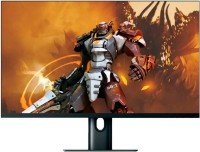
A high-performance gaming monitor with a high-quality 27-inch WQHD (2560x1440) thin-bezel screen, high refresh rate, wide colour gamut, high maximum brightness and full HDR video output support. It is positioned as a product of the upper part of the middle price category, aimed at demanding gamers and e-sportsmen. Compatible with AMD FreeSync Premium and Adaptive-Sync sync technologies to eliminate LCD mini-lag and tearing.
These technologies, combined with a high screen refresh rate (165Hz) and fast IPS-matrix response time (1ms GtG), provide maximum smoothness and clarity in dynamic gaming scenes. These features make the Xiaomi Mi Gaming Display 27 an equally good choice for all gaming genres, including competitive first-person shooters, sports sims, fighting games and real-time strategy games. With improved colour reproduction and high-quality factory calibration, this model will be useful for amateur / semi-professional processing of video content and photos. The thin bezel design allows this monitor to be used in horizontal multi-monitor configurations.
|
| ||||||||||||||||||||||||||||||||||||||||||||||||||||||||||||||||||||||||||||||||


Always clarify the specifications and configuration of the product with the online store manager before purchasing.
Catalog Xiaomi 2026 - new arrivals, bestsellers, and the most relevant models Xiaomi.

Buy Xiaomi Mi Gaming Display 27 27 " black
Xiaomi X-BHR5039GL | £274.99 |  | |||
| £308.06 |  | ||||
Xiaomi Mi 2K Gaming Monitor 27" - Black | £373.09 |  | |||






1 1 3 7 |
Interesting fact. It looks like there is some kind of gap somewhere in the monitor where some kind of midge could get into. This reptile crawled across the screen between the matrix and the outer layer. My surprise knew no bounds. Apparently, she died somewhere there, in the depths of the monitor. The picture is good, eyes don't get tired much, refresh rate is pleasing. Some shortcomings with HDR modes, flickering with HDR on during fullscreen gaming when message notifications arrive. It's still unclear whether the issue is with the video card, drivers, Windows, or the monitor. In use, it's noticeably more convenient than FHD. However, the width seems a little inadequate for me, I would prefer 21:9. As for the refresh rate, I don't notice a significant difference between 120Hz and 165Hz. So, I consider 144Hz the golden middle ground.  Arseniy Mironov: use Xiaomi Mi Gaming Display 27 few months Arseniy Mironov: use Xiaomi Mi Gaming Display 27 few months |
A good quality monitor, though my opinion might be subjective since I switched to it from a 1920 60 Hz, the picture in comparison is striking. IPS 165Hz 27-inch diagonal for 26k in March 2021, couldn't find cheaper. If you use the speaker jack 3.5, it severely distorts the sound, completely cutting off low frequencies. Additionally, the USB ports on the back panel are inconveniently placed. Aleksandr: use Xiaomi Mi Gaming Display 27 less than month |
What can I say... the monitor is certainly excellent. I've already seen 4K 60fps videos on a 4K 27-inch 60Hz display. I didn't experience a "wow" effect (the same videos look amazing here, but this is 2K, not 4K). But. I took this screen home because I have a 1080ti there. It won't handle 4K in games. And the old FHD Acer is really bad. Besides, I do enjoy gaming, but now I'm working from home, so the image quality and the panel's refresh rate have become VERY relevant, as my eyes were simply getting tired. As for HDR and Adoptive Sync (in my case, G-sync). If you enable HDR on the monitor, you need to enable support in Windows. The picture changes, so you have to adjust Windows settings to understand it. But again, for good video viewing, it should support HDR, which is rare today. So it's situational and for enthusiasts. I noted for myself that when I turned on HDR and maxed out all settings, the screen was slightly dimmer and less bright. This reduces eye strain. However, in gaming, I preferred HDR off because the color reproduction is different. It's a matter of taste. Regarding Adoptive Sync, I honestly didn't notice any difference. I didn't even understand if there's more load on the graphics card. So I turned it off. I'll test it in other games, of course, but I'm sure the effect will be the same. The package included a Chinese plug. But the socket on the monitor is standard, so I easily connected it to my UPS with an old cable. My unit is flawless. Happy as a clam. Light bleeding is a normal phenomenon. But I don't see it here. Maybe they are present in the bottom corners. But compared to my previous monitor, you could say they are nonexistent here. I don't notice it during work and gaming. The monitor test overall didn't reveal anything. But that's how it should be, it's normal. I personally think the prices are inflated. Quite a lot, actually. Not just for this model, but for the entire segment of screens with such specifications. If it wasn't for the low refresh rate and graphics card, I would have gone for a Samsung 4K for 20k RUB and clearly been happier. However, I do both gaming and work on my computer. The graphics card can't handle 4K in games, and 60Hz is not enough for me. Hence, I chose a compromise. As for this particular model, I don't see any drawbacks. There are purely general technological questions regarding the HDR feature. Enabling HDR makes the picture dull, but videos with HDR support still look rich and vibrant. Without HDR support, it's pretty mediocre. Arseniy Mironov: use Xiaomi Mi Gaming Display 27 less than month |