
Comparison ZTE MF65 vs ZTE AC30
Add to comparison | 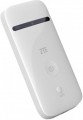 | 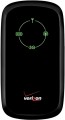 |
|---|---|---|
| ZTE MF65 | ZTE AC30 | |
from £40.32 | from $15.14 | |
| TOP sellers | ||
| Device type | portable router | portable router |
| Wi-Fi | Wi-Fi 3 (802.11g) | |
| Connected devices, up to | 10 | 5 |
| Effective range | 10 m | 10 m |
Connection | ||
| Communication generation | 2G 3G | 2G 3G |
| Transmission technology | GPRS EDGE W-CDMA HSUPA HSDPA HSPA+ | GPRS EDGE W-CDMA HSUPA HSDPA |
| Ports | USB-A | microUSB |
Features | ||
| Memory card slot |  |  |
| SIM card slot | | |
| R-UIM card slot | | |
General | ||
| Built-in battery | | |
| Battery capacity | 1500 mAh | 1500 mAh |
| Operating time (internet browsing) | 4 h | |
| Dimensions | 102x50x13.7 mm | 99x53x14 mm |
| Weight | 150 g | |
| Added to E-Catalog | july 2015 | january 2015 |


Compare ZTE MF65 and AC30
You may be interested in
My comparisons
ZTE MF65 often compared


ZTE AC30 often compared


Glossary
Wi-Fi
Wi-Fi generation and frequency bands over which the modem shares mobile internet. The 2.4 GHz frequency provides greater range and penetrates walls better, 5 GHz usually offers higher speeds and less interference, while 6 GHz provides additional free channels but requires compatible devices and penetrates obstacles less effectively. At the same time, newer Wi-Fi does not speed up the mobile network itself: the final speed also depends on the modem’s capabilities, the operator’s coverage, and the connected equipment.
— Wi-Fi 3 (802.11g). An outdated standard operating in the 2.4 GHz band with a theoretical speed of up to 54 Mbps. Suitable for basic internet access, but it can noticeably limit the speed of a modern LTE connection.
— Wi-Fi 4 (2.4 GHz). A widespread 802.11n standard with good range and broad compatibility. Suitable for everyday use, although the single 2.4 GHz band is more susceptible to interference and may limit the capabilities of fast LTE or 5G.
— Wi-Fi 5 (2.4 + 5 GHz). A dual-band option that allows 2.4 GHz to be used for better coverage or 5 GHz for higher speeds and less congested spectrum. This is a balanced solution for home use, travel, and connecting multiple devices simultaneously.
— Wi-Fi 6 (2.4 + 5 GHz). A modern 802.11ax standard that distributes traffic among connected devices more efficiently and operates...more stably under load. Well suited for sharing fast LTE or 5G with several smartphones, laptops, and other equipment.
— Wi-Fi 6 (2.4 GHz). A version of Wi-Fi 6 operating exclusively on the 2.4 GHz frequency. It combines modern traffic management mechanisms with good coverage range, but falls short of dual-band models in speed and resistance to interference.
— Wi-Fi 6E (2.4 + 5 + 6 GHz). A tri-band evolution of Wi-Fi 6 with the additional 6 GHz frequency, where there is usually less interference and more free channels are available. The benefits of the new band are realized only with compatible equipment, while other devices connect via 2.4 or 5 GHz.
— Wi-Fi 7 (2.4 + 5 GHz). The latest generation of wireless communication without support for the 6 GHz band. It provides more efficient data transmission and can use several bands simultaneously, but does not support the widest 320 MHz channels available to tri-band models.
— Wi-Fi 7 (2.4 + 5 + 6 GHz). A tri-band version of Wi-Fi 7 designed for maximum throughput and minimal latency. When supported by the modem and connected device, it can use several bands simultaneously and channels up to 320 MHz wide in the 6 GHz frequency.
— Wi-Fi 3 (802.11g). An outdated standard operating in the 2.4 GHz band with a theoretical speed of up to 54 Mbps. Suitable for basic internet access, but it can noticeably limit the speed of a modern LTE connection.
— Wi-Fi 4 (2.4 GHz). A widespread 802.11n standard with good range and broad compatibility. Suitable for everyday use, although the single 2.4 GHz band is more susceptible to interference and may limit the capabilities of fast LTE or 5G.
— Wi-Fi 5 (2.4 + 5 GHz). A dual-band option that allows 2.4 GHz to be used for better coverage or 5 GHz for higher speeds and less congested spectrum. This is a balanced solution for home use, travel, and connecting multiple devices simultaneously.
— Wi-Fi 6 (2.4 + 5 GHz). A modern 802.11ax standard that distributes traffic among connected devices more efficiently and operates...more stably under load. Well suited for sharing fast LTE or 5G with several smartphones, laptops, and other equipment.
— Wi-Fi 6 (2.4 GHz). A version of Wi-Fi 6 operating exclusively on the 2.4 GHz frequency. It combines modern traffic management mechanisms with good coverage range, but falls short of dual-band models in speed and resistance to interference.
— Wi-Fi 6E (2.4 + 5 + 6 GHz). A tri-band evolution of Wi-Fi 6 with the additional 6 GHz frequency, where there is usually less interference and more free channels are available. The benefits of the new band are realized only with compatible equipment, while other devices connect via 2.4 or 5 GHz.
— Wi-Fi 7 (2.4 + 5 GHz). The latest generation of wireless communication without support for the 6 GHz band. It provides more efficient data transmission and can use several bands simultaneously, but does not support the widest 320 MHz channels available to tri-band models.
— Wi-Fi 7 (2.4 + 5 + 6 GHz). A tri-band version of Wi-Fi 7 designed for maximum throughput and minimal latency. When supported by the modem and connected device, it can use several bands simultaneously and channels up to 320 MHz wide in the 6 GHz frequency.
Connected devices, up to
The largest number of devices that can be simultaneously connected to the modem via Wi-Fi (see "Connection").
The presence of this limitation is due to the fact that processing network requests from several devices at once requires a fairly large amount of computing resources, and there are not so many of them in miniature electronics like wireless modems. However, even inexpensive models can support about 5 – 6 devices, which is more than enough for most cases; and in more advanced modems, this number can reach 10.
The presence of this limitation is due to the fact that processing network requests from several devices at once requires a fairly large amount of computing resources, and there are not so many of them in miniature electronics like wireless modems. However, even inexpensive models can support about 5 – 6 devices, which is more than enough for most cases; and in more advanced modems, this number can reach 10.
Transmission technology
Data transfer technologies supported by the modem.
— GPRS. The oldest communication technology in use today. It was developed as a standard for GSM cellular networks, allowing data to be transmitted in parallel with voice communications and text messages, as well as charging network access by the amount of data transmitted, and not by connection time (as in the previous CSD standard). At the time of its creation, it was very progressive, but now it is considered completely obsolete and is used only in cases where more advanced standards cannot be used.
— EDGE. A technology created as a modification of the GPRS described above, which would increase the channel throughput and improve communication reliability. Otherwise, this standard is completely similar to GPRS in terms of its main practical features.
— W-CDMA. One of the early third generation ( 3G) communication standards. Used in UMTS networks. One of the main advantages of such networks is the ability to build networks based on the existing GSM infrastructure. Therefore, UMTS, and specifically W-CDMA, is being used by many mobile operators in the early stages of their transition from 2G to 3G.
— HSUPA. Third generation (3G) communication technology, an evolution of W-CDMA described above. The name stands for "Hi...gh-Speed Uplink Packet Access" — high-speed packet data transmission in the "from the subscriber" direction. This, in fact, describes the purpose of this technology: it increases the speed of data transfer from the modem to the base station, which can be useful for some specific tasks — for example, video communications.
— HSDPA. Further, after HSUPA, improvement of the W-CDMA standard (see above). It belongs to third generation (3G) networks, but is considered an “extended” standard, which is why HSUPA-enabled networks can be referred to as 3.5G, 3G+, etc. The name itself — "High-Speed Downlink Packet Access" — translates as "high-speed packet data transmission from the base station to the device."
— HSPA+. Today's most advanced third-generation communication standard based on UMTS networks (W-CDMA). Thanks to a number of improvements, it allows to achieve higher speeds than the options described above, approaching fourth-generation networks in terms of capabilities; therefore, sometimes conventionally referred to as 3.75G.
— WiMAX. Initially, WiMAX was created in two versions — "mobile" and "stationary"; the vast majority of modern cellular modems use the second option. It belongs to the fourth generation standards — 4G (whereas "mobile" was a competitor to 3G technologies, although sometimes it is also referred to as a 4th generation connection for marketing purposes). Some time ago, WiMAX was actively promoted as an alternative to wired broadband Internet connection (in particular, as the best option for areas, where it is difficult to reach the cable). However, now this standard is gradually losing popularity — in particular, in connection with the development and promotion of a more advanced LTE (which also does not have a division into "mobile" and "stationary" varieties).
— LTE (up to 173 Mbps). The fourth generation cellular communication standard, the most popular 4G technology today — in particular, due to the fact that it is a further development of W-CDMA/UMTS and can be implemented by improving existing networks (both UMTS and CDMA2000). Another reason for the popularity is the same convenience for both stationary and mobile equipment. On the other hand, when choosing a modem of this standard, you should keep in mind that LTE bands and channels may differ in different countries, so the support of this technology does not guarantee compatibility with a particular network. It should also be taken into account that in some countries LTE networks are only at the deployment stage, and in some they are not available at all.
When evaluating the capabilities of a modem, note that the speed values given for each technology are the maximum, which in fact is achievable only under perfect conditions. The actual values of the speed, usually, are lower than the potential ones; they may depend both on the specs of the network, signal strength and other technical issues, and on the policy of the operator and the conditions of a particular tariff.
— GPRS. The oldest communication technology in use today. It was developed as a standard for GSM cellular networks, allowing data to be transmitted in parallel with voice communications and text messages, as well as charging network access by the amount of data transmitted, and not by connection time (as in the previous CSD standard). At the time of its creation, it was very progressive, but now it is considered completely obsolete and is used only in cases where more advanced standards cannot be used.
— EDGE. A technology created as a modification of the GPRS described above, which would increase the channel throughput and improve communication reliability. Otherwise, this standard is completely similar to GPRS in terms of its main practical features.
— W-CDMA. One of the early third generation ( 3G) communication standards. Used in UMTS networks. One of the main advantages of such networks is the ability to build networks based on the existing GSM infrastructure. Therefore, UMTS, and specifically W-CDMA, is being used by many mobile operators in the early stages of their transition from 2G to 3G.
— HSUPA. Third generation (3G) communication technology, an evolution of W-CDMA described above. The name stands for "Hi...gh-Speed Uplink Packet Access" — high-speed packet data transmission in the "from the subscriber" direction. This, in fact, describes the purpose of this technology: it increases the speed of data transfer from the modem to the base station, which can be useful for some specific tasks — for example, video communications.
— HSDPA. Further, after HSUPA, improvement of the W-CDMA standard (see above). It belongs to third generation (3G) networks, but is considered an “extended” standard, which is why HSUPA-enabled networks can be referred to as 3.5G, 3G+, etc. The name itself — "High-Speed Downlink Packet Access" — translates as "high-speed packet data transmission from the base station to the device."
— HSPA+. Today's most advanced third-generation communication standard based on UMTS networks (W-CDMA). Thanks to a number of improvements, it allows to achieve higher speeds than the options described above, approaching fourth-generation networks in terms of capabilities; therefore, sometimes conventionally referred to as 3.75G.
— WiMAX. Initially, WiMAX was created in two versions — "mobile" and "stationary"; the vast majority of modern cellular modems use the second option. It belongs to the fourth generation standards — 4G (whereas "mobile" was a competitor to 3G technologies, although sometimes it is also referred to as a 4th generation connection for marketing purposes). Some time ago, WiMAX was actively promoted as an alternative to wired broadband Internet connection (in particular, as the best option for areas, where it is difficult to reach the cable). However, now this standard is gradually losing popularity — in particular, in connection with the development and promotion of a more advanced LTE (which also does not have a division into "mobile" and "stationary" varieties).
— LTE (up to 173 Mbps). The fourth generation cellular communication standard, the most popular 4G technology today — in particular, due to the fact that it is a further development of W-CDMA/UMTS and can be implemented by improving existing networks (both UMTS and CDMA2000). Another reason for the popularity is the same convenience for both stationary and mobile equipment. On the other hand, when choosing a modem of this standard, you should keep in mind that LTE bands and channels may differ in different countries, so the support of this technology does not guarantee compatibility with a particular network. It should also be taken into account that in some countries LTE networks are only at the deployment stage, and in some they are not available at all.
When evaluating the capabilities of a modem, note that the speed values given for each technology are the maximum, which in fact is achievable only under perfect conditions. The actual values of the speed, usually, are lower than the potential ones; they may depend both on the specs of the network, signal strength and other technical issues, and on the policy of the operator and the conditions of a particular tariff.
Ports
— USB plug. The presence in the design of the modem of its own USB plug, which allows you to connect the device to a computer directly. Such a connection provides a device with a USB port with Internet access, and the power necessary for the operation of the modem is also supplied via USB.
— microUSB. A smaller version of the USB connector (see above), used primarily in Wi-Fi modems (see "Type") that can work autonomously and do not require a constant connection to another device. At the same time, in 3G/4G modems, microUSB usually looks like a socket, not a plug, and a special cable is used to connect. This interface usually plays the role of a general-purpose service connector: the battery is charged through it, and it is also connected to a PC or other device to manage settings, update firmware, etc.
— USB. Wired interface, the most common and universal modern standard used to connect peripheral equipment to various electronic devices, ranging from computers to smartphones and even wireless modems. In this case, the full-size version of the USB connector is meant. It is usually installed in classic modems (see "Type") and has the form of a plug, with which the modem is connected to a control device (PC, laptop, tablet, etc.). Power is usually supplied through the same connector.
— USB-C.... Connector, in its functional features similar to the paragraph above. With the exception of the symmetrical form factor and the use of more modern technologies.
— LAN (RJ45). Classic wired connection via a cable with an RJ-45 connector. Also known as "LAN". Nowadays, it is one of the most common methods of wired Internet connection, and is also widely used in local networks. With it, you can connect a laptop or PC directly to the modem via a cable and not bother with a Wi-Fi connection. In addition, such a connection can be faster (depending on the speed of the LAN).
— ExpressCard. A connection interface mainly used in laptops. Peripheral devices of this standard, including wireless modems, have the form of cards, when connected, they are installed in a special slot in the device. It should be taken into account that there are two ExpressCard form factors — 54 mm and 34 mm, and 34 mm cards can be used without restrictions with 54 mm slots, but not vice versa. Therefore, when choosing such a modem, it is worth clarifying the correspondence of its form factor to the planned slot. However, this standard is gradually disappearing from the scene, being replaced by more advanced interfaces — in particular, USB 3.0.
— microUSB. A smaller version of the USB connector (see above), used primarily in Wi-Fi modems (see "Type") that can work autonomously and do not require a constant connection to another device. At the same time, in 3G/4G modems, microUSB usually looks like a socket, not a plug, and a special cable is used to connect. This interface usually plays the role of a general-purpose service connector: the battery is charged through it, and it is also connected to a PC or other device to manage settings, update firmware, etc.
— USB. Wired interface, the most common and universal modern standard used to connect peripheral equipment to various electronic devices, ranging from computers to smartphones and even wireless modems. In this case, the full-size version of the USB connector is meant. It is usually installed in classic modems (see "Type") and has the form of a plug, with which the modem is connected to a control device (PC, laptop, tablet, etc.). Power is usually supplied through the same connector.
— USB-C.... Connector, in its functional features similar to the paragraph above. With the exception of the symmetrical form factor and the use of more modern technologies.
— LAN (RJ45). Classic wired connection via a cable with an RJ-45 connector. Also known as "LAN". Nowadays, it is one of the most common methods of wired Internet connection, and is also widely used in local networks. With it, you can connect a laptop or PC directly to the modem via a cable and not bother with a Wi-Fi connection. In addition, such a connection can be faster (depending on the speed of the LAN).
— ExpressCard. A connection interface mainly used in laptops. Peripheral devices of this standard, including wireless modems, have the form of cards, when connected, they are installed in a special slot in the device. It should be taken into account that there are two ExpressCard form factors — 54 mm and 34 mm, and 34 mm cards can be used without restrictions with 54 mm slots, but not vice versa. Therefore, when choosing such a modem, it is worth clarifying the correspondence of its form factor to the planned slot. However, this standard is gradually disappearing from the scene, being replaced by more advanced interfaces — in particular, USB 3.0.
Memory card slot
The presence of a slot for memory card in the design of the modem. Memory cards are very popular in modern electronics as removable storage media; in wireless modems, there are two main options for working with them. The first one provides use as an external card reader, for exchanging information between the card and the device to which the modem is connected via USB (see below); Simply put, installing a card turns the modem into a "flash drive" with removable storage. And in models with Wi-Fi (see "Type"), it may also be possible to work as a server that provides access to the contents of the memory card to all wireless devices connected to the modem. As for the types of cards, the most common support for the microSD standard is that they are small enough to be easily combined with compact wireless modem cases. Note that even within the same standard of memory cards there are several varieties, and before buying it's worth to clarify which of them the device is compatible with.
R-UIM card slot
The presence of a slot for an R-UIM card in the modem design. The purpose of such cards is similar to the SIM cards described above, but they are used in networks based on CDMA (and, accordingly, in modems with EV-DO support, see "Transmission Technologies"). Note that, unlike devices for GSM and UMTS networks, for CDMA modems a slot for this type of card is not a mandatory element of equipment — many such devices are tied to the network by changing the firmware, which is why operators of such communication may not use R-UIM at all. Therefore, although in general the use of cards is simpler and more convenient for the user than flashing, however, the choice of the presence or absence of an R-UIM slot depends on the requirements of the network with which the modem is planned to be used.
Operating time (internet browsing)
The maximum operating time of the modem with battery power (see "Power") on a single charge in Internet browsing mode. Such power is typical for Wi-Fi routers, therefore, usually, Internet browsing is supposed to provide access to the World Wide Web for an external Wi-Fi device.
This spec is the main indicator of battery life for any battery-powered modem, because it describes the time of using it for its main purpose without recharging. At the same time, you should know that this indicator is measured under certain "perfect" conditions; the actual operating time depends on a number of factors, including the intensity of browsing, the amount of data transferred, the number of connected devices and the distance to them, the cellular network signal strength, etc. Therefore, in fact, the battery life of the modem may be somewhat lower. Nevertheless, it is quite possible to compare different models with each other according to the operating time stated in the specs.
This spec is the main indicator of battery life for any battery-powered modem, because it describes the time of using it for its main purpose without recharging. At the same time, you should know that this indicator is measured under certain "perfect" conditions; the actual operating time depends on a number of factors, including the intensity of browsing, the amount of data transferred, the number of connected devices and the distance to them, the cellular network signal strength, etc. Therefore, in fact, the battery life of the modem may be somewhat lower. Nevertheless, it is quite possible to compare different models with each other according to the operating time stated in the specs.