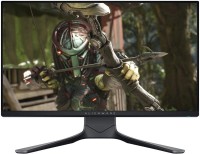
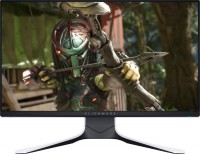
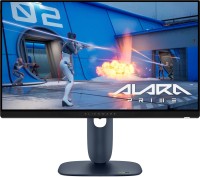
Dell Alienware AW2521HFL 25 " black (210-AVLT)
 | When you make a purchase through links on our site, we may receive a affiliate commission. Buy! 24,5-inch Dell Alienware AW2521HF LED Monitor Black Black Alienware AW2521HF refurbished 6781818887561BackMarket.co.ukDelivery: in United Kingdom Report |

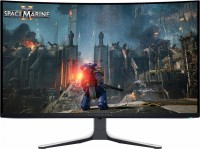
A style gaming monitor with "25" engraving and AlienFX decorative lighting on the back of the case. The abbreviated name of the model is Alienware 25. The front panel of the device is provided with a 24.5-inch diagonal IPS-screen. Its resolution is 1920x1080 pixels, response speed — from 1 ms, frame rate — 240 Hz. The screen also claims 99% coverage of the sRGB triangle and support for the Adaptive Frame Rate Sync technology suite (AMD FreeSync Premium along with NVIDIA G-Sync).
Flicker-Free and Low Blue Light technologies help reduce eye strain during long gaming sessions. The monitor communicates with signal sources via DisplayPort v 1.2 and HDMI v 2.0 connectors (2 in number). In load, the model was equipped with a four-port USB 3.0 hub. The monitor stand provides a wide range of adjustments — from the banal angle of the display to a quick flip of the screen from landscape to portrait orientation.
|
| ||||||||||||||||||||||||||||||||||||||||||||||||||||||||||||||||||||||||||||||||||


Always clarify the specifications and configuration of the product with the online store manager before purchasing.
Catalog Dell 2026 - new arrivals, bestsellers, and the most relevant models Dell.

















My brother bought it at Citilink and brought it to me in Zvezdny Gorodok by car. Be warned: it has a very large box. Also, I cut it a little while opening it - there's something like a scissor mark inside by the handle, showing where to cut along the dotted line. Apparently, I should have removed some plugs at the bottom of the box. I didn't know how to open the box properly, and the manufacturer seemed to ensure "guarantee" at the store hoping to make you damage the packaging. Overall, the monitor served its function; my previous one didn’t have flicker-free backlighting, and the 60 and 75 Hz frequency was more than sufficient, despite the 8 ms delay. I wouldn't have had any complaints if it hadn’t started giving me problems over time. I unknowingly treated demodicosis - almost leading to allergic dermatitis. Intuitively, I set a low brightness for the text mode, and even switched to black and white images when I realized the monitor was causing the issues. But the catch is that at low brightness, the seemingly comfortable backlight flicker strains and damages your retinal cells. At 100% brightness in sports mode, you can't look at the screen for long due to the harmful effects from the blue light. Therefore, I recommend those who face similar issues not to buy a new monitor, but rather buy glasses with a blue light filter. I was planning an eye operation; in any case, I decided the monitor needed to be changed. There was no one to advise me. Only personal experience. The result. The matrix itself, its pixels, have hidden specifications, and they are not as good as the marketers claim. Flicker-free backlighting, no longer kills my eyes in standard mode, many different modes, in particular, Comfort mode, which slightly greens the picture, which is good as it reduces the harmful blue spectrum. Of course, this can be supplemented with the "night mode" of Windows itself, but even without it, my eyes stopped hurting, and the skin on my eyelids no longer cracks or burns. The monitor backlight is adjustable through the menu and can be turned off, which is the most important. Macretting, regarding 240 hertz, the text blurs when moving at low speed from left to right, a little less when dragging the frame with the text up and down. The actual performance characteristics of the matrix pixels are almost no different from 60 Hz. At 100% contrast and 100% brightness, my eyelid skin burns - the effect is peeling and watery eyes. I took it specifically for the purpose of eye safety. Those. The backlight itself is still not safe from the point of view of harmful blue light; there is no screen in the monitor itself that would not let it through. In general, you will have to buy special glasses to preserve your vision and avoid related skin diseases. An excellent clear picture is only in SPORTS mode, but there is maximum brightness, which means maximum danger to the eyes, and the cumulative effect of blue on the retina. Price, for 34k you expect a lot more than just design. |