The information in the model description is for reference purposes. Always clarify the specifications and configuration of the product with the online store manager before purchasing. Catalog 3Dconnexion 2026 - new arrivals, bestsellers, and the most relevant models 3Dconnexion.
When you make a purchase through links on our site, we may receive a affiliate commission.
3Dconnexion SpaceMouse Pro USB Black. Grey
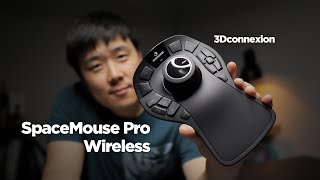
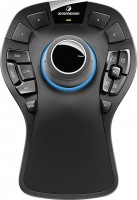
3Dconnexion SpaceMouse Pro USB Black. Grey SpaceMouse® Pro is the latest addition to 3Dconnexion’s line of professional 3D mi... morece. With an advanced ergonomic design and innovative On-screen Display. it delivers superior comfort and a simpler. more productive workflow.SpaceMouse Pro is the latest addition to 3Dconnexion’s line of professional 3D mice. It features a full size. soft coated hand rest and 15 large. fully programmable function keys for access to application commands. standard views and keyboard modifiers while a convenient On-Screen Display provides visual support.Like all 3Dconnexion 3D mice. SpaceMouse Pro features the patented 3Dconnexion 6-Degrees-of-Freedom (6DoF) sensor that enables you to easily navigate digital models or camera positions in 3D space.Simply push. pull. twist or tilt the 3Dconnexion controller cap to pan. zoom and rotate your model or camera precisely and intuitively.SpaceMouse Pro’s QuickView Keys provide fingertip access to 12 views. making it easier to detect errors. explore alternatives and present your work more effectively for review.The rotation toggle key disables the rotation axes. providing simultaneous pan-and-zoom navigation in work modes such as sketching.The full size. soft-coated hand rest ensures maximum comfort by positioning the hand perfectly for the 3Dconnexion controller cap.Every one of SpaceMouse Pro’s 15 tactile. fully programmable buttons are conveniently positioned. allowing you to access frequently used commands and work more efficiently.SpaceMouse Pro automatically recognizes your application environment and assigns appropriate commands to four large. soft touch Intelligent Function Keys.The On-Screen Display provides a convenient visual reminder of the commands assigned to the Intelligent Function Keys. on your computer screen. enabling you to stay focused.SpaceMouse Pro Keyboard Modifiers provide easy access to Control. Shift. Alt. Esc functions. saving you time by reducing the need to move your hand to the keyboard.Save time and maintain focus by using SpaceMouse Pro’s Virtual NumPad to input numerical data in to your application using the standard mouse instead of your keyboard.
3Dconnexion SpaceMouse Pro USB Black, Grey 3DX-700040
Interface: USB. Cable. Black, Grey. SpaceMouse® Pro is the latest addition to 3Dconnexion’s line of professional 3D mice. Wit... moreh an advanced ergonomic design and innovative On-screen Display, it delivers superior comfort and a simpler, more productive workflow.. SpaceMouse Pro is the latest addition to 3Dconnexion’s line of professional 3D mice. It features a full size, soft coated hand rest and 15 large, fully programmable function keys for access to application commands, standard views and keyboard modifiers while a convenient On-Screen Display provides visual support.. Like all 3Dconnexion 3D mice, SpaceMouse Pro features the patented 3Dconnexion 6-Degrees-of-Freedom (6DoF) sensor that enables you to easily navigate digital models or camera positions in 3D space.. Simply push, pull, twist or tilt the 3Dconnexion controller cap to pan, zoom and rotate your model or camera precisely and intuitively.. SpaceMouse Pro’s QuickView Keys provide fingertip access to 12 views, making it easier to detect errors, explore alternatives and present your work more effectively for review.. The rotation toggle key disables the rotation axes, providing simultaneous pan-and-zoom navigation in work modes such as sketching.. The full size, soft-coated hand rest ensures maximum comfort by positioning the hand perfectly for the 3Dconnexion controller cap.. Every one of SpaceMouse Pro’s 15 tactile, fully programmable buttons are conveniently positioned, allowing you to access frequently used commands and work more efficiently.. SpaceMouse Pro automatically recognizes your application environment and assigns appropriate commands to four large, soft touch Intelligent Function Keys.. The On-Screen Display provides a convenient visual reminder of the commands assigned to the Intelligent Function Keys, on your computer screen, enabling you to stay focused.. SpaceMouse Pro Keyboard Modifiers provide easy access to Control, Shift, Alt, Esc functions, saving you time by reducing the need to move your hand to the keyboard.. Save time and maintain focus by using SpaceMouse Pro’s Virtual NumPad to input numerical data in to your application using the standard mouse instead of your keyboard.. Features. Product colour. Black, Grey. Buttons quantity. 15. Interface. USB. Power. Power source. Cable. System requirements. Compatible operating systems. Windows 8/7/Vista/XPMac OS X v. 10.4.6 +Linux Red Hat Enterprise WS 4,5; Novell SuSE Linux 9.3, 10, 11. Weight & dimensions. Height. 58 mm. Depth. 204 mm. Width. 142 mm. Logistics data. Harmonized System (HS) code. 84716070
pa_mpn: 1118, pa_sku: 2296, pa_ean-gtin: 2297, pa_brand: 1708 The SpaceMouse Pro from 3DconnexionTHE STANDARD FOR ENGINEERING... moreIntroducing the SpaceMouse Pro, the latest addition to 3Dconnexions line of professional 3D mice. It's the optimal tool for engineers, designers, and architects worldwide to create 3D designs across an increasing variety of industries. Delivering intuitive, effortless, precision 3D navigation in CAD applications, the SpaceMouse Pro experience cannot be reproduced with a standard mouse and keyboard. It features a full-size, soft-coated handrest and 15 large, fully programmable function keys for access to application commands, standard views, and keyboard modifiers while a convenient On-screen Display provides visual support.CONVENIENT ACCESS AND CONTROLThe full-size, soft-coated hand rest ensure maximum comfort by positioning the hand naturally to easily grasp the 3Dconnexion controller cap. SpaceMouse Pro keyboard modifiers provide easy access to Control, Shift, Alt, and Esc functions, saving time by reducing hand movement to the keyboard. Every one of SpaceMouse Pros 15 fully programmable buttons is perfectly positioned to allow effortless access to frequently used commands for more efficient, comfortable work during even the longest design sessions.CREATE SUPERIOR DIGITAL CONTENT3Dconnexions patented 6-Degrees-of-Freedom (6DoF) sensor is explicitly designed to manipulate digital content and camera positions in industry-leading CAD applications. Push, pull, twist, or tilt the 3Dconnexion controller cap to simply and intuitively pan, zoom, and rotate your 3D drawing. This frees your other hand to simultaneously utilize a standard mouse to select, create, or edit models with ease.INTELLIGENT FUNCTION KEYSSpaceMouse Pro automatically recognizes your application environment and assigns appropriate commands to four large, soft-touch intelligent function keys, helping you work smarter, not harder. The on-screen display provides a convenient visual reminder of the commands assigned to the intelligent function keys on your computer screen, helping maintain focus.EVERY ANGLE COVEREDSpaceMouse Pros QuickView Keys offer fingertip access to 12 views, making it easier to detect errors, explore alternatives, and present your work more effectively.INCREDIBLE 3DXWARE 10 With deeply and fully customizable command presets and macros, supported by our simple but powerful 3DxWare 10 driver, CAD professionals can individualize SpaceMouse Pro for peak performance. Work with efficiency, comfort, and confidence using SpaceMouse Pro as the centerpiece of your CAD design workflow.Specifications: No. of Buttons 15 Features & Functions Scroll Button Tilt Track Ball Zoom Connectivity USB Wired/Wireless Wired Colour Black
3Dconnexion SpaceMouse Pro: Precision 3D Navigation for ProfessionalsElevate your design and engineering workflow with the 3D... moreconnexion SpaceMouse Pro, the definitive professional 3D mouse for unparalleled navigation in 3D applications. Engineered for peak performance, comfort, and efficiency, this device is an essential tool for architects, engineers, 3D artists, and designers seeking to interact with their digital models in a more intuitive and immersive way. Move beyond the limitations of a traditional mouse and keyboard and embrace a seamless, two-handed work style that dramatically increases productivity and reduces workflow friction.The core of the SpaceMouse Pro is its patented 6-Degrees-of-Freedom (6DoF) controller cap. Gently push, pull, twist, or tilt the cap to simultaneously pan, zoom, and rotate your 3D models with absolute precision. It feels less like controlling a model on a screen and more like holding it in your hand. This fluid, intuitive control allows your other hand to remain on your standard mouse, free to select, create, and edit, creating a powerful and synergistic workflow that can boost your productivity by over 20% while significantly reducing mouse clicks.Designed for long design sessions, the SpaceMouse Pro features a full-size, soft-coated hand rest that provides superior ergonomic comfort, positioning your hand perfectly for the controller cap. Its 15 strategically placed, tactile, and fully programmable function keys provide instant access to application commands, standard views, and keyboard modifiers, minimizing the need to move your hand to the keyboard. The intelligent On-Screen Display provides a convenient visual reminder of the commands assigned to the buttons, keeping you focused on your work.Key Benefits & Main Features:* Superior 3D Navigation: Utilize the patented 6-Degrees-of-Freedom (6DoF) sensor to pan, zoom, and rotate models and camera views with a single, fluid motion.* Enhanced Productivity: Adopt a two-handed workflow, using the SpaceMouse Pro to position your model and your standard mouse to edit, resulting in a more efficient and streamlined process.* Advanced Ergonomic Design: A full-size, soft-coated hand rest ensures maximum comfort and proper hand posture during extended use, reducing fatigue.* Intelligent Function Keys: 15 fully programmable buttons provide quick, one-touch access to your most frequently used application commands.* QuickView Keys: Instantly snap to standard views (top, right, front, etc.) for rapid model inspection from any angle.* On-Screen Display: A clear visual guide on your monitor shows the commands assigned to the intelligent function keys, specific to your active application.* Convenient Keyboard Modifiers: Dedicated buttons for Control, Shift, Alt, and Esc provide easy access to essential functions without moving your hand to the keyboard.
3Dconnexion SpaceMouse Pro USB Black Grey 3DX-700040
SpaceMouse Pro is the latest addition to 3Dconnexions line of professional 3D mice. With an advanced ergonomic design and inn... moreovative On-screen Display it delivers superior comfort and a simpler more productive workflow.
SpaceMouse Pro is the latest addition to 3Dconnexions line of professional 3D mice. It features a full size soft coated hand rest and 15 large fully programmable function keys for access to application commands standard views and keyboard modifiers while a convenient On-Screen Display provides visual support.
Like all 3Dconnexion 3D mice SpaceMouse Pro features the patented 3Dconnexion 6-Degrees-of-Freedom (6DoF) sensor that enables you to easily navigate digital models or camera positions in 3D space.
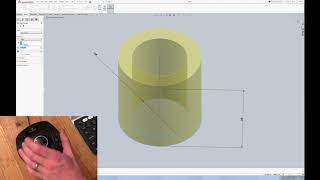
Simply push pull twist or tilt the 3Dconnexion controller cap to pan zoom and rotate your model or camera precisely and intuitively.
SpaceMouse Pros QuickView Keys provide fingertip access to 12 views making it easier to detect errors explore alternatives and present your work more effectively for review.
The rotation toggle key disables the rotation axes providing simultaneous pan-and-zoom navigation in work modes such as sketching.
The full size soft-coated hand rest ensures maximum comfort by positioning the hand perfectly for the 3Dconnexion controller cap.
Every one of SpaceMouse Pros 15 tactile fully programmable buttons are conveniently positioned allowing you to access frequently used commands and work more efficiently.
SpaceMouse Pro automatically recognizes your application environment and assigns appropriate commands to four large soft touch Intelligent Function Keys.
The On-Screen Display provides a convenient visual reminder of the commands assigned to the Intelligent Function Keys on your computer screen enabling you to stay focused.
SpaceMouse Pro Keyboard Modifiers provide easy access to Control Shift Alt Esc functions saving you time by reducing the need to move your hand to the keyboard.
Save time and maintain focus by using SpaceMouse Pros Virtual NumPad to input numerical data in to your application using the standard mouse instead of your keyboard.
The 3Dconnexion SpaceMouse Pro is a specialized 3D mouse designed with a futuristic design and equipped with 15 programmable buttons, making it potentially convenient for users who require extensive control options. However, it comes with a high price tag and may be challenging to use due to its complexity, which could be intimidating for some users. While it might be suitable for those who appreciate its unique features, others might find it difficult to navigate and prefer more traditional options. Despite these challenges, it remains a choice for gourmets who can leverage its capabilities after a period of adaptation.
I highly do not recommend it. It's better to buy A4 Tech Bloody or SteelSeries Rival 600.
13 March 2021
I don't understand how anyone can play with this mouse. It's even very difficult to work with it.
1 - Design of the Future.
1 - High price. 2 - Impossible to control. 3 - Unclear where the necessary button is located. 4 - Inconvenient to use. 5 - Some people may be intimidated by its complexity of use.
TheAlex : use 3Dconnexion SpaceMouse Pro more than year
gaming mouse, radio / Bluetooth / wired, Multi-Device, with memory, buttons: 6, programmable, + wheel, 4D, свитчи: optical, Razer Gen-3, up to 90 mln, RGB backlight, sensor 18000 DPI, battery, up to 180 h
gaming mouse, radio / Bluetooth / wired, USB-A, with memory, buttons: 6, programmable, + wheel, 4D, свитчи: optical, Razer Gen-3, up to 90 mln, RGB backlight, sensor 30000 DPI, battery, up to 150 h






















 TheAlex : use 3Dconnexion SpaceMouse Pro more than year