
Hator Gravity TKL
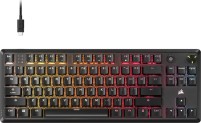
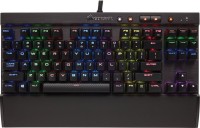
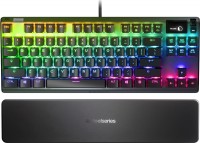
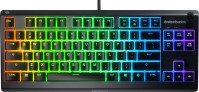
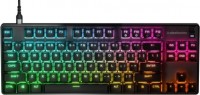
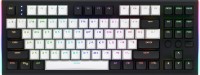 | Outdated Product A compact wired gaming mechanical keyboard in a practical TKL (80%) format, freeing up desk space by omitting the numeric keypad. At its core are proprietary Hator Aurum Orange linear switches of the second revision, with a lifespan of 70 million clicks. The switches are factory-lubricated, and their contacts are coated with composite gold. The board supports Hot Swap technology for quick mechanism replacement according to individual preferences without using a soldering iron. The Skeleton design is based on an internal plate made of anodized brushed aluminum, providing extra rigidity to the body. Typing acoustic comfort is achieved through a multi-layer noise isolation system and manually lubricated stabilizers made of POM polymer. The keys with a standard ANSI layout featur...e OMA profile caps, made from ABS plastic using double-shot molding, ensuring transparent Latin and Cyrillic symbols are wear-resistant. In the upper right corner, there is a metal volume control wheel and two additional buttons. The Hator Gravity TKL keyboard offers precise command registration due to a 1000Hz polling rate and N-KRO and Anti-Ghosting systems. The model provides deep customization thanks to firmware support on a QMK basis and a VIA interface. Weighing 755 grams, the device stands out with RGB lighting with side zones and connects to a PC with a detachable 1.8-meter fabric-braided cable. |






Hator Gravity TKL | ||||||||||||||||||||||||||||||||||||||||||||||||||||||||||||||||||||||||||||||||||||||
|
| |||||||||||||||||||||||||||||||||||||||||||||||||||||||||||||||||||||||||||||||||||||


A compact wired gaming mechanical keyboard in a practical TKL (80%) format, freeing up desk space by omitting the numeric keypad. At its core are proprietary Hator Aurum Orange linear switches of the second revision, with a lifespan of 70 million clicks. The switches are factory-lubricated, and their contacts are coated with composite gold. The board supports Hot Swap technology for quick mechanism replacement according to individual preferences without using a soldering iron.
The Skeleton design is based on an internal plate made of anodized brushed aluminum, providing extra rigidity to the body. Typing acoustic comfort is achieved through a multi-layer noise isolation system and manually lubricated stabilizers made of POM polymer. The keys with a standard ANSI layout feature OMA profile caps, made from ABS plastic using double-shot molding, ensuring transparent Latin and Cyrillic symbols are wear-resistant.
In the upper right corner, there is a metal volume control wheel and two additional buttons. The Hator Gravity TKL keyboard offers precise command registration due to a 1000Hz polling rate and N-KRO and Anti-Ghosting systems. The model provides deep customization thanks to firmware support on a QMK basis and a VIA interface. Weighing 755 grams, the device stands out with RGB lighting with side zones and connects to a PC with a detachable 1.8-meter fabric-braided cable.
Always clarify the specifications and configuration of the product with the online store manager before purchasing.
Catalog Hator 2026 - new arrivals, bestsellers, and the most relevant models Hator.






design software  Viacheslav K: use Hator Gravity TKL less than month Viacheslav K: use Hator Gravity TKL less than month |
Accessible mechanics
Over the past few years, mechanical keyboards have gone from expensive devices for enthusiasts to an affordable alternative to membrane models. A significant role in this was played by the cooperation of local brands with Chinese OEM manufacturers, which made it possible to reduce the cost of production without significant losses in quality. One of these manufacturers was the Ukrainian brand Hator, which quickly won the trust of users due to the combination of high quality and reasonable pricing policy.
A worthy successor to Rockfall TKL 2 Mecha
The new model from Hator called Gravity TKL is in many ways a continuation of the ideas of the popular Rockfall TKL 2 Mecha. Both keyboards are compact wired models with an aluminum base, mechanical switches of their own production, pre-lubricated stabilizers, double-molded keycaps, a detachable braided cable, laser-engraved symbols and noise-insulating pads. Naturally, there is also RGB backlighting.
Replaceable switches, customizable backlighting and volume wheel
However, the Gravity TKL takes these solutions a step further. The keyboard now supports hot-swapping of switches, and the Skeleton design (without a top cover) simplifies this process. Noise isolation has been improved, and the rounded keycaps with a two-tone design have become more pleasant to the touch. Two multimedia buttons and a volume control wheel have been added to the side. The backlight can be customized individually for each key. In addition, QMK/VIA support has appeared, which opens up wide possibilities for customization.
What's unpleasant is that the software is very inconvenient and seems to have been written just for show. There are only 2 layers of button customization for printing - the regular and the Fn layer. In my old Dierya DK61, there were about 5 layers. There is also no possibility to change the backlighting depending on the active layer (I used to assign the Numpad to the middle of the second layer's keyboard, but I don't use it often enough to remember exactly where).
Furthermore, with this keyboard, I couldn't assign the usual Fn+Ins/Fn+Home combinations to media track switching because these combinations are factory-assigned to backlight settings, and there's nothing you can do about it...
Next, for some reason, from time to time (so far twice in a few weeks), the lwin button starts working as lalt, and vice versa. This is probably some feature mentioned in the manual that nobody reads. I have to reassign these keys in the software every time.
Backlighting. The keyboard has plenty of built-in backlighting options, but try creating your own static backlighting set, and within half a minute, you'll get bored with it because selecting buttons in the software is quite a hassle. There doesn't seem to be any animation support in custom backlighting.
I want to try flashing it with QMK, but for this, you need to remove the rubber plug and short some contacts. Thank goodness, at least you don't have to solder!