
Logitech G102 Lightsync
 |

Logitech G102 Lightsync | |||||||||||||||||||||||||||||||||||||||||||||||||||||||||||||||||||||||||||||
|
| ||||||||||||||||||||||||||||||||||||||||||||||||||||||||||||||||||||||||||||


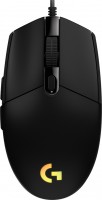
Convenient and functional gaming mouse with wired connection, six buttons, high-quality optical sensor, and impressive controllable RGB lighting Logitech Lightsync. One of the most affordable gaming controllers of this type from the Logitech G-series lineup. Positioned as a mid-range product of the 2020 model year, aimed at hardcore gamers and aspiring cyber athletes, as well as regular computer game enthusiasts.
The symmetrical ergonomic shape of the device's body is inherited from the previous 2017 model, G102 Prodigy. Quality plastic with a textured finish does not collect fingerprints and is easy to clean from dirt. The wide scroll wheel has a textured protector to prevent slipping and a discrete movement. The controllable RGB lighting, which distinguishes this model from its predecessor, is implemented as a luminous rim on the body and the branded emblem.
The Logitech G102 Lightsync gaming mouse is based on Logitech's own optical sensor. Its maximum resolution is not record-breaking (8000 dpi), but it is quite sufficient for the vast majority of games. The mouse is compatible with any operating system. However, for the most effective use of the device, it is recommended to use the Logitech G HUB software, which allows for individual adjustment of lighting, sensitivity, and button commands.

Always clarify the specifications and configuration of the product with the online store manager before purchasing.
Catalog Logitech 2026 - new arrivals, bestsellers, and the most relevant models Logitech.


Buy Logitech G102 Lightsync
All prices 18 →G102 LIGHTSYNC Gaming Mouse Black EER 910-005823 | £15.52 |  | |||
Logitech 222C632 | £15.99 |  | |||
LOGITECH G102 LIGHTSYNC - WHITE - EER 910-005824 | £18.94 | | |||
Logitech 910-005824 | £20.49 | | |||
Logitech 910-005801 | £19.99 | | |||

























9 8 20 36 |
sensor, rgb backlight, convenient software not found  David : use Logitech G102 Lightsync more than year David : use Logitech G102 Lightsync more than year |
I don't understand the comments about double-clicking; either you got a defective unit or you're clicking it like crazy. I've been using it constantly for 1.5-2 years playing PUBG and CS, and there hasn't been a single double-click issue. Not to mention any imaginary sensor issues. Great mouse for its price Didn't notice  ValAndFai: use Logitech G102 Lightsync more than year ValAndFai: use Logitech G102 Lightsync more than year |
I have been using the mouse for several months and it has not disappointed me. Beautiful understated appearance, perfectly matches the keyboard (Hator Rockfall EVO). Excellent shape, fits well in the hand. Very bright lighting, which surprised me a lot when I first connected the mouse to the computer. And the price, in my opinion, is also great. Works well even without G-Hub. 1. Weight 2. Appearance 3. Price 4. Cheap 5. Mouse shape For some reason, there was no sticker in the kit, but these are questions for the store. Gus: use Logitech G102 Lightsync few months |










A good gaming mouse doesn't have to be expensive.
As sales statistics show, in fact, few people really need terribly expensive and sophisticated manipulators, which are classified as professional primarily because of the price. The success of the Logitech G102 mouse showed the opposite picture: for the gaming public, first of all, it is important how comfortable the mouse is in the hand and how accurately it responds to the movements and commands of the user. That's all.
An old hit with full RGB lighting
The Logitech G102 Lightsync is a redesigned G102 Prodigy mouse released a few years ago. In it, the manufacturer tried to keep all the advantages of the Logitech G102 model by adding RGB backlighting with a palette of 16.8 million colours. That is, all the strengths of the original model are in place: excellent weight distribution and balance, Omron and Kailh switches (for the wheel), as well as a fast Mercury sensor with 25 G acceleration with flexible resolution adjustment (from "sniper" 200 DPI to killer 8000 DPI) . Well, do not forget about additional programmable buttons and proprietary Logitech G HUB software to optimize mouse behavior.
old sores
It is a pity that the old sores have not gone away. The DPI switch button barely noticeably rattles. After a year, “barely noticeable” can turn into “irritating”. Well, despite the presence of Omron switches, both the original and the modified G 102 begin to suffer from double clicks in six months or a year. Judging by the number of complaints, this is a pure lottery, which is why many buyers threaten to never buy Logitech products again. Naturally, we could not check this for 2 weeks of tests.
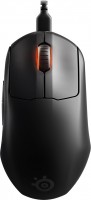







Firstly, the design and ergonomics of the mouse are simply superb. Its shape and size fit my hand perfectly, and it feels very comfortable. The buttons are arranged in a way that provides instant access, which is particularly crucial for quick reactions during games.
Secondly, the sensor quality is top-notch. Smooth and precise tracking allows me to achieve outstanding results in games and ensures a comfortable work experience when using a computer. No delays or jumps—just flawless performance.
Real-time DPI adjustment is just super! I can easily adjust the mouse sensitivity depending on the task: I set the maximum value for precise aiming in shooters, and decrease it for document work or regular internet surfing. This truly enhances my productivity and comfort in use.
Programmable buttons are a real find! I customize them for my needs in various applications, making work much more efficient. Moreover, the Logitech G Hub software offers extensive customization options, making the mouse usage even more enjoyable.
In general, I am completely thrilled with the Logitech G102 mouse! It perfectly combines quality, functionality, and stylish design. It has become an indispensable assistant for both gaming and computer work. If you're looking for a quality mouse, th