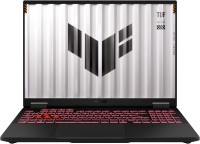
Asus TUF Gaming A16 2024 FA608WI [FA608WI-QT013W] (90NR0J21-M000H0)
 | Compare prices 3 → |
 |
Asus TUF Gaming A16 2024 FA608WI [FA608WI-QT013W] | |||||||||||||||||||||||||||||||||||||||||||||||||||||||||||||||||||||||||||||||||||||||||||||||||||||||||||||||||||||||||||||||||||||||||||||||||||||||||||||||||||||||||||||||||||||||||||||||||||||||||||||||||||||||||||
|
| ||||||||||||||||||||||||||||||||||||||||||||||||||||||||||||||||||||||||||||||||||||||||||||||||||||||||||||||||||||||||||||||||||||||||||||||||||||||||||||||||||||||||||||||||||||||||||||||||||||||||||||||||||||||||||


Always clarify the specifications and configuration of the product with the online store manager before purchasing.
Catalog Asus 2026 - new arrivals, bestsellers, and the most relevant models Asus.
Smart Computer Systems
The Asus TUF Gaming A16 2024 FA608WI-QT013W (90NR0J21-M000H0) laptop falls into the category of intelligent devices, designed with a focus on modern AI technologies. These allow for maximizing performance potential, increasing data processing efficiency, accelerating rendering, and simplifying the work for content creators, designers, and other creative professionals. The configuration is built on the Ryzen AI 9 HX 370 processor with a dedicated neural module delivering 50 TOPS, a GeForce RTX 4070 graphics card with its own AI algorithms, and 32 GB of RAM with a frequency of 7500 MHz for running multiple demanding tasks simultaneously. The RAM is soldered onto the board and does not allow for expansion, which is atypical for the gaming segment. The model confidently handles advanced gaming and other resource-intensive scenarios. The body has balanced dimensions and weight, making it convenient to take with you. The MIL-STD-810 protection standard reduces the likelihood of damage in unusual conditions. Battery life is supported by a 90 Wh battery with fast charging support—up to 50% in 30 minutes.
Comprehensive Approach
The model is equipped with reliable and tested components in the spirit of the TUF gaming line. Special attention is given to the display: at a diagonal of 16 inches, it has a resolution of 2560x1600, a refresh rate of 165 Hz, and NVIDIA G-Sync technology support for smooth rendering of dynamic scenes. The matrix ensures a quick response, high image clarity, and 100% coverage of the sRGB color space. Movies, games, text documents, spreadsheets, and graphics look as detailed and natural as possible. A modern M.2 SSD with a capacity of 2 TB provides ample space for storing games, media, and work files. A set of interfaces from different generations ensures compatibility with a variety of peripherals. Wireless connectivity is implemented through Wi-Fi 6E with support for three bands. Additionally, users have access to a 3D face scanner, a keyboard with RGB backlight and Asus Aura Sync support, as well as immersive sound with Dolby Atmos.
 | ASUS TUF AMD Ryzen AI 9 32GB RAM 2TB SSD RTX 4070 165Hz 16 Inch Windows 11 Gaming Laptop Black,Grey FA608WI-QT013W | £1,849.97 | ||||
 | ASUS TUF Gaming A16 FA608WI-QT013W laptop Copilot+ PC AMD Ryzen AI 9 3 | £2,001.78 | ||||
 | ASUS TUF Gaming A16 FA608WI-QT013W laptop Copilot+ PC AMD Ryzen AI 9 3 | £2,001.78 |















I have been using the laptop for several months. Asus does not seem to work on the quality of their updates, they come out and things only get worse. After updating the Bluetooth driver, my headphones won't connect to the laptop if I put it to sleep; I have to reboot the system. I always have a monitor connected (180 Hz gaming) with HDR display, and I play Horizon Forbidden West. The graphics card does not deliver full power after the laptop has been in sleep mode, and over time in the game, the fps starts to drop to a critically low 50fps with DLLS 3 + frame generation, resulting in a very choppy image. It's not overheating (the graphics card and CPU are around 76 degrees), and I'm sure the problem lies with the faulty BIOS. To fix it, you have to reboot the laptop again, while previously it was enough just to restart the game. In sleep mode, the keyboard occasionally blinks, I have disabled this feature several times, but it keeps blinking. I bought a USB-C to DisplayPort cable supporting 8k 60 Hz display. After waking from sleep, the image looks like an old black and white TV, you have to unplug and replug the cable. I have no programs that hinder the system's performance as I am tech-savvy and don't install unnecessary software. Everything is strictly licensed. This is anything but a gaming laptop! With very raw software. I do not recommend this model. Design, camera with Face ID, battery Everything else |