
Logitech Wireless Mouse M510
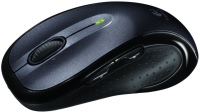 |

Logitech Wireless Mouse M510 | |||||||||||||||||||||||||||||||||||||||||||||||||||||||||
|
| ||||||||||||||||||||||||||||||||||||||||||||||||||||||||


Ability to connect multiple devices to one receiver
This wireless mouse stands out among analogues both in the design of the mouse itself and in the features of the radio adapter. So, the mouse is equipped with 4 buttons with the possibility of reprogramming, as well as a sensor made using laser technology. In turn, the USB adapter does not require additional configuration and allows you to connect multiple devices at once. Power is supplied by 2 AA batteries.
The information in the model description is for reference purposes.
Always clarify the specifications and configuration of the product with the online store manager before purchasing.
Catalog Logitech 2026 - new arrivals, bestsellers, and the most relevant models Logitech.
Always clarify the specifications and configuration of the product with the online store manager before purchasing.
Catalog Logitech 2026 - new arrivals, bestsellers, and the most relevant models Logitech.

How to choose a gaming mouseWe'll look at grip types, sensor sensitivity, pushbutton switches, and other important nuances

How to choose a mouse for games, office tasks and creative workLet's explore the nuances of the computer mouse market together and find the perfect options that match your requirements
Buy Logitech Wireless Mouse M510
All prices 14 →When you make a purchase through links on our site, we may receive a affiliate commission.
LOGITECH M510 Wireless Mouse 910-001826 | £98.65 |  | |||
Logitech M510 mouse Right-hand RF Wireless Laser 1000 DPI | £104.16 |  | |||
Logitech M510 mouse Right-hand RF Wireless Laser 1000 DPI 910-001826 | £104.16 |  | |||
Logitech Wireless Mouse M510 | £107.41 | | |||
Logitech M510 mouse Office Ambidextrous RF Wireless Laser | £107.41 | | |||
9 more offer(s)
Series Logitech M Series (small)Compare using chart →




































1 0 0 5 |
The mouse is full-size, heavier than a standard wired one, and requires exactly 2 AA batteries, which does not cause any discomfort at all. It can also run on one battery, which makes it a little lighter. Very comfortable design, rubberized black sides, with indentations for fingers. The top part is gray with a silver tint, the surface is glossy (it looks matte in the photos). The click of the main keys is at a standard volume, I wouldn’t call it quiet. The wheel is rubberized, quiet when scrolling, has a vertical click + 2 side clicks, the operation is clear, without lags. Additional side buttons are easy to find blindly and have a clear click. The batteries are inserted into a compartment under a removable cover at the bottom of the mouse; the compartment has a compartment for storing a miniature nano receiver. At the corners of the bottom of the mouse there are fairly wide feet for sliding. The sensor is shifted to the center of the right edge of the bottom. Works in the infrared range, does not emit visible light. The sensor works clearly on a desktop, a sheet, linoleum and even on a terry towel; on glossy surfaces it begins to slow down. I recommend downloading software from the website that has a wide range of settings. With more careful settings, cursor movement can become chaotic and unpredictable! It is possible to reassign buttons to any application. When stationary, it turns off for 5 minutes. Waking up without lags or delays from the first click or movement is accompanied by a 5-second indication of the green LED located at the very top of the mouse. Full-size. Comfortable for "palm" and "fingertip" grip. Additional weight with two batteries. Includes 2AA Duracell alkaline batteries. High-quality casing materials. Not prone to stains. Precise cursor positioning on almost any surface except glass and mirrors. Miniature Unifying receiver, with storage option inside the mouse body. Stable radio signal reception up to 7m. Glossy finish on the top of the case. It takes time to adapt to the location of the sensor - at first it slightly distorts the geometry of the cursor movement relative to the sensors located in the center of the mouse. Not suitable for a claw grip.  Vitaliy Soroka: use Logitech Wireless Mouse M510 month or more i recommend it should buy Vitaliy Soroka: use Logitech Wireless Mouse M510 month or more i recommend it should buy |
we gave the mouse a long time ago, about 4 years ago, the only downside was the broken side button, which was successfully repaired with a screwdriver and superglue, suitable for anything, low latency, if the receiver was installed nearby through an extension cord, it seemed a little heavy due to the batteries, but after a couple weeks I got used to it general quality, the battery was changed every six months with fairly active use, reasonable price for a product of this level, wear-resistant and almost indestructible mouse, with the exception of the side buttons after 3 years, the rubber side began to peel off, leaving a black mark on the ring finger after half an hour to an hour of use, the side button broke, the need to keep the Bluetooth receiver in close proximity to the mouse to ensure an adequate level of latency use Logitech Wireless Mouse M510 more than year |
I worked with a set of Energizer 19 batteries! months in a fairly active mode (at least 4 hours of Internet surfing per day)! very good at saving battery consumption convenient full-size mouse after 2 years no glitches in operation observed absent dmone: use Logitech Wireless Mouse M510 more than year i recommend it should buy |
3 out of 6 user review(s) shown
3 more user review(s)
Ask Question
Video reviews

Logitech M510 Wireless Mouse Review
11 July 201548 737 view

Logitech M510 Comfort Plus Mouse Setup & Review
17 April 202328 366 view

Review: Logitech Wireless Mouse M510
10 March 201123 308 view

Logitech Wireless Mouse M510 – Unboxing & First Impressions
1 July 20189 884 view

Review: Logitech M510 Wireless Computer Mouse for PC with USB Unifying Receiver
25 February 20228 059 view

Logitech m510 wireless mouse unboxing
20 May 20231 074 view

Logitech M510 Wireless Mouse Review
22 March 2021989 view

Logitech Wireless Mouse M510 Review
21 July 2014760 view
We recommendCompare using chart →

gaming mouse, radio / Bluetooth / wired, Multi-Device, with memory, buttons: 6, programmable, + wheel, 4D, свитчи: optical, Razer Gen-3, up to 90 mln, RGB backlight, sensor 18000 DPI, battery, up to 180 h

Bluetooth/radio, BT v 5, Multi-Device, buttons: quiet, 7, programmable, + wheel, sensor 8000 DPI, battery, 650 mAh, up to 70 days
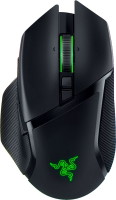
gaming mouse, radio / Bluetooth / wired, USB-A, with memory, buttons: 6, programmable, + wheel, 4D, свитчи: optical, Razer Gen-3, up to 90 mln, RGB backlight, sensor 30000 DPI, battery, up to 150 h

gaming mouse, radio / wired, USB-A, with memory, buttons: 6, programmable, + wheel, свитчи: optical, Logitech Lightforce, RGB backlight, sensor 32000 DPI, wireless charger, battery, up to 95 h

gaming mouse, Bluetooth/radio, Multi-Device, with memory, buttons: 6, programmable, + wheel, свитчи: mechanical, Razer Gen-2, up to 60 mln, RGB backlight, sensor 18000 DPI, 1xAA

gaming mouse, radio, with memory, buttons: 5, programmable, + wheel, sensor 30000 DPI, 1xAA
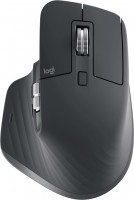
Bluetooth/radio, Multi-Device, buttons: quiet, 6, programmable, + wheel, sensor 8000 DPI, battery, 500 mAh, up to 70 days

gaming mouse, radio / wired, USB-A, with memory, buttons: 4, programmable, + wheel, свитчи: optical, Razer Gen-3, up to 90 mln, sensor 30000 DPI, battery, up to 90 h