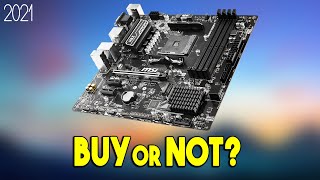
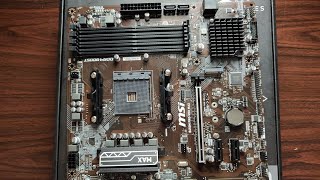
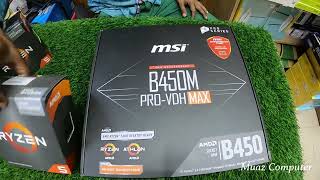
MSI B450M PRO-VDH MAX
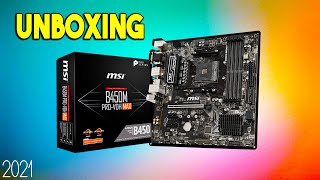
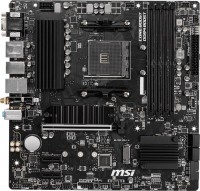
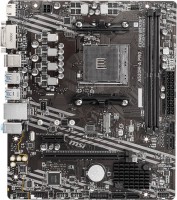
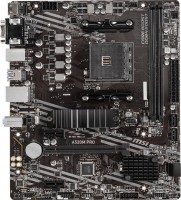
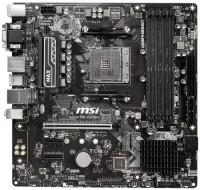 | Expecting restock Affordable 2019 microATX gaming motherboard with AMD AM4 socket and full support for 3rd generation Ryzen 3/5/7/9 CPUs based on Matisse/Picasso cores with Zen 2 microarchitecture. Guaranteed to support 2 –, 4-, 6-, and 8-core 2nd Gen Ryzen 3/5/7 CPUs (Summit Ridge/Pinnacle Ridge cores), Radeon Vega APUs with integrated graphics (Raven Ridge), and low-cost Athlon Zen CPUs (Raven Ridge) ). MSI B450M PRO-VDH MAX motherboard is a good choice for users who want to build an inexpensive all-in-one home PC, a reasonable cost gaming station or a powerful office system. Equipped with a 6-phase CPU power subsystem with heatsinks on VRM power assemblies and 4 slots for installing DDR4 memory modules (up to 64 GB in total). This volume is quite enough for any games, as well as home, office or specializ...ed professional tasks. It works without problems with high-performance discrete video cards, is equipped with a set of analogue (D-sub VGA) and digital (DVI, HDMI) interface ports for displaying images from the Radeon Vega video core built into some processors. The 8-channel codec Realtek ALC892 is responsible for high-quality sound. The Realtek 8111H controller provides a high data transfer rate in a cable network. To create a high-speed disk subsystem, there is an M.2 port (PCIe Gen3 x4) and 4 SATA 3 connectors. |


Affordable 2019 microATX gaming motherboard with AMD AM4 socket and full support for 3rd generation Ryzen 3/5/7/9 CPUs based on Matisse/Picasso cores with Zen 2 microarchitecture. Guaranteed to support 2 –, 4-, 6-, and 8-core 2nd Gen Ryzen 3/5/7 CPUs (Summit Ridge/Pinnacle Ridge cores), Radeon Vega APUs with integrated graphics (Raven Ridge), and low-cost Athlon Zen CPUs (Raven Ridge) ).
MSI B450M PRO-VDH MAX motherboard is a good choice for users who want to build an inexpensive all-in-one home PC, a reasonable cost gaming station or a powerful office system. Equipped with a 6-phase CPU power subsystem with heatsinks on VRM power assemblies and 4 slots for installing DDR4 memory modules (up to 64 GB in total). This volume is quite enough for any games, as well as home, office or specialized professional tasks.
It works without problems with high-performance discrete video cards, is equipped with a set of analogue (D-sub VGA) and digital (DVI, HDMI) interface ports for displaying images from the Radeon Vega video core built into some processors. The 8-channel codec Realtek ALC892 is responsible for high-quality sound. The Realtek 8111H controller provides a high data transfer rate in a cable network. To create a high-speed disk subsystem, there is an M.2 port (PCIe Gen3 x4) and 4 SATA 3 connectors.
|
| |||||||||||||||||||||||||||||||||||||||||||||||||||||||||||||||||||||||||||||||||||||||||||||||||||||||||||||||||||||||||||||||||||||||||||||||||


Always clarify the specifications and configuration of the product with the online store manager before purchasing.
Catalog MSI 2026 - new arrivals, bestsellers, and the most relevant models MSI.



3 1 3 1 |
Before purchasing a B450 motherboard, I read many comments and discussions. I chose this one - it has a good power scheme. The RAM speed is sufficient for me. The native frequency of the memory sticks, 3200, is easily enabled with the XMP profile. The compatibility of the motherboard with processors and various RAM is listed in the table on the manufacturer's website, MSI. I upgraded to Windows 11 without any issues. The option is supported by the latest BIOS version. I built a quite modern and efficient PC within my budget. It is possible to add an additional cooler to the front side of the case. Installed SSD m2 and 2.5-inch HDD. I faced only one problem - the BIOS did not recognize the SSD m2 as a system drive after the update. The problem was resolved by temporarily disconnecting the 2.5-inch HDD during the BIOS update.  Rospropaganda Rospropaganda: use MSI B450M PRO-VDH MAX more than year Rospropaganda Rospropaganda: use MSI B450M PRO-VDH MAX more than year |
The motherboard has a good power supply subsystem. I installed the r7 1700 pro, overclocked to 3.8 GHz at 1.32v, and g.skill Aegis RAM up to 3333MHz and 1.36v. Cooling is provided by Gammax 400. In the Aida 64 stress test, the VRM heats up to no more than 60°C according to the motherboard sensor and the pyrometer. With BIOS version B.B, there was often a black screen on startup, the fans would spin, the CPU check would occur (as indicated by the debug LED), but it wouldn't progress further. I had to reseat the RAM. This issue does not occur in version B.C. The power subsystem is similar to the b450 Tomohawk. Low cost, you don’t overpay for beauty. Convenient Bios. Problems with Bios version B.B. When setting secondary RAM timings, the computer does not boot - only in Auto. Not all programmers see the BIOS flash drive. Maksim Pereverzev: use MSI B450M PRO-VDH MAX more than year |
Crucial AESC took 3600 MHz at Cl15 on it. Cold. M2nvme ssd is heated no higher than 45 degrees (with a radiator out of the box). Vrm does not heat up. 1600AF drove up to a stable 3.8 GHz at 1.4 volts. Aleksey: use MSI B450M PRO-VDH MAX few months |